
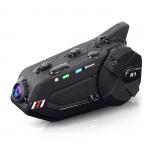
Motorcycle Helmet Bluetooth Intercom Headset, Built-in WiFi, with 1080P Camera, Supporting 6 Riders within 1000M Intercom Communication
SKU: GW53.0074
Q
Unable to connect to WiFi/WiFi not appearing in the list/unable to connect to the application?
Answer Question
A
Long press the "Recorder and Camera On/Off Button", and the green light will start flashing at a frequency of once every 3 seconds. At the same time, the blue and red lights flicker alternately. Short press the "WiFi button" and the green light will flash quickly, with a frequency of once every 0.5 seconds. Open Phone Settings WLAN, find 'FreedConn' and click on Connect. The initial password is 12345678, and you can change it through the app. Open the GoPlus application, click on the icon, connect successfully, and start using the camera function.
Related products




NEW
Arrival

Products You May Like
NEW
Arrival



Related articles








Related Searches
Camera Connect With Wifi
Smart Watch Connect To Iphone
Unable To Activate Shutter With Adapted Lens
Retro Game Console Connect To Tv
Cheap Security Cameras That Connect To Your Phone
Filter Lens To See The Sun
Adapt To The Same Lens Mount
See In The Dark Camera
Ring Light In The Dark
Security Camera That Connects To Phone Without Wifi
Related Scenes
Best Camera To Video Sports
Best Camera To Capture Wildlife
Best Tripod To Travel With
Best Video Camera To Record Sports
Best Easy To Use Compact Digital Camera
The Best Outdoor Wifi Camera
The Best Wifi Security Camera
The Best Wifi Camera System
The Best Wifi Outdoor Security Camera
Best In Home Wifi Security Camera