
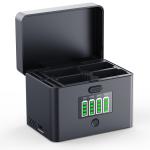
K&F CONCEPT 4-Slot Battery Charger for NP-FZ100 & LP-E6NH Batteries, 40W USB-C Fast Charger Compatible with Sony A7iii, A7iv, FX30, FX3, A6700, A6600, EOS R5 R6 R7 5D 6D 7D Mark II Cameras
SKU: KF28.0103
A
(1) To ensure that your batteries charge properly, please be sure to use a charging adapter with an output voltage of at least 12V. Failure to do so may result in the batteries not charging at all, significantly prolonged charging times, or the battery level indicator lights failing to illuminate; in such cases, the input indicator light will flash green.
When charging four batteries simultaneously, please use a charging adapter with a power output of 40W or higher. The specific requirements are as follows:
<19W: 1 charging channel enabled.
<28W: 2 charging channels enabled.
<40W: 3 charging channels enabled.
≥40W: 4 charging channels enabled.
Example: If your charging adapter has a power output of less than 40W but you need to charge four batteries, the charging hub will automatically identify the battery with the highest remaining charge level and prioritize charging it first, thereby ensuring that at least one battery becomes available for use as soon as possible. For instance, if you use an 18W adapter (12V/1.5A) to charge four batteries—with charge levels of 1%, 10%, 30%, and 60%, respectively—the charging hub will charge only one battery at a time. It will prioritize charging the 60% battery first; once that battery is fully charged, it will proceed to charge the remaining batteries in descending order of charge level (30%, 10%, and 1%), ensuring that the charging time for each individual battery remains within 2.5 hours.
A
If the lid of the charging case cannot be closed, please verify that your batteries are inserted correctly. If each battery is positioned according to the proper instructions, the lid should close normally.
Correct Battery Placement:
(1) For channels CH1 and CH3, the bottom of the NP-FZ100 battery (the side with the label) should face outward.
(2) For channels CH2 and CH4, the bottom of the NP-FZ100 battery (the side with the label) should face inward.
(3) For LP-E6 series batteries, the orientation is reversed. Note: The battery terminals must face downward; otherwise, charging will not occur.
A
Hold down the opening button with one hand while pushing on both sides of the lid with the other. When opening, please do not press down on the center of the lid, as this will prevent it from opening.
A
(1) Supports CFexpress Type-A/Type-B and standard SD cards; however, please pay attention to the specific slot assignments. The two smaller slots located on the outer side are designed for CFexpress Type-A and SD cards, while the two larger slots on the inner side are intended for CFexpress Type-B cards.
(2) Please do not force incompatible cards into the slots, as doing so may cause damage to the slots.
(3) The card slots serve a storage function only and do not support data transfer capabilities.
A
(1) You may place a charged battery (preferably fully charged) into the charging case. Then, use the included USB-C cable plugged into the OUT1 port on the case, or use your own USB-A charging cable plugged into the OUT2 port; the camera battery will then charge your device (such as a mobile phone, fill light, etc.) at a maximum power output of 15W.
(2) To ensure stable power output, there must be at least two fully charged batteries inside the case. Using only a single battery may lead to issues such as overheating or intermittent power supply. If the output indicator light begins to flash, simply unplug and then replug the charging cable to restore normal operation.
(3) When you are using the charging case to charge other devices and wish to check the remaining power level, you can briefly press the Power Display Button to view the battery status for each individual slot.
Note: When the charging case is functioning as a power bank, the displayed power level may appear to be 1–2 bars lower than the actual remaining capacity. This occurs because the discharge process causes a slight drop in the battery's voltage, and since the charging case's indicator lights determine the power level based on voltage readings, there will be a discrepancy between the displayed level during discharge and the actual level.
A
We do not recommend simultaneously charging the battery pack while using it to charge other devices. Doing so compromises the battery pack's own charging speed—as the output draws power away from the input—thereby reducing charging efficiency. Furthermore, this practice may cause both the battery pack and the charger to overheat, potentially leading to an interruption in the charging or discharging process.
If a user insists on utilizing the device in this manner, they must ensure that at least one battery remains inserted within the charging hub; otherwise, a proper power circuit cannot be established, resulting in abnormal charging behavior.
An example illustrating the impact on charging speed: When using a 40W power adapter, if you are solely charging the camera batteries, you can charge four batteries simultaneously. However, if you need to simultaneously charge the batteries *and* use them to charge other external devices, the charging hub will allocate 15W for output purposes, leaving the remaining 25W to charge the camera batteries; in this scenario, you can only charge two batteries at a time.
A
When using a multi-port charger to charge the batteries within the charging case, adding or removing other devices connected to the same charger may result in a disconnection. This occurs because the protocol handshake between the multi-port charger and the charging case may fail during this process, leading to charging anomalies. Therefore, we recommend that you avoid using a multi-port charger to charge the batteries; alternatively, if you do add or remove devices, please unplug and then re-plug the charging cable connected to the case to allow the charger to re-initiate the protocol handshake.
Related products
Products You May Like

$29.99







Related articles






Related Searches
Dual Screen Waterproof Digital Camera
Waterproof Digital Camera Bag
Best Waterproof Digital Camera
Small Waterproof Digital Camera
Memory Card For A Camera
Underwater Camera For Surfing Video Recording
Dual Screen Digital Camera
Waterproof Camera
Double Screens Waterproof Digital Camera
Binoculars With A Camera Built In
Related Scenes
Best Memory Card For Video Camera
Best Memory Card For Trail Camera
Best Memory Card For Security Camera
Best Digital Camera With Flip Screen
Best Waterproof Camera Backpack For Travel
Best Waterproof Action Camera
Best Waterproof Camera Bag
Best Outdoor Waterproof Camera
Best Waterproof Trail Camera
Best Waterproof Security Camera