
Q
Why camera indicated “lens is not properly installed”?
Answer Question
A
If your camera indicated "lens is not properly installed", please modify the camera menu settings. Usually called the "release the shutter the lens is not installed", you can modify the settings to allow. Specifically refer to the camera manual.Following are some examples:
-
MFT(M4/3 mount camera)'Lens Not Found' - Warning Message Appears
For Panasonic Lumix:
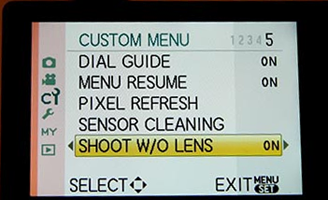
The camera needs to be set to function without a MFT-Mount lens attached. You can do this by changing the following camera setting:
'Menu' -> 'Custom Menu 5' -> 'Shoot W/O Lens' -> 'On'
(Exact naming and location of this option may change depending on camera model)
-
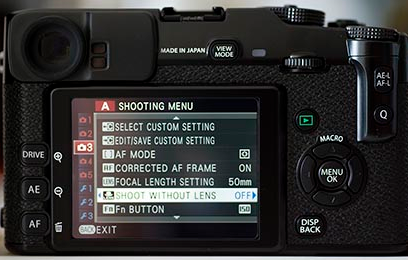
Fujifilm X mount camera, The camera needs to be set to function without a GFX-Mount lens attached. You can do this by changing the following camera setting:
'MENU' -> 'SETUP' -> 'BUTTON/DIAL SETTING' -> 'SHOOT WITHOUT LENS' -> 'ON' (Exact naming and location of this option may change depending on camera model) Choose ON to enable the shutter release when no lens is attached.
-
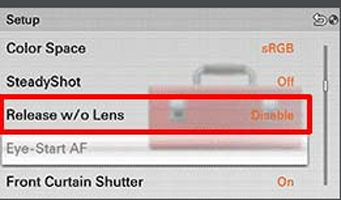
Sony E mount camera, 'No Lens Attached' - Warning Message Appears
The camera needs to be set to function without a E-Mount lens attached. You can do this by changing the following camera setting:'Menu' -> 'Setup' -> 'Release w/o Lens' -> 'Enable'
(Exact naming and location of this option may change depending on camera model)
-
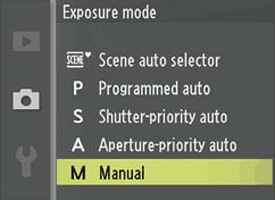
Nikon 1-Series mirrorless camera , 'Check lens. Pictures can only be taken when a lens is attached' - Warning Message Appears
With a Nikon 1-Series camera (such as the J2), you will need to make sure the camera is in 'Manual' exposure or shooting mode and the focus selection is also set to manual. When in any other mode the camera tries to take control of the lens which is not possible as the adapter does not have any contact with the camera circuitry, so you get the lens check warning as the camera does not think there is a lens attached.
-
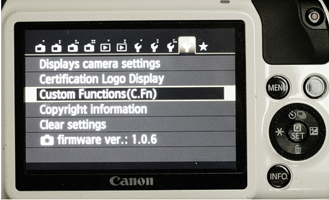
'EOS M mirrorless camera ,'No Lens Attached' - Warning Message Appears
The camera needs to be set to function without a EF-M Mount lens attached. You can do this by changing the following camera setting:
'Menu' -> 'Custom Menu' -> 'Custom Function 7' -> Select 'Release shutter w/o lens'
(Exact naming and location of this option may change depending on camera model)
-
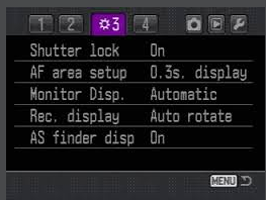
Konica Minolta:
For Konica Minolta and "No Lens Attached"
Custom Menu 3
First item "Shutter Lock"
Set it to "Off: no lens"
(Depending on camera model "Shutter Lock" May be in different menu location)
-
'Samsung NX 'No lens.' - Warning Message Appears
The adapter is designed to trigger a sensor inside the camera body itself so no setting needs to be changed. If the error message is coming up with one of our adapters attached, then it is possible that the adapter is not hitting that sensor the way that it should. Usually rotating the adapter slightly in the mount, or un-mounting and remounting the adapter clears the problem with no further action needed. If that doesn't solve the problem, then the best course of action would be to swap out the adapter you have with a replacement.
Related products

Products You May Like


Related articles




Related Searches
Best Is Binoculars
Auto Focus Not Working Lens Adapter
Ltm Lens Not Centered On Adapter
Metabones Adapter Not Effecting Lens Aperture
Canon 70-210 Lens Adapter Not Attaching
Canon Powershot S5 Is Lens Adapter
Light Bulb That Is A Security Camera
Is Nikon D5100 F Mount
Is Canon Eos M5 M Lens Mount
Canon 18 200 Is Ef-s Mount Lens