
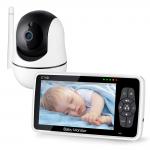
720P HD 5" Screen Video Baby Monitor Two-Way Audio 360° Wide View Angle and Full Coverage with Night Vision and Temperature Monitoring
SKU: GW50.0026UK
Q
How to make the camera lens move?
Answer Question
A
You could try this tip. Hope it helps.
Pan&tilt operation: Press the “pan/tilt” button on the upper right corner (A direction icon will appear in the middle of the screen when you press the “pan/tilt” button) →use the sound and brightness buttons to move the lens(The specific operation is shown in the video).
Related products

Products You May Like

$53.99 $27.99
$449.99 $314.99


Related articles







Related Searches
Adapter To Make Manual Lens Autofocus
Make Your Own Camera Lens Filter
Lens Adapter To Make Focal Length Longer
Extension To Make E Mount Lens Macro
Filter Lens To See The Sun
Adapt To The Same Lens Mount
Smartwatch Make And Receive Calls
The Best Wireless Cctv Camera
Over The Shoulder Camera Bag
Best Camera On The Market
Related Scenes