
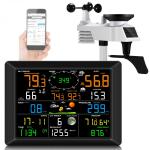
Reviews
Well constructed and very accurate.
No problems getting the display and remote sensor unit connected.
As other reviews have noted it is a bit tricky to connect to wifi and get connected to a internet weather reporting network. This is not necessarily a problem with the unit.
Do the following.
Connect whatever device you are using to configure the display unit to the 2.4 ghz wifi of your home wifi router. Be sure that your device has "auto reconnect " turned on for the 2.4ghz connection.
Open the app and follow the prompts . Select the 2.4ghz wifi SID ,and then enter the password for that network. Note your password is case sensitive- be certain that whatever keyboard you are using does not improperly capitalize the first letter of your pw. The app doesn't have a show pw function, so entering your password correctly is essential.
If all goes well you will see a notification in red letters saying "connected to dns server".
Now you can create an account with weather underground and register your station. Just select "other" for station brand - all home weather stations use the same data communication protocol. The rest of the registration process is relatively simple.
Also it can take up to 24 hours to fully enable your station on weatherunderground.
This is a function of how the WU servers work.
As other reviews have noted it is a bit tricky to connect to wifi and get connected to a internet weather reporting network. This is not necessarily a problem with the unit.
Do the following.
Connect whatever device you are using to configure the display unit to the 2.4 ghz wifi of your home wifi router. Be sure that your device has "auto reconnect " turned on for the 2.4ghz connection.
Open the app and follow the prompts . Select the 2.4ghz wifi SID ,and then enter the password for that network. Note your password is case sensitive- be certain that whatever keyboard you are using does not improperly capitalize the first letter of your pw. The app doesn't have a show pw function, so entering your password correctly is essential.
If all goes well you will see a notification in red letters saying "connected to dns server".
Now you can create an account with weather underground and register your station. Just select "other" for station brand - all home weather stations use the same data communication protocol. The rest of the registration process is relatively simple.
Also it can take up to 24 hours to fully enable your station on weatherunderground.
This is a function of how the WU servers work.
16/07/2025
Related products
HOT
Seller
Products You May Like

NEW
Arrival
NEW
Arrival
Related articles



Blog You May Like




Popular products
Related searches
Weather Station With Rain Gauge
Weather Forecast Station For Home
Wifi Weather Station With Camera
Home Weather Station With Wifi
Indoor Weather Station For Home
Best Home Weather Station With Wifi
Wireless Weather Station With Phone App
Weather Station Monitoring System
Weather Station For Sale
Wireless Weather Stations
Related Scenes
Best Wireless Wifi Camera Outdoor
Best Wireless Wifi Outdoor Security Camera
Best Binoculars For Hunting And Outdoor
Best Outdoor Wireless Camera With Night Vision
Best Wireless Outdoor Security Camera With Light
Best Large Camera Backpack
Best Wireless Outdoor Security Camera With Motion Light
Best Wireless Wifi Security Camera
Best Digital Point And Shoot Camera With Zoom
The Best Wildlife Camera