
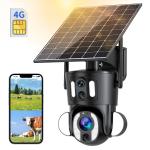
Dual-Lens 4G LTE Security Camera Solar Outdoor Surveillance 10X Optical Zoom
SKU: GW50.0105AU
A
Remove the silicone cover at the bottom of the camera and press the reset button for 3–5 seconds to reset the device.
A
Follow these steps to troubleshoot:
1. Ensure the device is powered on and check if the working light is functioning normally.
2. Verify that the 4G network connection is stable.
3. If the camera is in an area with a poor 4G signal, relocate it to a spot with better signal reception.
4. Delete the camera from your UBox account, and re-add it. Ensure the app is updated to the latest version.
A
The security camera support can support T-Mobile, AT&T and Verizon. This 4G camera can not work with WiFi.
A
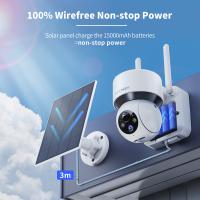
For optimal performance, install the solar panel in an open area with direct sunlight exposure for at least 5 hours a day.
A
Yes, the 4G security camera comes with a SIM card preloaded with 300MB of mobile data.
Related products


Products You May Like

NEW
Arrival
NEW
Arrival



Related articles










Hot Searches
small camera with audio
small business security camera system
wireless solar powered security camera
porch light security camera
solar powered security camera outdoor
solar powered security camera wireless
security camera system for small business
business camera security system
video surveillance security camera
small camera for security
Related Searches
Wifi Security Camera With Night Vision
Night Vision Security Camera Wifi
Color Night Vision Security Camera
Solar Powered Security Camera With Monitor
Wifi Security Camera Outdoor Night Vision
Solar Security Camera With Wifi
Weatherproof Color Security Camera With Night Vision
Battery Powered Security Camera With Wifi
Solar Security Camera Wifi
Wireless Night Vision Security Camera With Monitor
Related Scenes
Best Solar Powered Wifi Security Camera
Best Wifi Night Vision Security Camera
Best Battery Powered Security Camera With Night Vision
Best Dual Lens Security Camera
Best Battery Powered Wifi Security Camera
The Best Wifi Security Camera
Best Battery Powered Outdoor Wifi Security Camera
Best Solar Powered Security Camera
The Best Wifi Outdoor Security Camera
Best Camera For Security With Wifi