
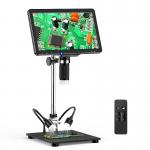
10.1" Digital Microscope with Upgraded Polarizer Lens for Ultra HD 1080p Imaging, 50-1600X Magnification, 24MP Sony Cmos Sensor, HDMI/USB Output
SKU: GW45.0074
Q
How do I connect the digital microscope to my computer?
Answer Question
A
You can connect the digital microscope to a computer using the provided USB cable. Once the connection is successful, you can use the appropriate software to view and process the images or videos captured by the microscope.
Related products
HOT
Seller
HOT
Seller
HOT
Seller
Products You May Like

$162.99 $106.99

$162.99 $106.99



Related articles












Hot Searches
high magnification digital microscope
microscope with output video
microscope with digital camera
microscope with digital screen
digital microscope connected to computer
LCD Digital Microscope
4k digital microscope camera
digital microscope hdmi out
Digital Microscope
digital microscope for soldering
Related Scenes
Best Usb Digital Microscope
The Best Digital Microscope
Best Hdmi Microscope Camera
Best Usb Microscope Camera
Best Digital Microscope Camera
Best Handheld Digital Microscope
Best Wifi Digital Microscope
Best Lcd Digital Microscope
Best Digital Microscope For Coins
Best Digital Microscope For Soldering