kfconcept

KENTFAITH
K&F Concept    Blog >

Enjoy Your Selected Digital Life

Recently Viewed
  • Recently Viewed
  • 72mm Variable ND Filter ND32-512 (5-9 Stops) Neutral Density Lens Filter with 28 Multi-Layer Coatings Hydrophobic/Scratch Resistant Nano-Xcel
    72mm Variable ND Filter ND32-512 (5-9 Stops) Neutral Density Lens Filter with 28 Multi-Layer Coatings Hydrophobic/Scratch Resistant Nano-Xcel
    $74.99 $59.99
    67mm True Color Variable ND2-400 (1-9 Stops) ND Lens Filter Adjustable Neutral Density Filter with 18 Multi-Layer Coatings for Camera Lens Nano-Klear Series
    67mm True Color Variable ND2-400 (1-9 Stops) ND Lens Filter Adjustable Neutral Density Filter with 18 Multi-Layer Coatings for Camera Lens Nano-Klear Series
    $33.99
    2-Pack VND / CPL Filter Kit for DJI Mavic 3/Mavic 3 Cine, 28 Multi-Layer Coatings Variable ND2-ND32 (1-5 Stops) & Circular Polarizer Filter Set
    2-Pack VND / CPL Filter Kit for DJI Mavic 3/Mavic 3 Cine, 28 Multi-Layer Coatings Variable ND2-ND32 (1-5 Stops) & Circular Polarizer Filter Set
    $40.99
    77mm Circular Polarizer Lens Filter with Filter Cap Cleaning Cloth Optical Glass Ultra Slim Polarizing CPL Filter with 28 Multi-Layer Coatings Nano-Xcel Series
    77mm Circular Polarizer Lens Filter with Filter Cap Cleaning Cloth Optical Glass Ultra Slim Polarizing CPL Filter with 28 Multi-Layer Coatings Nano-Xcel Series
    $55.99
    62mm CPL Filter True Color Circular Polarizers Filter with 28 Multi-Layer Coatings for Camera Lens Nano-Xcel Series
    62mm CPL Filter True Color Circular Polarizers Filter with 28 Multi-Layer Coatings for Camera Lens Nano-Xcel Series
    $62.99 $49.99
Compare (0) 0
  • Compare
  • You have not chosen any products to compare.

  • Compare
Currency: USD
  • Currency
Shop by Scene Shop by Rank

Log Into Your Account

Account

Order History

Wish List

Login

Forgotten Password?

Or connect with

Register Account

Already have an Account?Log In

  • Shopping Cart
  • Your shopping cart is empty!

  • Register/Login to purchase, earn points
  • Favorite
  • Your wish list is empty.

  • Register/Login to like, earn points
  • Activities
  • Guide
    • Filter Guide
    • Lens Adapter
    • Product Review
  • News & Reviews
    • Camera Reviews
    • Sample Gallery
    • News
  • Tutorials
    • Solar eclipse photography
    • Photography Basics
    • Landscape Photography
  • Inspiration
    • Travel
    • Travel Stories
  • Home
  • Blog
  • How To Remove Sound From A Recorded Video?

How To Remove Sound From A Recorded Video?

Kentfaith 2024-08-13 01:01:56 0 Comments

Removing sound from a recorded video is a common task that many people encounter, whether for professional video editing, creating silent films, or simply wanting to eliminate background noise. This article will guide you through various methods to remove sound from a recorded video using different tools and software. By the end of this article, you will have a comprehensive understanding of how to achieve this using both free and paid options, catering to different levels of expertise and requirements.

Why Remove Sound from a Video?
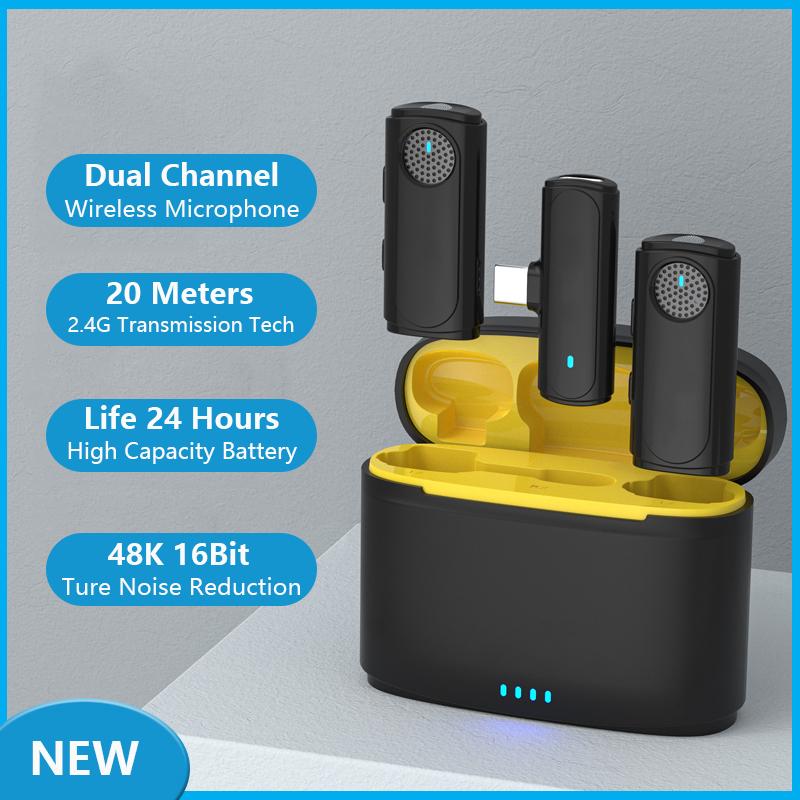
how to remove sound from a recorded video 1

Before diving into the methods, it's essential to understand why you might want to remove sound from a video. Here are some common reasons:

1. Background Noise: Unwanted background noise can detract from the quality of your video.

2. Voiceover: You may want to add a voiceover or different audio track.

3. Silent Films: Creating a silent film or a video with subtitles.

4. Privacy: Removing sensitive or private conversations from the video.

Methods to Remove Sound from a Video

how to remove sound from a recorded video 2

1. Using Online Tools

how to remove sound from a recorded video 3

Online tools are convenient for quick edits and do not require any software installation. Here are some popular online tools:

a. Clideo

Clideo is a user-friendly online tool that allows you to remove audio from a video easily.

- Step 1: Visit the Clideo website.

- Step 2: Upload your video file.

- Step 3: Click on the "Remove Sound" button.

- Step 4: Download the edited video.

b. Kapwing

Kapwing is another versatile online tool that offers various video editing features, including audio removal.

- Step 1: Go to the Kapwing website.

- Step 2: Upload your video.

- Step 3: Click on the "Mute Video" option.

- Step 4: Export and download the video.

2. Using Desktop Software
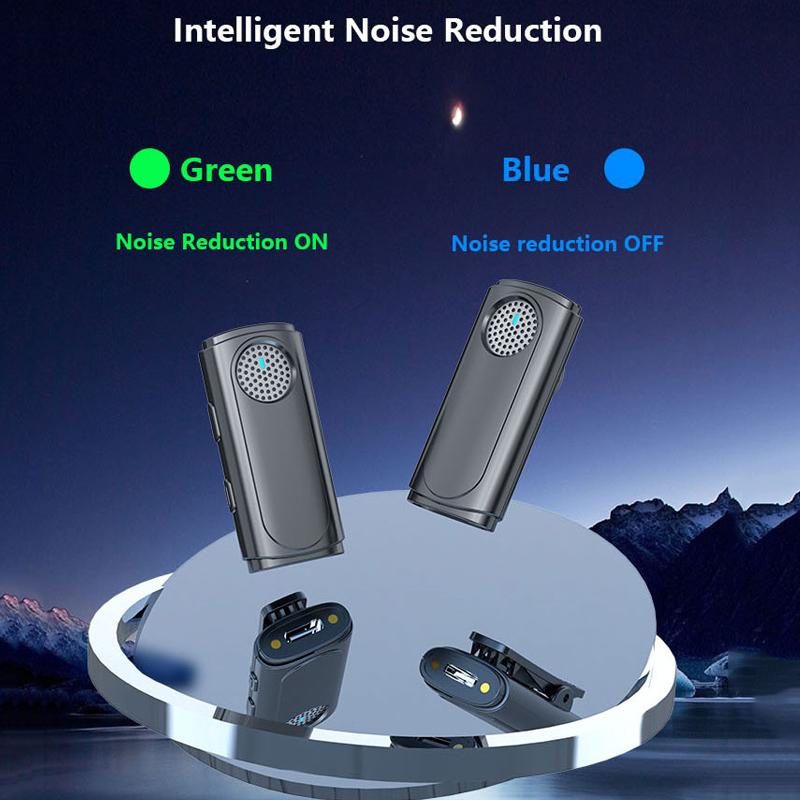
how to remove sound from a recorded video 4

For more advanced editing, desktop software provides greater control and additional features. Here are some popular options:

a. Adobe Premiere Pro

Adobe Premiere Pro is a professional video editing software widely used in the industry.

- Step 1: Import your video into Adobe Premiere Pro.

- Step 2: Drag the video to the timeline.

- Step 3: Right-click on the audio track and select "Unlink."

- Step 4: Delete the audio track.

- Step 5: Export the video without the audio.

b. iMovie (Mac)

iMovie is a free video editing software available for Mac users.

- Step 1: Open iMovie and import your video.

- Step 2: Drag the video to the timeline.

- Step 3: Right-click on the audio track and select "Detach Audio."

- Step 4: Delete the detached audio track.

- Step 5: Export the video without the audio.

c. Windows Movie Maker (Windows)

Windows Movie Maker is a free video editing software for Windows users.

- Step 1: Open Windows Movie Maker and import your video.

- Step 2: Drag the video to the timeline.

- Step 3: Click on the "Edit" tab and select "Video Volume."

- Step 4: Drag the volume slider to the left to mute the audio.

- Step 5: Save the video without the audio.

3. Using Mobile Apps

For those who prefer editing on their mobile devices, several apps can help you remove audio from a video:

a. InShot (iOS and Android)

InShot is a popular mobile app for video editing.

- Step 1: Open InShot and import your video.

- Step 2: Tap on the video track and select the "Volume" option.

- Step 3: Drag the volume slider to zero.

- Step 4: Save the video without the audio.

b. KineMaster (iOS and Android)

KineMaster is another powerful mobile video editing app.

- Step 1: Open KineMaster and import your video.

- Step 2: Tap on the video track and select the "Audio" option.

- Step 3: Mute the audio track.

- Step 4: Export the video without the audio.

Tips for Removing Sound from a Video

1. Backup Your Original File: Always keep a copy of the original video file before making any edits.

2. Check the Video Quality: Ensure that the video quality is not compromised during the editing process.

3. Use High-Quality Software: Opt for reputable software to avoid any potential issues or malware.

4. Consider the Output Format: Make sure the edited video is saved in a format compatible with your intended use.

Removing sound from a recorded video is a straightforward process, whether you choose to use online tools, desktop software, or mobile apps. Each method has its advantages, and the best choice depends on your specific needs and the tools you have available. Online tools are great for quick edits, desktop software offers advanced features, and mobile apps provide convenience for on-the-go editing.

By following the steps outlined in this article, you can easily remove unwanted audio from your videos, enhancing their quality and making them more suitable for your intended purpose. Whether you're a professional video editor or a casual user, these methods will help you achieve the desired results efficiently.
Leave your comment
Cancel reply
Note: HTML is not translated!
Related products
Variable ND2-32 Filter Compatible with DJI Osmo Action 5 Pro/Osmo Action 4/Osmo Action 3, Snap-on Installation, no need to remove the original filter
$24.99
Variable ND32-512 Filter Compatible with DJI Osmo Action 5 Pro//Osmo Action 4/Osmo Action 3, Snap-on Installation, no need to remove the original filter
$24.99
Variable ND2-32 & ND32-512 Filter Kit Compatible with DJI Osmo Action 5 Pro/Osmo Action 4/Osmo Action 3, Snap-on Installation, no need to remove the original filter
$44.99
Minolta A / Sony A Lenses to Leica M Lens Mount Adapter K&F Concept M47151 Lens Adapter
31
$75.99 $39.99
Minolta A / Sony A Lenses to Pentax Q Lens Mount Adapter K&F Concept M22161 Lens Adapter
$45.99 $23.99
Mini Voice Recorder, Sound-activated & Magnetic, 128GB 1600H Capacity with AI Noise Cancelling Kentfaith
13
$94.99 $53.99
Mini Sound Recorder 128GB 1600H Recording Capacity with 1.4" Screen, Voice Activated Mode Kentfaith
12
$99.99 $79.99
ND2-32 & PL & Black Mist 1/4 Filter Kit Compatible with DJI Osmo Action 5 Pro/Osmo Action 4/Osmo Action 3, Snap-on Installation, no need to remove the original filter
$49.99
Minolta A / Sony A Lenses to Pentax Q Lens Mount Adapter with Tripod Mount K&F Concept M22162 Lens Adapter
$55.99 $28.99
Children’s Entry-Level Metal Detector, High Sensitivity, With LCD Display and Sound Indication, Suitable for Beginners
144
$64.49 $50.99
Products You May Like
Digital Rain Gauge with Wireless Self-Emptying Rain Collector, Thermometer, Weather Station with Large Display, Rain Alerts
$134.99 $94.99
62mm Circular Polarizer Optical Glass Lens Filter Ultra-Slim 18 Multi-Layer Coatings Circular Polarizing Filters for Camera Lens (Nano-Klear)
64
$23.99 $18.49
72mm Magnetic Lens Filter Kit GND8+ND8+ND64+ND1000+Magnetic Adapter Ring 5 in 1 Quick Swap System Nano X Series
$219.99 $139.99
Celluar Trail Cameras
9
$135.99 $74.99
10x28 Children Mini Binoculars HD Detachable Monocular for Kids
16
$59.99 $37.81
K&F Concept 12X50 Binoculars Telescope with Smartphone Adapter, Tripod Adapter, Cleaning Cloth, FMC Lens BAK4 Prism for Adults, HD Binoculars for Bird Watching Hunting Hiking Camping Travelling
79
$89.99 $66.99
K&F CONCEPT Variable ND Filter Compatible with DJI Mini 5 Pro, ND2-32 1-5 Stops Multicoated HD Optical Glass Lightweight Drone Camera Lens Accessories for Aerial Photography Video Recording
79
$35.99 $24.99
K&F Concept 24" x36”(60x90cm) 5-in-1 Oval Foldable Reflector with Carrying Bag, Gold, Silver, Black, White Reflective Fabric and Translucent Soft Fabric for Studio Lighting
13
$28.99
40.5mm Black Mist 1/8 Filter + Lens Cap, Mist Cinematic Effect Filter with 18 Multi-Layer Coatings for Video, Vlog, Portrait Photography Nano-Klear Series
20
$37.32 $24.74
58mm Filter Set (UV, CPL, FLD, Graduated Blue, Orange, Grey, Red, Green, Brown)
33
$40.99 $19.99
Related articles
How To Improve Sound Quality Of Recorded Video?
How To Remove The Selfie Stick From Video?
Home Recorded Music Fluttering Sounds How To Remove?
How To Remove A Sd Card From Phone?
How To Make Recorded Audio Sound Better?
How To Record Audio From A Video?
How To Get Sound On Screen Recorded Videos?
How To Remove Outdoor Camera From Base?
How To Remove Night Filter From Camera Clip?
How To Use Metal Detectors Beginner?
Blog You May Like
How Does A Selfie Stick Work With Remote?
What Are Flash Memory Cards Used For?
How To Get Sound On Screen Recordings?
Which Cellular Trail Camera?
How To Fix A Selfie Stick Phone Holder?
How To Find Hidden Camera Using Cell Phone?
How To Install Security Camera With No Wifi?
Can Bluetooth Headphones Connect To Xbox?
How Do We Record In Car?
What Does A Scanning Electron Microscope Do?
Related categories
A Mount Lens Adapter Sony A Mount Lens Adapters Video Shooting minolta a mount lenses lightweight video tripod C mount lens adapter m4/3 adapter
Popular products
led video light for camera nd filter for dji osmo action security camera home surveillance fpv drone and goggles ambient light for car leica m sony e mount adapter sony minolta adapter sony a mount to minolta adapter mft adapter sony Fuji Mount Adapter
Related searches
Remove A Stuck Lens Filter Video Sound Recorder Ho Remove A Lens Adapter Pentax Video Recorder With Sound Lens Filter To Remove Reflections Small Video Camera With Sound Filter To Remove Lens Artifacts Halo Change Lens Mount From Minolta To Nikon Wireless Headphones From Tv A Digital Video Camera
Popular searches
Fujifilm X20 Lens Hood Filter Kit Silver Nikon Mount Toy Lens K&f Nd Filters Selfie Ring Light For Phone M To Rf Mount Sony Focal Reducer For E Mount Lens Outdoor Projector With Speakers Black Light Reflector Nikon F To Canon Ef Canon Fl Lens Adapter
Blog Category
  • Activities
  • Guide
    • Filter Guide
    • Lens Adapter
    • Product Review
  • News & Reviews
    • Camera Reviews
    • Sample Gallery
    • News
  • Tutorials
    • Solar eclipse photography
    • Photography Basics
    • Landscape Photography
  • Inspiration
    • Travel
    • Travel Stories
Search Article
Latest from the Blog
How To Stream Live From Surveillance Camera?
What Tripod To Buy?
How To Remove Memory Card From Nikon Camera?
How To Place Cameras Around Your House?
Can You Zoom In With Binoculars?
Which Bluetooth Earphones?
What Power Binoculars For Long Distance Viewing?
Black Friday 2025 Special at Kentfaith
ND Filter: The Complete Guide to Neutral Density Filters for Photography and Video
How Do Trail Cameras Work? The Ultimate Guide to Trail Cameras
  • Easy Payment Multilple Payment Options

  • Free Shipping Global WareHouse Shipment

  • No Risk 30-Day No Reason Return

  • Limited Deals Buy More, Save More

  • Tax Free No any surcharges or tax fee

Information
  • About us
  • Contact Us
  • Site Map
  • Blog
  • Video
  • Gallery
  • VIP Membership Rewards
Service
  • Privacy Policy
  • Terms & Conditions
  • Shipping & Delivery
  • Payment Info
  • Warranty, Return & Refund
  • Intellectual Property Rights
  • Ambassador
  • Affiliates
  • Wholesale
Support
  • My account
  • Order History
  • FAQs
  • Extend Warranty
  • Logistics Tracking
Follow us
NewsLetter

Get the latest product, K&F Concept respects your privacy.

Powered By KENTFAITH © 2025