Can Wireless Cameras Work Without Internet?
The advent of wireless cameras has revolutionized the way we secure our homes, offices, and other spaces. Convenient, versatile, and easy to install, these devices are often associated with internet connectivity as a prerequisite for their functionality. However, a question that often arises is: can wireless cameras work without the internet? The short answer is yes, but the details can be more nuanced. In this article, we’ll explore the functionality of wireless cameras without internet connectivity, the conditions under which they operate effectively, their limitations, and some practical use cases.
How Wireless Cameras Operate Without Internet

It’s important to understand that the term "wireless camera" can refer to two different things: cameras that are wire-free (powered by batteries and transmitting data wirelessly via radio frequencies) and those that are Wi-Fi-enabled for internet connectivity. A common misconception is that all wireless cameras require constant internet access to operate. In reality, many wireless cameras are designed to function locally without an active internet connection, depending on how they are set up and the specific features of the camera.
Let’s break down the common scenarios in which wireless cameras can maintain functionality offline:
1. Local Storage
Many wireless cameras come equipped with local storage options such as SD cards or built-in hard drives. When the camera records footage, it’s saved directly to the storage device within the camera, bypassing the need for internet access. Security footage can later be retrieved and reviewed by physically accessing the storage.
2. Connection to Local Network or NVRs
Some wireless cameras operate via a local network rather than the internet. By connecting to a non-internet local area network (LAN), these cameras can transmit recorded footage to devices such as Network Video Recorders (NVRs). This setup essentially creates a closed security ecosystem within your property, enabling live monitoring and video archiving without relying on the internet.
3. Direct Wireless Communication
Certain cameras come with point-to-point wireless communication capabilities, where the camera transmits video data directly to a receiver, such as a dedicated monitor or smartphone via proprietary applications. These cameras generally have a limited range but work efficiently for on-premises monitoring.
4. Motion Detection Alerts via Local Means
Some advanced cameras operate with motion-detection features, sending alerts or activating alarms locally. Without internet connectivity, these actions are triggered internally or via local network interactions. Cameras with this feature can still enhance security by notifying users within the premises when unusual activity is detected.
Limitations of Wireless Cameras Without Internet

While wireless cameras can function without an active internet connection, there are several limitations to be aware of when operating them offline:
1. No Remote Access
One of the most sought-after advantages of modern wireless cameras is the ability to access live feeds or playback footage remotely through smartphone apps. Without internet connectivity, this feature becomes unavailable. You can only view footage on-site by accessing the local storage or display.
2. Lack of Cloud Storage
Many wireless security camera systems offer cloud storage options where footage is encrypted and stored remotely. Without internet, you miss out on this feature, leaving local storage as your only option. Local storage is prone to being stolen or damaged if the camera itself is tampered with.
3. No Software Updates or Smart Features
Internet-enabled wireless cameras often receive regular software updates that enhance features and patch vulnerabilities. Cameras operating offline cannot access these updates, potentially creating security risks or making them less effective over time. Features reliant on smart AI, like facial recognition or advanced tracking, may also not work fully without access to cloud-based computing.
4. Limited Monitoring Range
In setups where cameras rely on direct wireless communication or non-internet LAN access, the monitoring range is typically limited to the camera's broadcast distance. This can be a challenge in larger properties or locations with obstacles that could interfere with the communication signal.
5. No Integration with Smart Home Devices
Advanced smart home integrations, such as pairing your security system with smart locks or voice assistants like Alexa, require an active internet connection. Offline cameras cannot be integrated into these ecosystems, potentially limiting their usefulness in a connected home.
Practical Use Cases of Wireless Cameras Without Internet

Despite the limitations mentioned above, there are several scenarios where using wireless cameras without internet makes complete sense. Let’s explore some practical use cases:
1. Remote Areas with No Internet
In rural areas, construction sites, or areas prone to unreliable internet connectivity, wireless cameras with local storage provide an effective solution. These cameras can work independently without requiring an internet infrastructure.
2. Temporary Surveillance Needs
For short-term projects where installing an internet connection is impractical, wireless cameras with offline functionality can offer temporary surveillance. Examples include events, pop-up shops, or temporary work zones.
3. Privacy-Conscious Individuals
Some people prefer offline cameras for added privacy. With these systems, footage isn’t uploaded to the cloud or connected to the internet, reducing the risk of hacking or unauthorized access to sensitive recordings.
4. Backup Security Systems
Offline cameras can serve as a backup to internet-connected devices. In cases where the internet fails due to technical issues or power outages, offline cameras can continue capturing footage locally.
5. On-Site Use in Businesses or Organizations
Certain businesses, such as warehouses or manufacturing plants, may want to keep their surveillance systems isolated from the internet for security reasons while still maintaining effective monitoring.
Tips for Setting Up and Using Wireless Cameras Offline

If you plan to use a wireless camera offline, here are some practical tips to ensure you get the most out of your setup:
1. Invest in Quality Local Storage
Choose high-capacity, reliable storage solutions such as SD cards with ample space to handle video footage. Periodically back up the data to prevent losing important recordings.
2. Position Cameras Strategically
Since you won’t be able to monitor the footage remotely in real-time, ensure that the cameras cover critical areas such as entry points, driveways, or valuable assets.
3. Consider Battery Backup
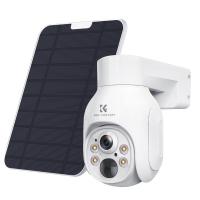
For wire-free cameras, ensure they have a sufficient battery life or are paired with solar panels. This ensures continuity of operation during power outages.
4. Complement with an Alarm or Motion Trigger System
Without internet connectivity, immediate notifications won't be possible. To compensate, use the camera with a local motion-triggered alarm to alert you when suspicious activity occurs.
5. Regularly Check and Maintain Equipment
Without the remote diagnostics and updates provided by an internet connection, it’s important to periodically check your system for issues such as storage limits, power levels, or hardware malfunctions.
While internet connectivity is often associated with wireless cameras, it’s not a strict requirement for their operation. Many wireless cameras can function efficiently offline using local storage, connection to a LAN, or direct wireless communication. These systems are perfectly suited for areas with no internet access, privacy-focused users, or temporary surveillance needs. However, it’s essential to understand their limitations, including the lack of remote monitoring, cloud storage, and software updates.
By choosing the right camera for your needs, strategically setting up your system, and understanding the trade-offs involved, you can effectively use wireless cameras even in offline environments. Whether as a standalone security solution or a backup to an internet-connected system, offline wireless cameras are a viable option for enhancing security in a wide range of scenarios.