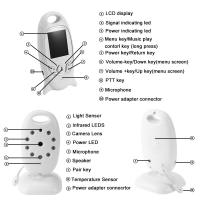
Can Wireless Backup Cameras Be Wired?
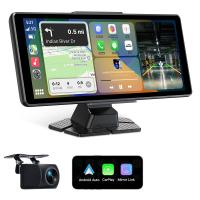
Wireless backup cameras have become increasingly popular due to their ease of installation, affordability, and ability to provide extra safety for drivers. However, one question that often arises is whether wireless backup cameras can be converted to a wired setup. This topic may appeal to individuals who are considering upgrading their car's safety features, as well as those who may already own a wireless camera but are facing issues with connectivity or interference. In this article, we will delve into this topic while addressing concerns, solutions, and how-tos for those who are curious about making such conversions.
Why Consider Using a Wired Setup for a Wireless Camera?

Wireless backup cameras are typically easy to install because they don’t require running wires through a vehicle. They involve a transmitter and receiver that connect the camera to the display screen wirelessly. While this design offers convenience, there are situations where you might consider converting your wireless system into a wired setup. Here’s why:
1. Signal Interference: Wireless cameras can experience connectivity issues due to interference from Wi-Fi signals, Bluetooth devices, or even the materials in your car body. This may cause delays, distortion, or a complete loss in the video feed.
2. Poor Signal Strength Over Long Distances: In larger vehicles, such as trucks, RVs, or vans, the distance between the camera and the monitor can lead to weak signals, which affect video quality.
3. More Reliable Connection: Wired systems are inherently more stable since they physically transmit data between the camera and the monitor. For those who want a worry-free and consistent video feed, a wired setup might feel more appealing.
4. Battery Dependence of Wireless Cameras: Some wireless cameras rely on external batteries that need periodic recharging. A wired setup eliminates the need to change or charge batteries since the power is usually drawn from the vehicle itself.
5. Potential for Better Image Quality: Signal lag and compression over wireless systems can affect video clarity. Wired connections often deliver superior image quality.
Can Wireless Backup Cameras Be Converted?

The short answer to whether wireless backup cameras can work as wired systems is: it depends. It is possible in some cases, given the appropriate components and technical know-how, but this feasibility depends on two critical factors:
1. Camera Design

Not all wireless backup cameras are designed in a way that allows them to be easily wired. Many wireless systems don’t have built-in wired connections, and modifying them may require advanced technical skills. Before starting the conversion process, check the hardware specifications or contact the manufacturer to determine if your model supports this.
2. Availability of Necessary Ports

Some wireless cameras come with options for both wireless and wired setups, meaning that they have specific ports where you can plug in wires for power and video transmission. However, if your camera does not have these, converting it to a wired unit may require additional work, such as soldering wires or modifying the circuit board, which could void warranties or risk permanent damage.
Steps to Convert Wireless to Wired
If you are determined to make your wireless backup camera work as a wired system, these steps can serve as a guideline. Note that this process assumes your camera model allows for wired functionality.
Step 1: Assess Your Camera and Monitor Setup
Check to see if your camera and monitor have the required connectors. For most cameras, you'll need:
- A video output port (usually a yellow RCA jack or specific connector)
- A power input port for a DC power connection
Similarly, your monitor should also have an input section for a wired video connection.
Step 2: Purchase Necessary Cables
You'll typically need:
- A video cable (e.g., RCA or similar, depending on the port type of your camera and monitor)
- A power cable to connect to the vehicle’s electrical system (usually 12V power)
Step 3: Run and Secure Wiring
Once you have the necessary cables, you’ll need to route these wires through the vehicle to connect the camera at the back of the car to the display unit on the dashboard. It's important to:
- Keep the wiring organized and secure to avoid tangles or damage.
- Utilize cable ties and adhesive clips to fasten cables.
- Follow the existing wiring systems whenever possible for a clean and professional setup.
Step 4: Connect Components
Insert one end of the video cable into the camera's output port, and connect the other end to the monitor's input port. Similarly, connect the power cable to the vehicle’s reverse light circuit or fuse box so the camera gets power when the vehicle is in reverse.
Step 5: Test the System
After running all cables and connecting components, test the system by turning on the car and shifting into reverse. Ensure the video feed is live and free of interruptions, and double-check all connections if there are any issues.
Challenges You May Encounter
1. Hardware Compatibility Issues:
Not all wireless systems are designed for conversion. If your camera lacks physical ports for a wired connection, you might need to replace it with a compatible unit or find alternative solutions.
2. Cable Management:
Running cables through a vehicle can be cumbersome, particularly in larger vehicles or those with intricate interiors. Specialty tools (like a fish tape) can help, but this process can be time-consuming.
3. Potential Damage to Car Components:
If not carefully executed, the process of routing wires can damage your vehicle's interior or electrical systems. It’s a task that may require patience and caution.
Alternative Solutions to Consider
If you find that converting your wireless backup camera is more trouble than it’s worth, here are other options to achieve similar benefits:
1. Invest in a Dual-System Camera:
Some backup cameras are sold as hybrids, with the ability to function as both wireless and wired setups. Upgrading to this type of device provides flexibility without any modifications.
2. Upgrade to a High-Quality Wireless Unit:
If the primary issue with your current wireless system is interference or weak signals, upgrading to a more robust wireless camera system may solve the problem. Higher-quality models often come with better antennas and signal transmission technology.
3. Professional Installation of a Wired System:
If reliability and consistency are your top priorities, opting for a professional wired backup camera kit could be a stable long-term solution.
Final Thoughts
Converting a wireless backup camera into a wired system can be a feasible project, but it requires an evaluation of your existing equipment and its compatibility. For some drivers, the reliability and quality of a wired system justify the effort, while for others, it may make more sense to either stick with their existing wireless setup or upgrade to a better system altogether.
Before starting this project, weigh your goals, technical ability, and available resources to find the best solution for your specific needs. Whether you’re a DIY enthusiast or completely new to automotive cameras, understanding the basics can give you more confidence in improving your vehicle’s safety and functionality.