kfconcept

KENTFAITH
K&F Concept    Blog >

Enjoy Your Selected Digital Life

Recently Viewed
  • Recently Viewed
  • Recently Viewed list is empty.

Compare (0) 0
  • Compare
  • You have not chosen any products to compare.

  • Compare
Currency: USD
  • Currency
Shop by Scene Shop by Rank

Log Into Your Account

Account

Order History

Wish List

Login

Forgotten Password?

or connect with

Register Account

Already have an Account?Log In

  • Shopping Cart
  • Your shopping cart is empty!

  • Register/Login to purchase, earn points
  • Favorite
  • Your wish list is empty.

  • Register/Login to like, earn points
  • Activities
  • Guide
    • Filter Guide
    • Lens Adapter
    • Product Review
  • News & Reviews
    • Camera Reviews
    • Sample Gallery
    • News
  • Tutorials
    • Solar eclipse photography
    • Photography Basics
    • Landscape Photography
  • Inspiration
    • Travel
    • Travel Stories
  • Home
  • Blog
  • How To Find Wifi Camera Port Number?

How To Find Wifi Camera Port Number?

Kentfaith 2024-10-08 01:05:17 0 Comments

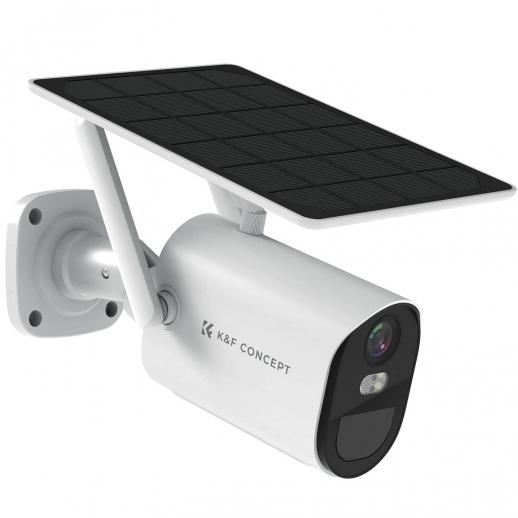
Finding the port number for a WiFi camera involves several steps, which, although straightforward, can be slightly challenging for beginners. For tech enthusiasts, security professionals, and home automation hobbyists, understanding the process can help in effectively managing and optimizing their WiFi camera setup. This article aims to provide a detailed guide on locating and utilizing the port numbers of WiFi cameras.

Understanding Port Numbers and Their Importance

WiFi cameras provide a convenient way to monitor and secure spaces remotely. However, for remote access and integration into larger security systems, these cameras need to communicate over a network using IP addresses and port numbers. A port number is a unique identifier that allows data to be sent and received between devices on a network. Knowing the correct port number is essential for tasks such as remote viewing, integrating with third-party applications, or ensuring seamless data flow in a network.

Step-by-Step Guide to Finding Your WiFi Camera’s Port Number

Step 1: Check the User Manual or Manufacturer’s Website

The first and simplest place to start is the user manual provided with your WiFi camera. Manufacturers often mention default port numbers in the device documentation. If the manual is not available, the manufacturer's website or support FAQs may contain the necessary information. Typical default ports are:

- HTTP Port: 80

- HTTPS Port: 443

- RTSP Port: 554

- FTP Port: 21

Step 2: Access the Camera’s Configuration Interface

Most WiFi cameras allow users to access a web-based configuration interface. To enter this interface:

1. Connect your computer to the same network as your WiFi camera.

2. Open a web browser.

3. Enter the camera’s IP address into the browser’s address bar. You can usually find the IP address in the camera’s user manual or by scanning your network with network discovery tools like "Advanced IP Scanner" or "Fing."

Once logged in, navigate to the network settings section, which may be labeled differently depending on the manufacturer (e.g., "Network," "Advanced Settings," or "Configuration"). Here, you should find details about the camera's port numbers.

Step 3: Utilize Network Discovery Tools

If the above steps do not reveal the port numbers, network discovery tools can help:

- Advanced IP Scanner: Download and install this software. Run a scan of your network; it will list all connected devices, including your WiFi camera, along with their IP addresses and open ports.

- Fing (Mobile App): Install Fing on your smartphone. Perform a network scan, and it should offer similar information as Advanced IP Scanner.

These tools are particularly useful for identifying any alterations to the default settings.

Step 4: Command Line Tools

For those comfortable with command-line operations, using built-in tools like `netstat` (Network Statistics) and `telnet` can provide the required information:

On Windows:

1. Open Command Prompt.

2. Run `netstat -a` to display a list of active connections and listening ports.

3. Identify the relevant ports of your camera by matching IP addresses and process names.

On macOS/Linux:

1. Open Terminal.

2. Use `netstat -an` to list active connections.

3. Verify the port numbers similar to the method above.

Step 5: Port Forwarding Configuration

Once you have identified your camera's port numbers, the next step is configuring your router to enable remote viewing. This involves setting up port forwarding:

1. Log in to your router’s web interface.

2. Navigate to the port forwarding section (usually under "Advanced" or "Firewall").

3. Create a new port forwarding rule, entering your camera’s IP address and port numbers.

4. Save the settings and reboot the router if necessary.

Troubleshooting Common Issues

1. Camera Not Accessible on Browser: Ensure that you are using the correct IP address and port combination. Check if your firewall settings or anti-virus software block the connection.

2. Port Conflicts: If a port number is already in use by another device, change the camera’s port number via the configuration interface and update the port forwarding rule.

3. Dynamic IP Issues: Use a Dynamic DNS (DDNS) service if your public IP address changes frequently. This will provide a consistent address to access your camera remotely.

Practical Applications and Advanced Tips

Secure Your Setup

Security should be paramount when configuring your WiFi camera for remote access:

- Change the default usernames and passwords.

- Use secure port numbers and avoid common ones like 80 or 443.

- Implement network encryption protocols wherever possible.

Integration with Home Automation Systems

Identifying your camera’s port numbers allows seamless integration with home automation systems such as:

- SmartHub (Home Assistant)

- Security panel integrations (e.g., Honeywell, DSC panels)

Monitoring and Alerts

By correctly configuring network settings, you can set up automatic alerts and monitoring through software applications that require accurate port configurations to function optimally.

Understanding how to find and configure the port numbers for your WiFi camera can significantly enhance your device’s functionality and security. This comprehensive guide provides a structured approach, from checking manuals to using advanced network tools and ensuring secure configurations. Whether you are optimizing your home security systems or integrating advanced monitoring solutions, this acquired knowledge empowers you to make informed decisions and establish a robust surveillance setup.
Leave your comment
Cancel reply
Note: HTML is not translated!
Related products
Anti-Spy Detector Scan & Disconnect for 24/7 Protection Find Bugs Hidden Cams
15
$89.99 $59.99
Metal Detectors for Adults and Kids, Gold Detector Kit with LCD Display & IP68 Waterproof Search Coil for Find Valuables
NEW Arrival
Metal Detectors for Adults and Kids, Gold Detector Kit with LCD Display & IP68 Waterproof Search Coil for Find Valuables
285
$215.99 $151.99
M39 Lenses to Fuji X Lens Mount Adapter K&F Concept M19111 Lens Adapter Non-SLR port M39
4
$49.99 $31.99
M39 Lenses to M43 MFT Lens Mount Adapter K&F Concept M19121 Lens Adapter Non-SLR port M39
104
$45.99 $23.99
Leica M39 28mm/90mm Lenses to Leica M Lens Mount Adapter K&F Concept M19151 Lens Adapter Non-SLR port M39
31
$37.99 $19.99
Leica M39 35mm/135mm Lenses to Leica M Lens Mount Adapter K&F Concept M19151 Lens Adapter Non-SLR port M39
33
$37.99 $19.99
Leica M39 50mm/75mm Lenses to Leica M Lens Mount Adapter K&F Concept M19151 Lens Adapter Non-SLR port M39
31
$37.99 $19.99
K&F Concept 3 Port Phone Battery Charger
$151.99 $79.99
WiFi 3 Lens Solar Security Camera Wireless Outdoor, 6MP Full HD Video, 360° View Pan/Tilt Home Security Camera with Color Night Vision, Easy to Install, PIR Alarm, Kentfaith
15
$156.24 $124.99
WiFi 3 Lens Solar Security Camera Wireless Outdoor, 6MP Full HD Video, 360° View Pan/Tilt Home Security Camera with Color Night Vision, Easy to Install, PIR Alarm, 2pcs, Kentfaith
$281.24 $224.99
Products You May Like
Motorcycle Dash Cam with 2K Resolution 140° Wide Angle WiFi Control USB Power Kentfaith
10
$84.99 $67.99
Darkfield Microscope with 7in Screen, 40X-2500X Magnification, Capture 2K Videos 24MP Photos, 195 Achromatic Objectives, HDMI Output, for Labs, Clinics, Ranches, Kentfaith
$999.99 $799.99
M42 Lenses to Canon EOS M Lens Mount Adapter K&F Concept M10141 Lens Adapter
4
$49.99 $27.99
52mm Black Mist 1/8 Filter + Lens Cap, Mist Cinematic Effect Filter with 18 Multi-Layer Coatings for Video, Vlog, Portrait Photography Nano-Klear Series
NEW Arrival
52mm Black Mist 1/8 Filter + Lens Cap, Mist Cinematic Effect Filter with 18 Multi-Layer Coatings for Video, Vlog, Portrait Photography Nano-Klear Series
21
$63.98 $31.99
Lens Mount Adapter MD-NEX IV Manual Focus Compatible with Minolta Rokkor (SR/MD/MC) Lens and Sony E Mount Camera Body
74
$70.99 $39.99
10-300×40 Continuous Zoom Monocular HD Metal Telescopes with Phone Holder & Tripod for Bird Watching Hunting Camping
19
$45.99 $28.99
Predator Trail Camera
10
$162.99 $106.99
Camera Neck Strap Camera Shoulder Strap Suitable for DSLR SLR Cameras Strap Urban Wander 05 Grey
96
$12.99
64 micro SD Card U3/V30/A1 with Adapter Pack of 2 Memory Cards for Home Surveillance Cameras, Hunting Cameras and Dash Cams
$27.99
77mm Gold Diffusion 1/4 Filter Mist Soft Glow Warm Highlights Vintage Cinematic Aesthetic Camera Lens Filter Nano-Xcel Series
NEW Arrival
77mm Gold Diffusion 1/4 Filter Mist Soft Glow Warm Highlights Vintage Cinematic Aesthetic Camera Lens Filter Nano-Xcel Series
72
$133.99 $99.99
Related articles
How To Find Camera Wifi Password ?
How To Find Out Your Canon Camera Wifi Password ?
How Do I Find A Wifi Camera Ip Address ?
How To Find Camera Model?
How To Find Camera Uid?
How To Find Camera Password?
How To Find Best Camera?
How To Protect Nikon Wifi Camera?
How To Record Wifi Security Camera?
How To Turn On Camera And Microphone On Dell Laptop ?
Blog You May Like
What Is Polarized Filter Used For Camera?
What Is A Good Lavalier Microphone?
How To Put Camera On Ring Light?
Which Speed Cameras Flash?
What Is A Trail Camera Used For?
How To Set Up Lavalier Microphone On Laptop?
How Do You Have Sound On Screen Record?
How To Fix Camera On Tripod Stand?
What's A Digital Camera?
How To Clean Mobile Camera Lens Glass?
Related categories
Outdoor Security Camera Wifi C mount lens adapter Wifi Trail Cameras Baby Movement Monitor Camera Parts | Studio Camera Accessories streaming video camera digital camera for beginner Solar Cellular Trail Camera
Popular products
no spy hidden camera detector pl lens mount adapter m39 to m mount adapter Leica M39 to M Mount Adapter leica t lens adapter Gold Detector Kit universal phone battery charger leica m mount to canon ef adapter remote wildlife camera wifi wifi trail camera
Related searches
Metal Detector Find Bag Small Video Camera With Usb Port Sony E Mount Lens Serial Number Sony Wm Port Adapter Metal Detectors That Find Gold And Silver Wifi Inspection Camera Wifi Trail Camera Budget Wifi Camera Portable Wifi Camera Wifi Hunting Camera
Related Scenes
Best Camera To Video Sports Best Camera To Capture Wildlife Best Tripod To Travel With Best Video Camera To Record Sports Best Easy To Use Compact Digital Camera Best Outdoor Wifi Camera Best Wifi Surveillance Camera Best Home Camera Wifi Best Battery Wifi Camera Best Wifi Digital Microscope
Blog Category
  • Activities
  • Guide
    • Filter Guide
    • Lens Adapter
    • Product Review
  • News & Reviews
    • Camera Reviews
    • Sample Gallery
    • News
  • Tutorials
    • Solar eclipse photography
    • Photography Basics
    • Landscape Photography
  • Inspiration
    • Travel
    • Travel Stories
Search Article
Latest from the Blog
When Red Light Camera Flash?
What Is The Use Of A Compound Microscope?
How To Read A Carbon Monoxide Detector?
Can You Carry On A Camera Tripod?
How Does A Wireless Headphones Work?
What Is The Range Of A Trail Camera?
Dash Cam Record When Parked?
Can Security Camera Record Voice?
What Is The Function Of A Condenser Microphone?
How To Use Old Phone As Security Camera?
  • Easy Payment Multilple Payment Options

  • Free Shipping Global WareHouse Shipment

  • No Risk 30-Day No Reason Return

  • Limited Deals Buy More, Save More

  • Tax Free No any surcharges or tax fee

Information
  • About us
  • Contact Us
  • Site Map
  • Blog
  • Video
  • Gallery
  • VIP Membership Rewards
Service
  • Privacy Policy
  • Terms & Conditions
  • Shipping & Delivery
  • Payment Info
  • Warranty, Return & Refund
  • Intellectual Property Rights
  • Ambassador
  • Affiliates
  • Wholesale
Support
  • My account
  • Order History
  • FAQs
  • Extend Warranty
  • Logistics Tracking
Follow us
NewsLetter

Get the latest product, K&F Concept respects your privacy.
Powered By KENTFAITH © 2026