kfconcept

KENTFAITH
K&F Concept    Blog >

Enjoy Your Selected Digital Life

Recently Viewed
  • Recently Viewed
  • Recently Viewed list is empty.

Compare (0) 0
  • Compare
  • You have not chosen any products to compare.

  • Compare
Currency: USD
  • Currency
Shop by Scene Shop by Rank

Log Into Your Account

Account

Order History

Wish List

Login

Forgotten Password?

Or connect with

Register Account

Already have an Account?Log In

  • Shopping Cart
  • Your shopping cart is empty!

  • Register/Login to purchase, earn points
  • Favorite
  • Your wish list is empty.

  • Register/Login to like, earn points
  • Activities
  • Guide
    • Filter Guide
    • Lens Adapter
    • Product Review
  • News & Reviews
    • Camera Reviews
    • Sample Gallery
    • News
  • Tutorials
    • Solar eclipse photography
    • Photography Basics
    • Landscape Photography
  • Inspiration
    • Travel
    • Travel Stories
  • Home
  • Blog
  • How Do You Use A Bluetooth Selfie Stick?

How Do You Use A Bluetooth Selfie Stick?

Kentfaith 2024-12-06 01:49:50 0 Comments

Using a Bluetooth selfie stick has become an essential skill for anyone keen on capturing perfect moments without needing an extra set of hands. The Bluetooth feature adds convenience by allowing you to take photos without physically touching your phone, thus improving the overall quality and ease of the process. In this article, I will provide a detailed and coherent guide on how to effectively use a Bluetooth selfie stick, helping you confidently capture those unforgettable moments.
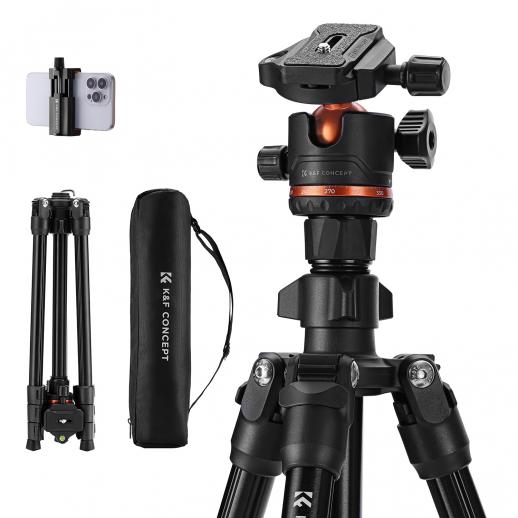

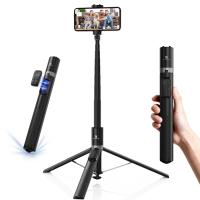
Understanding Your Bluetooth Selfie Stick

Before diving into the step-by-step instructions, it’s vital to familiarize yourself with the different parts of the selfie stick and how they function together.

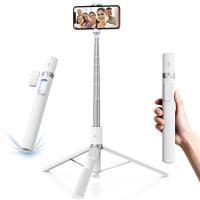
1. Stick and Handle: The stick is telescopic, meaning it can be extended and retracted. The handle is where the grip is located, and often it contains the Bluetooth button.

2. Phone Holder: This is a clamp at the top of the stick where you place your phone. It’s adjustable to fit various phone sizes.

3. Bluetooth Remote or Button: Located either on the handle or as a separate remote, this button pairs with your phone and signals the camera to take a photo.

4. Charging Port: Some sticks come with a built-in battery charged via a USB cable.

Step-by-Step Guide to Using Your Bluetooth Selfie Stick

Step 1: Charge Your Selfie Stick

Most modern Bluetooth selfie sticks come with a built-in rechargeable battery. Before your first use, ensure it’s fully charged. This typically involves plugging a USB cable into the selfie stick and connecting it to a power source. Charging times can vary, but two hours is usually sufficient for a full charge.

Step 2: Pair the Selfie Stick with Your Phone

1. Turn On the Bluetooth Feature: Start by turning on the Bluetooth connectivity on your smartphone. This is usually found within the settings menu under ‘Bluetooth.’

2. Power Up the Selfie Stick: Some sticks have a power button; press it to turn the stick on. You may see a small LED light indicating it’s ready to pair.

3. Pairing: On your phone’s Bluetooth settings, look for the name of your selfie stick, which is typically the brand or model number. Select it to pair.

4. Confirmation: Once paired, your phone will usually display a confirmation message, and the LED on the selfie stick may change color or turn off.

Step 3: Mount Your Phone

Once paired, it’s time to mount your phone securely:

1. Extend the Clamp: Expand the phone holder to fit your device. Avoid stretching too much as it could damage the holder.

2. Position Your Phone: Place your phone into the holder and ensure it’s secure. The camera should face outwards, unobstructed by the holder.

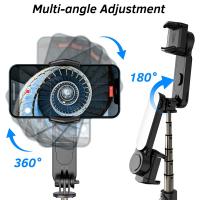
3. Adjust the Angle: Most holders allow you to tilt and rotate the phone, providing the optimal angle for your shot. Experiment with different angles to find what works best for your scene.

Step 4: Extend the Selfie Stick

With your phone securely in place, extend the selfie stick to the desired length. The stick should telescope smoothly but make sure not to pull too hard, risking damage or accidental collapse. If your holder can rotate, decide whether a landscape or portrait orientation suits your photo.

Step 5: Taking the Photo

1. Open Camera App: On your smartphone, open the camera application. Some selfie sticks come with their app, but the default camera app usually works fine.

2. Position the Stick: Hold the stick firmly, ensuring it's stable. Adjust the angle for the perfect shot.

3. Click the Button: Either press the Bluetooth button on the handle or use the remote to take the photo. The photo should capture instantly while ensuring minimal to no shake.

Troubleshooting Common Issues

Unsuccessful Pairing

If you face trouble pairing the selfie stick with your phone, ensure the stick is charged and in pairing mode. Restart the Bluetooth function on your phone and try again. If all else fails, consult the manual specific to your selfie stick model.

Phone Falling Out

If your phone constantly slips out of the holder, ensure the clamp is undamaged and adequately tight. If the holder is loose or broken, consider replacing it. Also, don’t extend the stick too far as it increases the lever force on the holder, making it unstable.

Button Malfunction

If the Bluetooth button or remote doesn’t work, ensure it’s fully charged and properly paired with the phone. Sometimes, drivers or specific app permissions may need updating.

Additional Tips and Tricks

Lighting

Optimal lighting is crucial for taking great photos. Natural light is preferable, but if you’re indoors or it’s dark, ensure your phone’s flash is on. Some selfie sticks come with built-in LED lights to enhance lighting conditions.

Stability

To avoid blurry pictures, stabilize the stick by holding it steadily or resting it against a firm surface. Extending the stick fully makes it prone to shakes, so avoid fully extending unless necessary.

Using Timer Mode

Instead of using the button, consider using your phone’s timer mode to take a selfie. This can add another layer of stability as you can prepare and hold still after setting a countdown.

Filters and Editing

Enhance your photos with filters available on your camera app or third-party photo editing apps. Subtle edits can make a significant difference, especially in a well-composed shot.

Mastering the use of a Bluetooth selfie stick can significantly elevate your photography game, making it easier to capture perfect shots without assistance. From charging and pairing your device to mounting your phone and taking stunning photos, each step is vital for a seamless experience. With practice, these actions become second nature, allowing you to focus more on capturing beautiful moments rather than fumbling with equipment. Happy snapping!

Leave your comment
Cancel reply
Note: HTML is not translated!
Related products
A Camping Lantern That Dances with You, Rechargeable, Telescoping & Compact with Bluetooth Speaker, Emergency Power Bank 14000mAh Battery Kentfaith
116
$199.99 $94.99
Cell Phone Tripod MS02 13.4''/34cm bluetooth selfie stick Desktop Stand Orange Gray
97
$29.99 $21.99
MS04 62''/1.58m Tripod Phone Selfie Stick, Black And Orange With Bluetooth Remote Control + Gopro Adapter
107
$49.99 $29.99
23.6‘’/60cm 3 in 1 selfie stick desktop stand with ball head + mobile phone holder + GoPro adapter + Bluetooth remote control MS11
45
$37.99 $23.99
DJI Osmo Action 4 & Osmo Action 5 Pro Action Camera Filter and Selfie Stick Kit, 4 Pack (CPL + ND8 + ND16 + ND32) Screw On Polarizing Neutral Density Filter HD Optical Glass / Multi-Coated / Metal Frame and Portable 2-in-1 Selfie Stick Tripod
$49.99
67''/170cm Eccentric Tube Cellphone Tripod, Lightweight Super Portable Selfie Stick, DSLR Camera Tripod E224A3+BH-18 Silver
36
$89.99 $49.99
67''/1.7m Eccentric Tube Cellphone Tripod, Lightweight Super Portable Selfie Stick, DSLR Camera Tripod E224A3+BH-18 Black
36
$85.99 $49.99
MS03 13''/33cm Action Camera Mounts Selfie Stick Desktop Stand (Small Size) For Gopro, Action, And Insta Black Orange
5
$37.99 $18.99
63'' Magnetic Iphone Tripod Phone Selfie Stick Tripod And Clip-On ND Filter(1-9 stops) For All Phone Set
207
$113.99 $59.99
Products You May Like
58mm Explosive-Proof MCUV Lens Protection Filter 28 Multi-Layer Coatings Ultra-Slim HD Waterproof Scratch Resistant Nano-Xcel Series
58
$43.74 $34.99
Grade Pro Trail Camera
20
$162.99 $106.99
46mm Lens Filter Kit Neutral Density ND8+ND64+CPL Circular Polarizer for Professional Camera Lens with Multiple Layer Nano Coated
11
$69.99 $41.99
3PCS Solar Powered Wireless Security Camera 1080P with Audio & Light Alert Outdoor Home Security Camera Color Night Vision & 14400mAh Built in Battery All White
23
$159.99
Compound Microscope for Laboratory, Professionals, Research, with lnfinity-corrected Plan Optics, 40x-1000x Magnification, 5W Koehler System, Kentfaith
10
$2,374.99 $1,899.99
Night Time Trail Camera
10
$162.99 $106.99
Strobe Light Signal Light Machine Arm Light Single Pack, Suitable for DJI DJI FPV/ Mini 2 / Mavic Air 2/Mavic mini, etc.
$16.99
【$99.9 Flash Deal One order per customer】10'' Selfie Ring Light with Stand Phone Holder for Vlog Camera Video Smartphone Self-Portrait Makeup Shooting 4G Solar Outdoor Security Cameras System 2K Infrared Night Vision
118
$243.99 $157.99
V13 Bluetooth Speaker Mini Wireless Subwoofer Stereo Music Surround Speaker
263
$34.99
67mm CPL Filter True Color Circular Polarizers Filter with 28 Multi-Layer Coatings for Camera Lens Nano-Xcel Series
46
$62.99 $49.99
Related articles
How To Setup Selfie Stick Bluetooth Remote?
Can You Record With A Selfie Stick?
How Use Button On Selfie Stick?
How To Use Camera Selfie Stick?
How To Use Audio Jack Selfie Stick?
How To Use Selfie Stick For Video?
Can You Put Polaroid On Selfie Stick?
How To Use Selfie Stick With Iphone 10?
How To Use Selfie Stick With Shutter Button?
How Does Time Lapse Camera Work?
Blog You May Like
How To Add A Blink Outdoor Camera?
What Is Neutral Density Filter Used For?
How Do Red Light Camera Detectors Work?
Baby Cameras That Can Take Pictures?
How To Get Good Video Lighting?
How Many Stops Is An Nd 8 Filter?
What Is Ring Flash Macro Photography?
Can I Set Up One Outdoor Security Camera?
How To Make A Flash Ring?
What Size Screws For Sony Tv Wall Mount?
Related categories
A Mount Lens Adapter Sony A Mount Lens Adapters minolta a mount lenses Square Filter System Leica M Mount Lens Adapters drone filters Baby Movement Monitor camera and lens cleaning kit
Popular products
best camping rechargeable lantern mirrorless selfie stick phone tripod selfie stick insta 360 camera case mobile phone selfie ring light camera selfie stick tripod safe selfie stick mi selfie stick tripod black dji osmo action camera selfie stick
Related searches
Selfie Stick Bluetooth Wireless Bluetooth Selfie Stick Tripod Bluetooth Remote Control Selfie Stick Gopro Selfie Stick Small Selfie Stick Selfie Stick Tripod Selfie Stick Battery Phone Selfie Stick Selfie Stick Stand Magsafe Selfie Stick
Popular searches
Smart Watch With Phone Calls Solar Powered Motion Camera Om To Micro 4 3 Adapter Trail Camera For Sale 52mm Protector Filter Long Distance Surveillance Camera Sony E Mount Teleconverter Compatibility Kiwi Lens Adapter For Fuji Sl1000 Binoculars For Travel Lightweight Best Digital Pocket Camera
Blog Category
  • Activities
  • Guide
    • Filter Guide
    • Lens Adapter
    • Product Review
  • News & Reviews
    • Camera Reviews
    • Sample Gallery
    • News
  • Tutorials
    • Solar eclipse photography
    • Photography Basics
    • Landscape Photography
  • Inspiration
    • Travel
    • Travel Stories
Search Article
Latest from the Blog
Where Can I Find Hidden Cameras?
How Do Metal Detectors Work? A Complete Guide for Beginners and Pros
How To Put Sd Card In Camera?
Neutral Density Filter: The Ultimate Guide for Photographers and Videographers
Can I Charge Camera Battery With Power Bank?
Can You Zoom In With Binoculars?
What is A Variable ND Filter? The Complete Guide to Mastering Exposure Control
Which Smart Watches Are Waterproof?
UV Filter: Everything You Need to Know About UV Protection Lens Filters
How To Make A Camera Flash After Effects?
  • Easy Payment Multilple Payment Options

  • Free Shipping Global WareHouse Shipment

  • No Risk 30-Day No Reason Return

  • Limited Deals Buy More, Save More

  • Tax Free No any surcharges or tax fee

Information
  • About us
  • Contact Us
  • Site Map
  • Blog
  • Video
  • Gallery
  • VIP Membership Rewards
Service
  • Privacy Policy
  • Terms & Conditions
  • Shipping & Delivery
  • Payment Info
  • Warranty, Return & Refund
  • Intellectual Property Rights
  • Ambassador
  • Affiliates
  • Wholesale
Support
  • My account
  • Order History
  • FAQs
  • Extend Warranty
  • Logistics Tracking
Follow us
NewsLetter

Get the latest product, K&F Concept respects your privacy.

Powered By KENTFAITH © 2025