kfconcept

KENTFAITH
K&F Concept    Blog >

Enjoy Your Selected Digital Life

Recently Viewed
  • Recently Viewed
  • Recently Viewed list is empty.

Compare (0) 0
  • Compare
  • You have not chosen any products to compare.

  • Compare
Currency: USD
  • Currency
Shop by Scene Shop by Rank

Log Into Your Account

Account

Order History

Wish List

Login

Forgotten Password?

Or connect with

Register Account

Already have an Account?Log In

  • Shopping Cart
  • Your shopping cart is empty!

  • Register/Login to purchase, earn points
  • Favorite
  • Your wish list is empty.

  • Register/Login to like, earn points
  • Activities
  • Guide
    • Filter Guide
    • Lens Adapter
    • Product Review
  • News & Reviews
    • Camera Reviews
    • Sample Gallery
    • News
  • Tutorials
    • Solar eclipse photography
    • Photography Basics
    • Landscape Photography
  • Inspiration
    • Travel
    • Travel Stories
  • Home
  • Blog
  • Can Selfie Sticks Take Videos?

Can Selfie Sticks Take Videos?

Kentfaith 2024-08-01 02:07:53 0 Comments

In the age of social media and digital content creation, the selfie stick has become an indispensable tool for many. Originally designed to help users take better selfies, these handy devices have evolved significantly over the years. One of the most common questions that arise is whether selfie sticks can be used to take videos. The short answer is yes, but there are several nuances and considerations to keep in mind. In this article, we will explore the various aspects of using selfie sticks for video recording, including the types of selfie sticks available, their features, and tips for getting the best results.
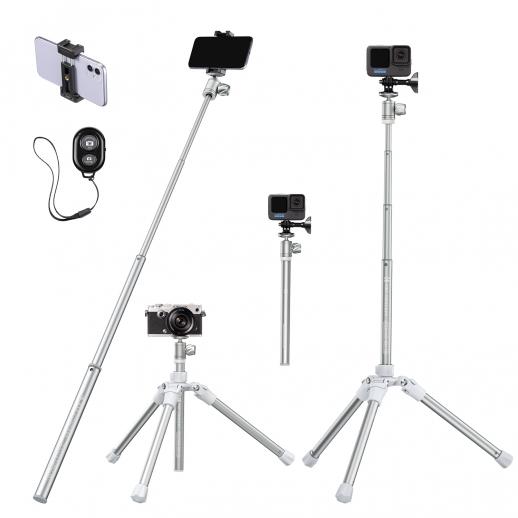

Types of Selfie Sticks

Selfie sticks come in various shapes and sizes, each designed to cater to different needs. Here are the main types:

1. Basic Selfie Sticks: These are the simplest form of selfie sticks, usually featuring a telescoping pole and a phone holder. They often come with a wired or Bluetooth shutter button to help you take photos or start/stop video recording.

2. Bluetooth Selfie Sticks: These sticks connect to your smartphone via Bluetooth, allowing you to control the camera remotely. They often come with additional features like zoom control and switching between front and rear cameras.

3. Tripod Selfie Sticks: These versatile devices can be used as both a selfie stick and a tripod. They are ideal for stable video recording and often come with a remote control for added convenience.

4. Gimbal Selfie Sticks: These are the most advanced type, featuring a built-in gimbal to stabilize your phone while recording. They are perfect for capturing smooth, professional-quality videos.

Features to Look For

When choosing a selfie stick for video recording, there are several features you should consider:

1. Stability: A stable selfie stick is crucial for capturing smooth videos. Look for sticks with a sturdy build and a good grip.

2. Length: The length of the selfie stick can affect the framing of your video. Longer sticks allow for wider shots, while shorter ones are more portable.

3. Remote Control: A remote control can make it easier to start and stop recording without having to touch your phone.

4. Compatibility: Ensure that the selfie stick is compatible with your smartphone. Most sticks are designed to work with a wide range of devices, but it's always good to double-check.

5. Battery Life: If you're opting for a Bluetooth or gimbal selfie stick, battery life is an important consideration. Make sure the stick can last through your recording sessions.

How to Use a Selfie Stick for Video Recording

Using a selfie stick for video recording is relatively straightforward, but there are a few tips to help you get the best results:

1. Set Up Your Phone: Attach your phone securely to the selfie stick and make sure it's properly balanced. This is especially important for gimbal sticks, as an unbalanced phone can affect the stabilization.

2. Choose the Right Angle: Experiment with different angles to find the best framing for your video. A higher angle can be flattering for selfies, while a lower angle can add drama to your shots.

3. Use the Remote Control: If your selfie stick comes with a remote control, use it to start and stop recording. This can help you avoid shaky footage caused by touching your phone.

4. Stabilize Your Shots: If you're using a basic or Bluetooth selfie stick, try to keep your movements smooth and steady. For tripod and gimbal sticks, make sure they are set up on a stable surface.

5. Mind the Background: Pay attention to what's in the background of your shots. A cluttered or distracting background can take away from the quality of your video.

Advantages of Using a Selfie Stick for Video Recording

There are several benefits to using a selfie stick for video recording:

1. Improved Framing: A selfie stick allows you to capture wider shots and include more of your surroundings in the frame.

2. Stability: Tripod and gimbal selfie sticks provide added stability, resulting in smoother, more professional-looking videos.

3. Convenience: With a remote control, you can start and stop recording without having to touch your phone, making it easier to capture spontaneous moments.

4. Portability: Selfie sticks are lightweight and portable, making them easy to carry around and use on the go.

Common Issues and How to Solve Them

While selfie sticks are generally easy to use, there are a few common issues that users may encounter:

1. Shaky Footage: If your videos are coming out shaky, try to keep your movements smooth and steady. Using a tripod or gimbal stick can also help.

2. Poor Audio Quality: The built-in microphone on your phone may not always capture the best audio. Consider using an external microphone for better sound quality.

3. Battery Drain: Bluetooth and gimbal sticks can drain your phone's battery quickly. Make sure to carry a portable charger if you plan on recording for extended periods.

4. Compatibility Issues: If your selfie stick isn't working with your phone, check the compatibility and make sure it's properly connected. Updating your phone's software can also help resolve compatibility issues.

In conclusion, selfie sticks are versatile tools that can be used for both photography and video recording. By choosing the right type of selfie stick and following a few simple tips, you can capture high-quality videos with ease. Whether you're a casual user looking to document your adventures or a content creator aiming for professional-quality footage, a selfie stick can be a valuable addition to your toolkit. So go ahead, grab your selfie stick, and start recording those memorable moments!


Leave your comment
Cancel reply
Note: HTML is not translated!
Related products
Gift Certificate: $200 Value - Can Use with Any Discounts
$200.00 $190.00
Gift Certificate: $300 Value  - Can Use with Any Discounts
Gift Certificate: $300 Value - Can Use with Any Discounts
$300.00 $285.00
Gift Certificate: $1000 Value  - Can Use with Any Discounts
Gift Certificate: $1000 Value - Can Use with Any Discounts
$1,000.00 $950.00
Gift Certificate: $500 Value  -Can Use with Any Discounts
Gift Certificate: $500 Value -Can Use with Any Discounts
$500.00 $475.00
Gift Certificate: $800 Value - Can Use with Any Discounts
$800.00 $760.00
14Pcs Double-Headed Cleaning Stick Set, CMOS Full Frame Cleaning Stick 24mm Cleaning Cloth Sticks Set
$36.99 $19.99
10Pcs Double-Headed Cleaning Stick Set, CMOS Full Frame Cleaning Stick 24mm Cleaning Cloth Sticks Set
5
$30.99 $15.99
10Pcs Double-Headed Cleaning Stick Set, CMOS APS-C Frame Cleaning Stick 16mm Cleaning Cloth Sticks Set
1
$34.99 $17.99
Pocket Action Camera 4K 30FPS Videos EIS Stabilization 210min Battery Life 64GB
15
$149.99 $125.99
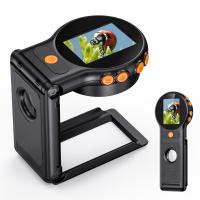
Handheld Microscope, 500X Magnification, 1080P Videos, 2-inch Screen, Autofocus, Rechargeable, Kentfaith
12
$87.49 $69.99
Products You May Like
Mini Portable Projector for Kids - Home Theater Projector 1080p Supported(UK Plug)
17
$89.99
K&F Concept 1026MT 10x26 Binoculars Multi-Coated Optics and BaK4 Prisms for Bird Watching, Hunting, Sports Events or Concerts
6
$82.99 $51.99
82mm White Pro Mist Filter Cinematic Effect Filter with 18 Multi-Layer Coatings for Portrait and Landscape Photography Nano-K Series
$44.99 $27.99
Drone Filter DJI Mavic 3 Pro CPL Filter Multi Coated HD Optical Glass with Anti-reflective Green Coating
11
$39.99 $24.99
46mm Black Mist Filter 1/8 + 3pcs Cleaning Cloth with 18 Multi-Layer Coatings Nano-Klear Series
212
$24.99 $19.99
2-in-1 Battery Car Charger Adapter Quick Charger Compatible with DJI Mini 3/mini 3 Pro Drone, Support Batteries & Remote Controller Charging Together
$37.49 $29.99
DJI Mini 3 Pro & Mini 3 (ND4 & PL) Filter HD, Light Reduction 2-stops, with Anti-reflection Green Film, Waterproof, Scratch-resistant
121
$28.99 $17.99
58mm Black Mist Filter 1/8 + 3pcs Cleaning Cloth with 18 Multi-Layer Coatings Nano-Klear Series
212
$31.99 $24.99
K&F CONCEPT 58mm Press-on CPL Phone Lens Filter Kit, Polarizing Filter Compatible with iPhone 17/16/15/14/13/12 Standard, 16/15/14/13/12 Pro/Pro Max, 58mm Threaded Filters
16
$19.99
36MP/2.7K/0.2s Trigger Trail Camera HD Outdoor Game Camera Waterproof Hunting Infrared Night Vision Camera HC-900A
5
$78.99
Related articles
How Do Selfie Sticks Work With Cameras?
How To Take Good Selfie Stick Photos?
Can Digital Camera Record Videos?
Telescope That Can Take Pictures?
Can Action Cameras Take Pictures?
Baby Cameras That Can Take Pictures?
Selfie Stick Can Hand Carry?
How Use Button On Selfie Stick?
How To Use Selfie Stick For Video?
Is There A Doorbell Camera That Works Without Wifi ?
Blog You May Like
What Lens Filter Should I Buy?
What Filter Effect Can You Use Camera?
What Is An Digital Slr Camera?
How To Use Binoculars?
How To Connect Hisense Tv To Bluetooth Headphones ?
Can I Mount Fx Lens On Dx Camera?
What Type Of Lens Filter To Use?
How To Stop Crackling Noise In Headphones ?
What Has The Telescope Discovered?
How To Install A Smart Key Lock?
Related categories
58mm lens filter 4G Cameras camera lens filters canon ring flash Pentax 67 Mount Lens Adapters ND64 filter Square GND Filter square filter kit nd100000 filter
Popular products
uhf wireless microphone system quadcopter drone with camera camera sensor cleaning swabs drone carrying case sensor cleaning swabs sensor cleaning swab mini web camera wifi rechargeable led clip light Bluetooth mesh intercom tripod with remote for phone
Related searches
Cameras That Can Adapt Canon Fd Lens Best Camera For Hunting Videos Recording Camera For Music Videos Video Camera For Family Videos Video Camera For Training Videos Cheap Camera To Record Videos Best Camera For Recording Videos Best Camera For Youtube Videos Cameras For Photos And Videos Gopro Selfie Stick
Popular searches
Home Security Camera 2 Way Audio Earphone For Bluetooth Canon Lens X2 Adapter Camera Bag For Nikon Coolpix Gopro Hero 9 Tripod Mount Adapter Cable For Cctv Security Camera Kodak Ektanar Lens Adapter Pentacon Six Lens Mount Camera Lens Filter For Solar Eclipse Helios Lens Canon Adapter
Blog Category
  • Activities
  • Guide
    • Filter Guide
    • Lens Adapter
    • Product Review
  • News & Reviews
    • Camera Reviews
    • Sample Gallery
    • News
  • Tutorials
    • Solar eclipse photography
    • Photography Basics
    • Landscape Photography
  • Inspiration
    • Travel
    • Travel Stories
Search Article
Latest from the Blog
Camera That Can Wifi Photos To Phone?
How Do Night Vision Goggles Work?
How Do Trail Cameras Work? The Ultimate Guide to Trail Cameras
How Do Metal Detectors Work? A Complete Guide for Beginners and Pros
Can I Charge Camera Battery With Power Bank?
Can You Save Facebook Videos To Camera Roll?
How To Remove Memory Card From Nikon Camera?
What Does Tripod?
What Is The Difference Between Binoculars And Telescope?
Best Metal Detector for Kids in 2025
  • Easy Payment Multilple Payment Options

  • Free Shipping Global WareHouse Shipment

  • No Risk 30-Day No Reason Return

  • Limited Deals Buy More, Save More

  • Tax Free No any surcharges or tax fee

Information
  • About us
  • Contact Us
  • Site Map
  • Blog
  • Video
  • Gallery
  • VIP Membership Rewards
Service
  • Privacy Policy
  • Terms & Conditions
  • Shipping & Delivery
  • Payment Info
  • Warranty, Return & Refund
  • Intellectual Property Rights
  • Ambassador
  • Affiliates
  • Wholesale
Support
  • My account
  • Order History
  • FAQs
  • Extend Warranty
  • Logistics Tracking
Follow us
NewsLetter

Get the latest product, K&F Concept respects your privacy.

Powered By KENTFAITH © 2026