kfconcept

KENTFAITH
K&F Concept    Blog >

Enjoy Your Selected Digital Life

Recently Viewed
  • Recently Viewed
  • 49mm Variable ND Filter ND2-400 (1-9 Stop) Lens Filter Waterproof Scratch Resistant Nano-X Series
    49mm Variable ND Filter ND2-400 (1-9 Stop) Lens Filter Waterproof Scratch Resistant Nano-X Series
    $81.99 $64.99
    K&F Concept 49mm Variable ND Filter ND8-128 (3-7 Stop) HD Hydrophobic VND Filter for Camera Lens No X Cross Nano-Xcel
    K&F Concept 49mm Variable ND Filter ND8-128 (3-7 Stop) HD Hydrophobic VND Filter for Camera Lens No X Cross Nano-Xcel
    $62.99 $49.99
    GND8 Lens Filter 100*150mm Soft 3 f-stop Square Graduated Neutral Density Filter Multi Coated with Holder Bag
    GND8 Lens Filter 100*150mm Soft 3 f-stop Square Graduated Neutral Density Filter Multi Coated with Holder Bag
    $124.99 $99.99
    WiFi 30MP 4K/30fps Trail Camera Upgrade Bluetooth Game Camera with Night Vision Motion Activated and 120°Detection Angel for Outdoor Wildlife Monitoring
    WiFi 30MP 4K/30fps Trail Camera Upgrade Bluetooth Game Camera with Night Vision Motion Activated and 120°Detection Angel for Outdoor Wildlife Monitoring
    $105.99
    ND8 Square Filters(0.9/3 Stops) 100*150mm Reverse Graduated Grad Neutral Density ND Filters Optical Glass GND Slim HD Nano-Coating Waterproof
    ND8 Square Filters(0.9/3 Stops) 100*150mm Reverse Graduated Grad Neutral Density ND Filters Optical Glass GND Slim HD Nano-Coating Waterproof
    $124.99 $99.99
    K&F Concept 63'' Camera Monopod 5-Section Height Aluminum Monopod With Metal And Rubber Feet 2-in-1 Design,Lightweight & Portable Camera Accessories
    K&F Concept 63'' Camera Monopod 5-Section Height Aluminum Monopod With Metal And Rubber Feet 2-in-1 Design,Lightweight & Portable Camera Accessories
    $23.99
    ND4+ND8+ND16+ND32 Filter Kit (4 Pcs) for DJI Mavic 3/Mavic 3 Cine, Neutral Density Filter with 28 Multi-Layer Coatings Waterproof/Scratch Resistant
    ND4+ND8+ND16+ND32 Filter Kit (4 Pcs) for DJI Mavic 3/Mavic 3 Cine, Neutral Density Filter with 28 Multi-Layer Coatings Waterproof/Scratch Resistant
    $53.99
    K&F Concept Soft Tip Strong Air Blower, Single Air Intake Camera Lens Blower with Short Nozzle, for Digital SLR Lens Sensor LCD Screens Musical Instruments Keyboards Telescope Filters
    K&F Concept Soft Tip Strong Air Blower, Single Air Intake Camera Lens Blower with Short Nozzle, for Digital SLR Lens Sensor LCD Screens Musical Instruments Keyboards Telescope Filters
    $14.99
    P7 automatic face tracking, gesture control dual-axis intelligent gimbal, cell phone stabilizer, no application, support 360 ° rotation of the live, cell phone stand, intelligent follow-up gimbal, suitable for real-time Vlog, streaming, video shooting Bla
    P7 automatic face tracking, gesture control dual-axis intelligent gimbal, cell phone stabilizer, no application, support 360 ° rotation of the live, cell phone stand, intelligent follow-up gimbal, suitable for real-time Vlog, streaming, video shooting Bla
    $44.99
     US Sim Card Without Contract
    US Sim Card Without Contract
    $10.90
Compare (0) 0
  • Compare
  • You have not chosen any products to compare.

  • Compare
Currency: USD
  • Currency
Shop by Scene Shop by Rank

Log Into Your Account

Account

Order History

Wish List

Login

Forgotten Password?

Or connect with

Register Account

Already have an Account?Log In

  • Shopping Cart
  • Your shopping cart is empty!

  • Register/Login to purchase, earn points
  • Favorite
  • Your wish list is empty.

  • Register/Login to like, earn points
  • Activities
  • Guide
    • Filter Guide
    • Lens Adapter
    • Product Review
  • News & Reviews
    • Camera Reviews
    • Sample Gallery
    • News
  • Tutorials
    • Solar eclipse photography
    • Photography Basics
    • Landscape Photography
  • Inspiration
    • Travel
    • Travel Stories
  • Home
  • Blog
  • How To Use Your Mobile Camera As PC Webcam Discord?

How To Use Your Mobile Camera As PC Webcam Discord?

Kentfaith 2023-07-04 09:32:35 0 Comments
In the current digital age, video calls have become an integral part of our daily lives and work. Whether you're working remotely, studying online, or video connecting with friends and family, a high-quality webcam is essential. However, not every computer comes with a high-quality webcam. Fortunately, we can take advantage of our phone's high-quality camera and use it as a webcam for our computer. This article will detail how to implement this feature, the required hardware and software, common problems and their solutions, and other related suggestions.
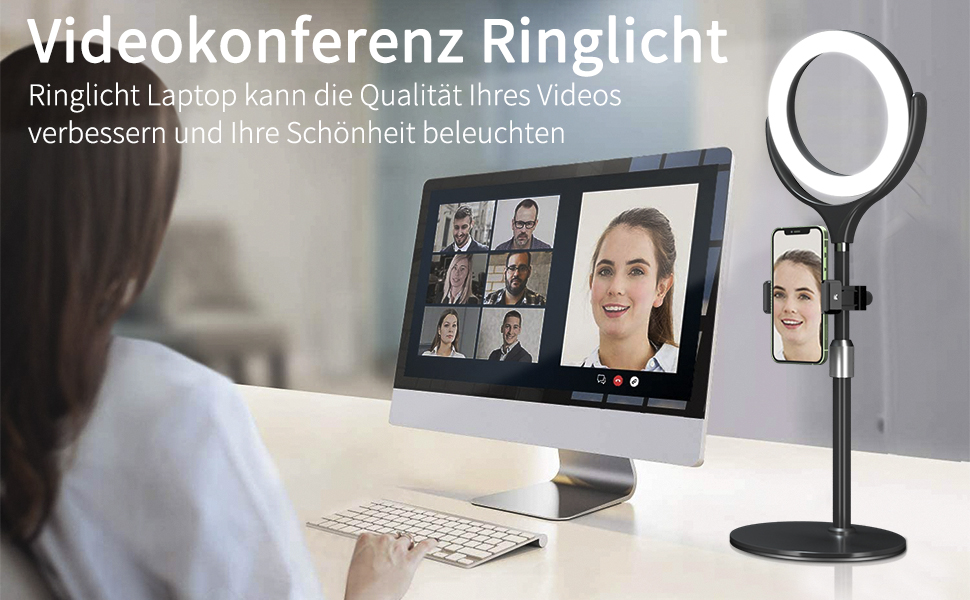

How to set up a mobile camera to use as a computer webcam
Here are the steps to use your phone's camera as a computer webcam:
Download the app: Download and install the appropriate app on your phone and computer. For example, many users choose DroidCam (available for Android and iOS) or EpocCam (available for iOS).
Connect your device: Connect your phone and computer via Wi-Fi, USB cable, or Bluetooth, depending on the application's requirements.
Configure the application: Select the mobile phone camera as the video input source in the computer application.
Test the connection: Open the video calling software (such as Zoom, Skype, etc.), select the mobile phone camera as the video source in the settings, and conduct a test.

What hardware and software are needed
To use your phone camera as a computer webcam, you need the following hardware and software:
hardware:
A smartphone (iOS or Android)
Computer (Windows or Mac)
USB data cable (if you choose to connect via USB)
Stable Wi-Fi network (if you choose to connect via Wi-Fi)
software:
Mobile applications (such as DroidCam, EpocCam)
Corresponding application client for PC
The specific application selection depends on your operating system and personal needs. Here are some recommended apps and their features:

DroidCam: Available for Android and iOS devices, connects via Wi-Fi or USB. The free version offers basic features, while the paid version offers HD quality and an ad-free experience.
EpocCam: Available for iOS devices, connects via Wi-Fi, USB or Bluetooth. The free version offers basic features, while the paid version offers more advanced features like green screen and gesture control.

During the setup process, you may encounter the following common issues:
Connection failed: Make sure the phone and computer are connected to the same Wi-Fi network, or check whether the USB data cable is damaged. If you still can't connect, you can try restarting your phone and computer, or reinstalling the app.
Screen freeze or delay: Try to choose USB connection method to improve connection stability and reduce delay. If you must use a Wi-Fi connection, make sure the network signal is strong and stable.
Device not recognized: Check that the app and operating system are up to date, sometimes updates can resolve compatibility issues. If the problem persists, you can try another app.
How to set up different operating systems
The steps for setting up your phone's camera to be used as a computer webcam may be slightly different under different operating systems:

Windows: You usually need to confirm that the mobile device is connected correctly in the device manager and select the correct video input source in the settings of the video calling software. Taking DroidCam as an example, after installing and opening the DroidCam application, connect your phone and computer via Wi-Fi or USB. In the settings of video calling software (such as Zoom, Skype, etc.), select "DroidCam Source" as the video input source.
Mac: Make sure you give the app the necessary permissions in System Preferences, then select your phone camera as the video source in your video calling software. Taking EpocCam as an example, install and open the EpocCam application and connect your phone and computer via Wi-Fi or USB. In the settings of the video calling software, select "EpocCam" as the video input source.
Suggestions for improving connection stability and image quality
To ensure connection stability and improve image quality, you can try the following suggestions:
Use USB connection: Compared with Wi-Fi connection, USB connection is more stable and has lower latency. If your network environment is unstable or your bandwidth is limited, give priority to USB connection.
Optimize light conditions: Making video calls under good light conditions can significantly improve the picture quality. Use natural light or soft indoor lighting to reduce noise and improve image clarity.
Adjust the position of the mobile phone: Use a mobile phone holder or tripod to fix the mobile phone in a suitable position to avoid shaking caused by holding it. Adjust the camera angle to eye level for a more natural perspective.
Lower the resolution: If the connection is unstable, you can try lowering the video resolution to reduce bandwidth usage and improve smoothness.

Security and privacy protection
When using your mobile phone camera as a computer webcam, pay attention to the following security and privacy protection measures:
Use trusted apps: Choose apps that are well-known and proven to be safe, and avoid downloading software from unknown sources. Both DroidCam and EpocCam are widely used and tested applications with guaranteed security.
Check permission settings: When installing an application, carefully check and set the necessary permissions to avoid leaking personal privacy. Regularly check the permission settings on your phone and computer and turn off unnecessary permissions.
Update software regularly: Keep mobile and computer applications up to date to prevent security vulnerabilities. Application developers regularly release updates to fix known security issues and improve performance.

Detailed description of different applications
DroidCam:
Supports Android and iOS devices.
Connect via Wi-Fi or USB.
Provides high-definition quality and low-latency video transmission.
The free version has ads, while the paid version is ad-free and offers more advanced features.
EpocCam:
Available for iOS devices.
Supports Wi-Fi, USB and Bluetooth connections.
Provides high-quality video transmission and supports advanced features such as green screen and gesture control.
The free version has limited features, while the paid version offers comprehensive advanced features.
iVCam:
Supports Android and iOS devices.
Connect via Wi-Fi or USB.
Available in HD and 4K quality options.
Supports a variety of video effects and filters.
IP Webcam:
Available only on Android devices.
Connect via Wi-Fi.
Offers multiple video resolution and frame rate options.
Supports video recording and remote access.
Video calling software settings
After selecting the application and completing the connection, you need to make the corresponding settings in the video calling software. Take Zoom as an example:
Open the Zoom app.
Enter the "Settings" menu.
Select the "Video" tab.
Select your phone camera app (such as DroidCam Source or EpocCam) in the camera options.
Test the video screen to make sure the connection is normal.
Similar steps also apply to other video calling software, such as Skype, Microsoft Teams, Google Meet, etc.

With the steps and suggestions above, you can easily use your phone's camera as your computer's webcam and enjoy a high-quality video calling experience. Whether used for remote working, online learning, or connecting with friends and family, this method provides great convenience and better picture quality. I hope the detailed guide in this article can help you successfully complete the setup, solve common problems, and improve your user experience.
Leave your comment
Cancel reply
Note: HTML is not translated!
Related products
Compound Microscope with 9" Smart Screen 40x-1600x Magnification PC Connection for Lab, Professionals Use Kentfaith
17
$799.99 $639.99
OBSBOT Tiny 2 Webcam 4K Voice Control PTZ, AI Tracking Multi-Mode & Auto Focus, Web Camera with 1/1.5" Sensor, Gesture Control, 60 FPS, HDR Light Correction, Webcam for PC, Streaming, Meeting
$374.99 $299.99
OBSBOT 4K 60 FPS Webcam for PC with 1/2" Sensor AI Framing & Autofocus Dual Mics Beauty Mode
$174.99 $139.99
OBSBOT Tiny 2 Lite 4K Webcam for PC, AI Tracking PTZ Streaming Camera with 1/2" Sensor, Gesture Control, 60 FPS, HDR, Microphones, Web Camera for Desktop Computer, Laptop, Meeting, Video Calls.
$250.00 $200.00
67mm Clip-on CPL Phone Camera Lens Filter Kit Applicable to All Mobile Phone Models
24
$18.99
67mm Clip-on ND2-32 Phone Camera Lens Filter Kit Applicable to All Mobile Phone Models
24
$37.99
67mm Clip-on Black Mist 1/4 Phone Camera Lens Filter Kit Applicable to All Mobile Phone Models
24
$29.99
52mm Clip-on CPL Phone Camera Lens Filter Kit, Circular Polarizer Polarizing Filter Applicable to All Mobile Phone Models
24
$16.99
67mm Clip-on CPL&Black Mist 1/4 2-in-1 Phone Camera Lens Filter Kit Applicable to All Mobile Phone Models
24
$29.99
K&F Concept Premium is compatible with the Ricoh cameras GR III, GR III HDF, GR IIIx HDF, GR IIIX, WG-6 with DB-110 batteries as well as with the Olympus cameras TG7/6/5/4 with Li-90B/Li-92B batteries.
7
$29.99
Products You May Like
Motorcycle Helmet Bluetooth Intercom Headset, Built-in WiFi, with 1080P Camera, Supporting 6 Riders within 1000M Intercom Communication
45
$236.39 $100.99
Hc 300m Digital Trail Camera
10
$162.99 $106.99
46mm Fader ND2-ND32 (1-5 Stop) Variable ND Lens Filter Neutral Density Filter for Camera Lens NO X Spot Nanotec Ultra-Slim Weather-Sealed
$59.99 $39.99
ES-62 Lens Hood for Canon
$35.99 $17.99
K&F Concept Soft Tip Strong Air Blower, Single Air Intake Camera Lens Blower with Long Nozzle, for Digital SLR Lens Sensor LCD Screens Musical Instruments Keyboards Telescope Filters
$15.99
Wireless Earbuds Bluetooth Headphones Touch Control with Wireless Charging Case
148
$27.99
Industrial Pipeline Endoscope, 8 LED Lights, 8mm Lightning Interface Snake Camera, for iPHONE14 13 12 11 X XR 8 7 6 Series IP67 Waterproof 10 Meters Rigid Cable
37
$79.19 $37.99
Silicone Non-Slip Desktop Mount for DJI Osmo Pocket 3, Lightweight and Compact, OSMO Pocket 3 Accessories
24
$7.99
67mm Variable ND2-400 Filter With Cap, K Pro Fader ND2 to ND400 (9 Stop)
1
$51.99 $33.99
LF08 12-inch beautification live fill light, compact and portable foldable fill light, dimmable 3 colors, suitable for YouTube, video, TikTok, live makeup
4
$25.82
Related articles
How To Use Phone As Webcam For Pc?
Can You Use Ps5 Camera As Webcam ?
How To Use Mobile As Car Dash Cam?
How To Record Audio In Discord Mobile?
How To Setup Dslr As Webcam?
How To Flip Your Webcam Camera ?
Can I Use Earphones As Mic On Pc?
How To Use Phone Camera As Projector ?
How To Use Iphone As A Security Camera?
How To Set Time On Huawei Smart Watch?
Blog You May Like
What Thread For Nikon Camera Mount?
How Do You Install A Wireless Backup Camera?
How To Take Pictures With Studio Lighting?
Neutral Density Filter How Many Stops Ocean?
What Is Best Microphone For Voice Recording?
How To Use Wireless Camera Without Receiver?
How To Insert Sd Card Into Macbook Air?
Travel Tripod That Can Go Low?
What Does Tripod?
What Does Tripod?
Star Lens Filters: Unleashing the Starburst Effect
Related categories
C mount lens adapter m4/3 adapter Camera Parts | Studio Camera Accessories streaming video camera digital camera for beginner Solar Cellular Trail Camera Non Cellular Trail Camera
Popular products
skype camera microphone 1080p hd usb webcam 1080p autofocus webcam portable lcd microscope 2 lens microscope hd webcam with microphone 3 light video kit Best HD Webcam with Microphone microscope mobile camera mini web camera wifi
Related searches
Nikon As-15 Non-dedicated Pc Sync Terminal Adapter Easy To Use Video Camera Wireless Pc Camera Pc Video Camera Outdoor Use Camera Camera Lens For Your Iphone Pc Camera And Microphone Pc Camera With Microphone Webcam Security Camera Outdoor Webcam Camera
Popular searches
Sony E Mount Flash M42 Mount To Fuji X Flat Camera Lens Minolta To Canon Adaptor Leica R To Nikon Z Adapter Extra Smart Watch Metal Detector For Water Dicapac Wp-s10 Front Port Lens Adapter Metal Detector Depth Range Sony A6400 Adapter Canon
Blog Category
  • Activities
  • Guide
    • Filter Guide
    • Lens Adapter
    • Product Review
  • News & Reviews
    • Camera Reviews
    • Sample Gallery
    • News
  • Tutorials
    • Solar eclipse photography
    • Photography Basics
    • Landscape Photography
  • Inspiration
    • Travel
    • Travel Stories
Search Article
Latest from the Blog
ND Filter: The Complete Guide to Neutral Density Filters for Photography and Video
What Is The Difference Between Binoculars And Telescope?
How Do Night Vision Goggles Work?
What Tripod To Buy?
How To Find Camera Roll On Iphone 5s?
Dash Cam That Can Connect To Phone?
Camera Use Which Lens?
Can You Save Facebook Videos To Camera Roll?
What Does Tripod?
What Is Surveillance Camera Control System?
  • Easy Payment Multilple Payment Options

  • Free Shipping Global WareHouse Shipment

  • No Risk 30-Day No Reason Return

  • Limited Deals Buy More, Save More

  • Tax Free No any surcharges or tax fee

Information
  • About us
  • Contact Us
  • Site Map
  • Blog
  • Video
  • Gallery
  • VIP Membership Rewards
Service
  • Privacy Policy
  • Terms & Conditions
  • Shipping & Delivery
  • Payment Info
  • Warranty, Return & Refund
  • Intellectual Property Rights
  • Ambassador
  • Affiliates
  • Wholesale
Support
  • My account
  • Order History
  • FAQs
  • Extend Warranty
  • Logistics Tracking
Follow us
NewsLetter

Get the latest product, K&F Concept respects your privacy.

Powered By KENTFAITH © 2025