How Are Dash Cameras Powered?
Dash cameras have become increasingly popular among drivers for their ability to record events on the road, provide evidence in accidents, and enhance personal security. While many are familiar with their core functionalities, fewer understand how they are powered, a critical aspect that affects their usability and performance. In this article, we’ll explore the various power options for dash cameras, discussing the pros and cons of each method, how to ensure your dash camera remains properly powered, and offer practical advice for choosing the right setup for your needs.
Understanding How Dash Cameras Are Powered
Dash cameras are designed to operate continuously while you're driving, and in some cases even when your car is parked, depending on their features. To achieve this, they require a reliable and consistent power source.
Broadly speaking, dash cameras can be powered in three key ways:
1. The Car’s Cigarette Lighter Socket (12V Outlet)
2. Hardwiring to the Vehicle
3. Integrated Batteries
Each of these power sources has unique benefits and drawbacks, and your choice may depend on your specific needs and how you intend to use the camera. Let’s delve deeper into each one.
Power Source #1: Car's Cigarette Lighter Socket (12V Outlet)

Most basic dash cameras are designed to operate directly from your car’s cigarette lighter socket, also known as the 12V outlet. This is one of the most convenient options because it doesn’t require extensive installation work.
How It Works:
Dash cameras typically come with a power cable that plugs directly into your car’s 12V outlet. In this setup, the camera is powered whenever the car is running, as the outlet is active only when the vehicle is turned on. A long cable attaches to the dash camera mount, and you can often tuck the wiring around the interior trim for a cleaner look.
Pros:
Ease of Use: Requires little to no installation; just plug and play.
Availability: Most cars have at least one 12V socket near or on the dashboard.
Cost-Effective: No additional expense for installation or specialized equipment.
Cons:
Limited Parking Mode Functionality: If you want to use the camera when your car is turned off, this option often won’t work unless paired with an additional backup battery.
Cable Clutter: While routing the cable properly can mitigate clutter, some drivers find the exposed wires cumbersome.
Power Source #2: Hardwiring to the Vehicle
Hardwiring is a more permanent solution to powering a dash camera. This method connects the camera directly to the car’s electrical system, bypassing the need for the 12V outlet.
How It Works:
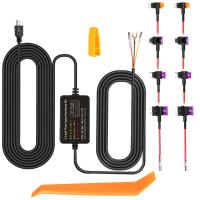
Hardwiring kits typically include an adapter and fuse taps that allow you to connect the camera to your car’s fuse box. Once installed, the dash camera draws power directly from the vehicle’s electrical system, providing a consistent power supply even when the ignition is turned off.
Pros:
Continuous Power: With proper setup, the dash camera can operate in parking mode or offer security features like motion detection and time-lapse recording.
Cleaner Installation: Hardwiring eliminates visible cables hanging from the dashboard.
Enhanced Functionality: Hardwiring unlocks advanced features of many dash cameras, such as 24/7 surveillance.
Cons:
Installation Requires Expertise: Unless you are experienced with vehicle electrical systems, you will likely need professional installation, which incurs additional costs.
Complexity: Hardwiring may seem intimidating for the average user and is not easily removable.
Battery Drain Risk: Improper setup could drain your car battery if the camera is left running for extended periods.
Power Source #3: Integrated Batteries
Some dash cameras come with built-in rechargeable batteries. These cameras are typically designed for temporary use or special applications. Integrated batteries are only a primary or secondary option depending on the camera model.
How It Works:
The camera is powered by its internal battery, which can be recharged via USB, a 12V outlet, or hardwiring. While running on battery power, the camera is free from physical connection to any external source.
Pros:
Compact and Portable: Useful for situations where you need to move the camera between vehicles or use it outside your car temporarily.
No Wiring Hassle: Ideal for those looking for the least complicated setup.
Backup Power: In some models, the internal battery allows the camera to continue functioning briefly after disconnecting from its primary source.
Cons:
Short Battery Life: Most internal batteries have a limited capacity, typically lasting only 30 minutes to a few hours depending on the camera.
Not Ideal for Continuous Use: Relying solely on battery power is impractical for daily driving needs.
Performance Degradation: Over time, rechargeable batteries may lose capacity, requiring replacement.
Choosing the Right Power Option for Your Needs
Now that we’ve outlined the primary ways dash cameras are powered, the next step is understanding which option suits your requirements. Here are some considerations:
Use Case
If you only need simple functionality—recording while driving—the 12V socket option is perfectly adequate. However, if you want your camera to continue recording when the vehicle is off, hardwiring might be the better choice. For short-term or occasional use, cameras with integrated batteries could suffice.
Parking Mode
Drivers who want parking surveillance features—such as motion detection that triggers recording when someone approaches your vehicle—will benefit more from hardwiring solutions. These allow for extended operation even when the car is off, provided a proper setup is applied.
Installation Preferences
If you’re comfortable with DIY projects, you might be able to tackle hardwiring independently with a fuse tap kit. Otherwise, hiring a professional ensures safety and proper installation. Users wanting low-effort setups may prefer the 12V socket option.
Budget
Hardwiring kits and professional installation can increase the upfront cost of your dash camera, but this is often offset by the added functionality. If you’re on a budget or want a quick setup, the 12V method is more affordable.
Battery Considerations
Dash cameras that run solely on internal batteries may encounter overheating or reduced battery life over time, especially during long hours of recording. These are best used as supplementary power sources.
Practical Tips to Ensure Reliable Dash Camera Power
1. Check Voltage Compatibility: Ensure that your dash camera’s power input is compatible with your car’s electrical system. Modern cameras typically come with universal adapters.
2. Use a High-Quality Power Cable: Cheaper cables may drain power inefficiently and fail quickly, so invest in durable accessories.
3. Battery Backup Systems: If you frequently use parking mode features, consider installing a battery backup system designed for dash cameras to avoid draining your vehicle battery.
4. Regular Maintenance: Check cables and connectors periodically to prevent any interruptions in power supply due to wear and tear.
Understanding how dash cameras are powered is crucial for optimizing their functionality and longevity. Whether you prefer the simplicity of using your vehicle’s 12V outlet, the benefits of hardwiring for advanced features, or portable battery-powered options, each power method has unique advantages depending on your needs. When choosing the most suitable power setup, consider your budget, desired features, and willingness to invest time and effort in installation.
Dash cameras are increasingly becoming indispensable accessories for drivers, and ensuring reliable power is the foundation for enjoying their benefits. By taking the time to evaluate your options carefully, you’ll ensure that your dash camera serves you well under all circumstances—whether you’re on the road or off.