kfconcept

KENTFAITH
K&F Concept    Blog >

Enjoy Your Selected Digital Life

Recently Viewed
  • Recently Viewed
  • Recently Viewed list is empty.

Compare (0) 0
  • Compare
  • You have not chosen any products to compare.

  • Compare
Currency: USD
  • Currency
Shop by Scene Shop by Rank

Log Into Your Account

Account

Order History

Wish List

Login

Forgotten Password?

Or connect with

Register Account

Already have an Account?Log In

  • Shopping Cart
  • Your shopping cart is empty!

  • Register/Login to purchase, earn points
  • Favorite
  • Your wish list is empty.

  • Register/Login to like, earn points
  • Activities
  • Guide
    • Filter Guide
    • Lens Adapter
    • Product Review
  • News & Reviews
    • Camera Reviews
    • Sample Gallery
    • News
  • Tutorials
    • Solar eclipse photography
    • Photography Basics
    • Landscape Photography
  • Inspiration
    • Travel
    • Travel Stories
  • Home
  • Blog
  • How To Change Battery On Selfie Stick L01?

How To Change Battery On Selfie Stick L01?

Kentfaith 2024-10-21 04:06:07 0 Comments

## How to Change the Battery on a Selfie Stick L01: A Step-by-Step Guide

Selfie sticks have revolutionized the way people capture their lives on camera, enabling better angles, wider frames, and a greater sense of creativity. The Selfie Stick L01 is an immensely popular model due to its ease of use and reliability. However, like any other electronic device, it requires occasional maintenance, notably battery replacement. This article will guide you through the entire process, ensuring you can keep capturing your favorite moments without interruption.

Why Battery Replacement is Necessary
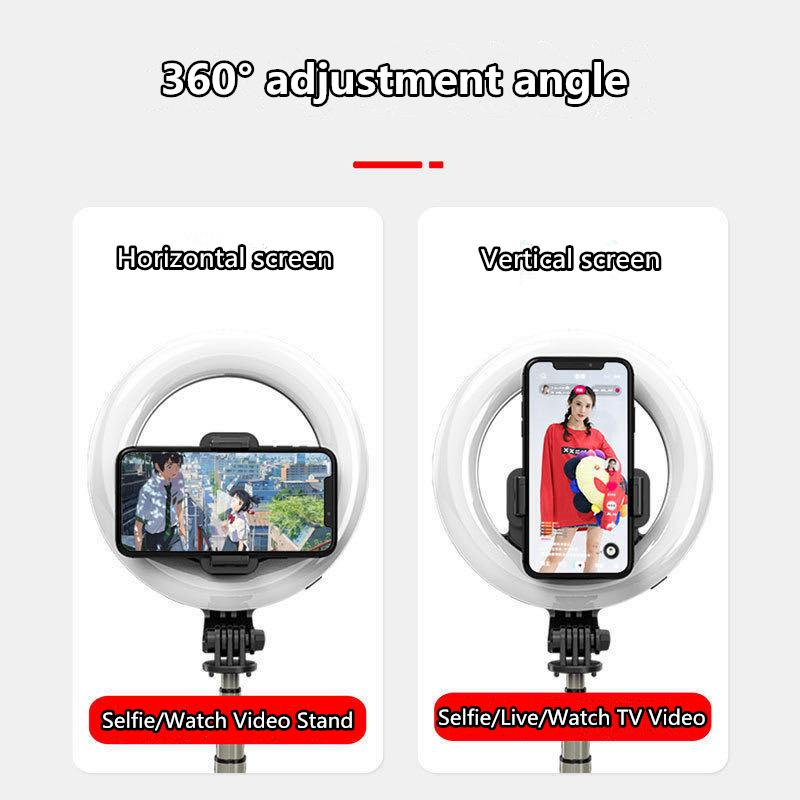
how to change battery on selfie stick l01 1

Selfie sticks are often powered by rechargeable batteries, allowing for repeated use. However, over time, these batteries may lose their efficiency, resulting in shorter usage times or even failure to operate. Replacing the battery can resolve these issues, ensuring that your selfie stick performs as it did when it was new.

Tools and Materials Needed
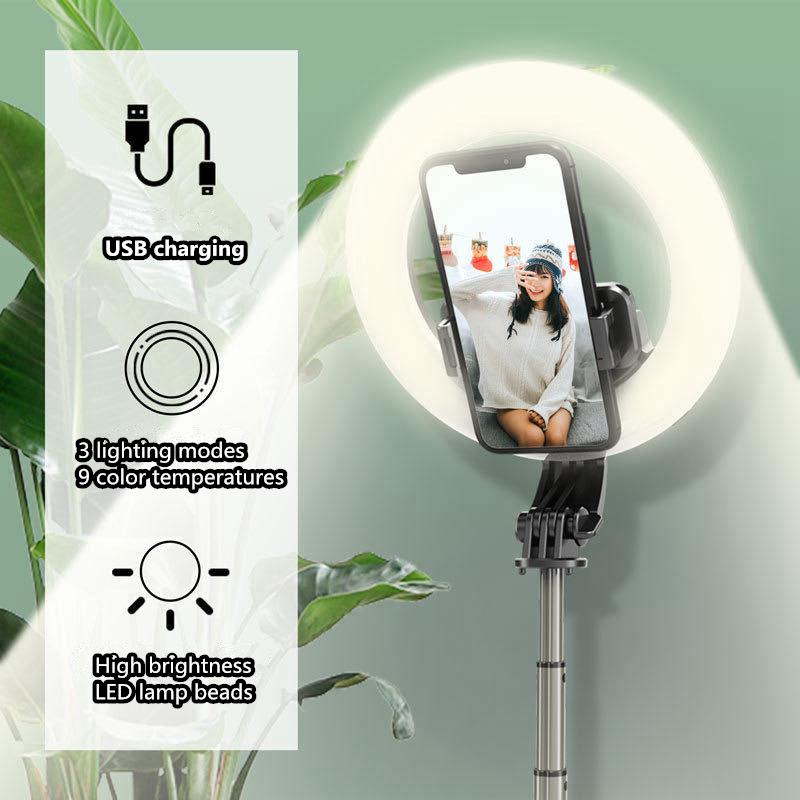
how to change battery on selfie stick l01 2

Before we dive into the replacement process, ensure that you have the following tools and materials at hand:

- A new replacement battery compatible with the Selfie Stick L01 model

- A small Phillips screwdriver

- A set of plastic prying tools

- A clean, flat workspace

- Anti-static wrist strap (optional but recommended)

Step-by-Step Guide to Replacing the Battery
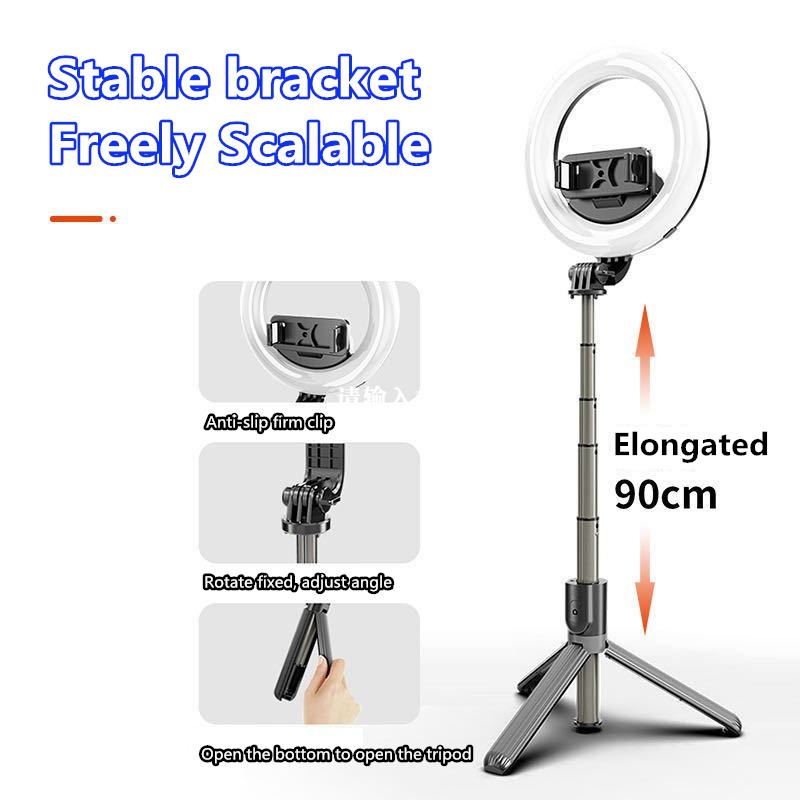
how to change battery on selfie stick l01 3

1. Preparation and Safety

Turn off the Selfie Stick: Ensure that the selfie stick is turned off to avoid any electrical hazards. If the stick has been recently used, give it some time to cool down.

Workspace Preparation: Lay down a clean mat or cloth on a flat surface to organize your tools and avoid losing small screws or parts. For added safety, use an anti-static wrist strap to prevent any electrostatic discharge that could damage the electronic components.

2. Disassembling the Selfie Stick

Locate the Screws: The first step involves locating the screws that hold the selfie stick casing together. Generally, these screws are small and may be hidden under stickers or rubber plugs.

Remove the Screws: Using the Phillips screwdriver, carefully remove the screws. Place the screws in a small container to ensure they don’t get lost during the process.

Open the Casing: Once all screws are removed, use a plastic prying tool to gently open the selfie stick casing. Start at a corner and work your way around, applying moderate force to avoid breaking any internal clips.

3. Removing the Old Battery

Locate the Battery: Inside the casing, you'll see the internal components, including the battery. The battery is usually a small rectangular or cylindrical unit.

Disconnect the Battery: Gently disconnect the battery from the circuit board. This may involve pulling a small connector. Be cautious to avoid damaging the connectors or surrounding parts.

Remove the Battery: Carefully lift the battery out of its housing. It may be secured with a bit of adhesive, so you may need to apply gentle pressure to detach it.

4. Installing the New Battery

Position the New Battery: Place the new battery in the same spot from which you removed the old one. Ensure it fits snugly and aligns with the connector.

Connect the Battery: Attach the battery connector to the circuit board. Ensure it is firmly connected, but be careful not to use excessive force.

5. Reassembling the Selfie Stick

Close the Casing: Once the new battery is in place and connected, close the selfie stick casing. Make sure all clips are aligned, and the casing fits together seamlessly.

Secure the Screws: Replace the screws that were removed earlier, ensuring each is tightened securely. Be cautious not to over-tighten, as this could strip the screws or damage the casing.

6. Testing the Selfie Stick

Power On: Turn on the selfie stick to check if the new battery is functioning correctly. If the device powers up and operates as expected, the battery replacement was successful.

Charging Cycle: If your new battery is a rechargeable one, give it a full charge before your first use to ensure optimal performance.

Common Issues and Troubleshooting
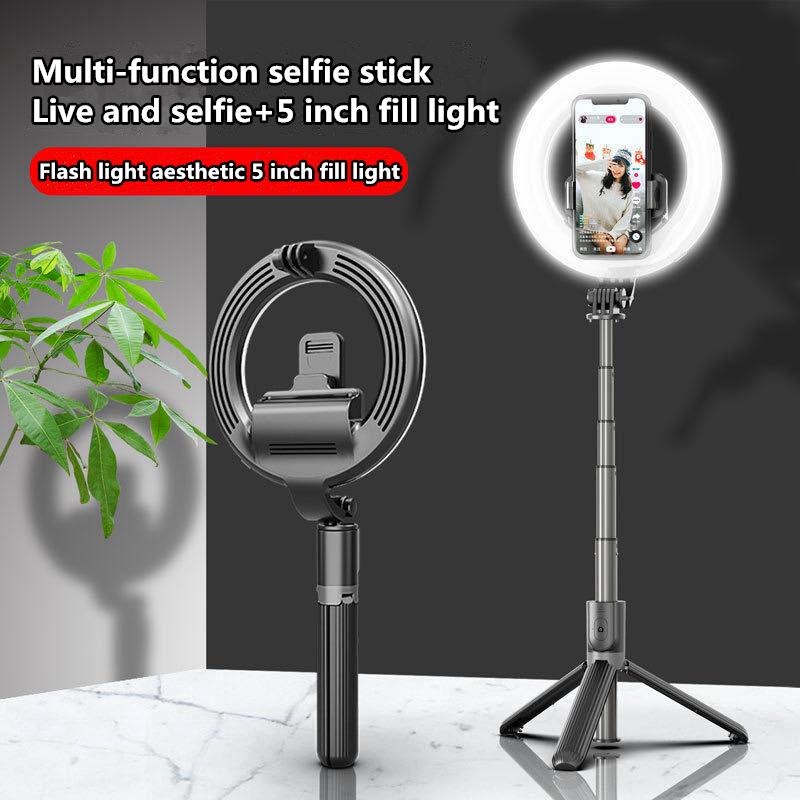
how to change battery on selfie stick l01 4

1. Selfie Stick Not Powering On: Double-check that the battery is correctly connected to the circuit board. If the connection is secure, the new battery may need charging.

2. Loose Casing: If the casing doesn't fit properly after reassembling, ensure that no internal components are obstructing the closure. Reopen the casing if necessary and realign everything.

3. Poor Battery Performance: If the new battery doesn’t perform well, it may be due to a poor-quality battery. Always purchase batteries from a reputable source to avoid such issues.

Maintenance Tips for Longevity

For prolonged battery life and optimal performance, consider these maintenance tips:

- Regular Charging: Avoid letting the battery completely discharge. Recharge it regularly to keep it healthy.

- Proper Storage: Store the selfie stick in a cool, dry place. Extreme temperatures can degrade battery performance.

- Periodic Checks: Periodically check the battery for any signs of wear or damage. Early detection can prevent sudden failures.

Changing the battery on a Selfie Stick L01 can seem daunting, but with the right tools and a systematic approach, it’s a manageable task. This guide aims to provide a clear, step-by-step procedure to help you efficiently replace the battery and ensure your selfie stick remains a reliable companion for all your photographic adventures. By addressing common issues and offering maintenance tips, this article aims to answer practical problems and prolong the life of your device.

Regular maintenance and timely battery replacement will ensure you can continue capturing treasured moments with your selfie stick without interruptions. Whether you're a casual user or a selfie enthusiast, a functioning selfie stick is integral to preserving those perfect shots.

Leave your comment
Cancel reply
Note: HTML is not translated!
Related products
63'' Magnetic Iphone Tripod Phone Selfie Stick Tripod And Clip-On ND Filter(1-9 stops) For All Phone Set
207
$113.99 $59.99
DJI Osmo Action 4 & Osmo Action 5 Pro Action Camera Filter and Selfie Stick Kit, 4 Pack (CPL + ND8 + ND16 + ND32) Screw On Polarizing Neutral Density Filter HD Optical Glass / Multi-Coated / Metal Frame and Portable 2-in-1 Selfie Stick Tripod
$49.99
Cell Phone Tripod MS02 13.4''/34cm bluetooth selfie stick Desktop Stand Orange Gray
97
$29.99 $21.99
MS04 62''/1.58m Tripod Phone Selfie Stick, Black And Orange With Bluetooth Remote Control + Gopro Adapter
107
$49.99 $29.99
67''/170cm Eccentric Tube Cellphone Tripod, Lightweight Super Portable Selfie Stick, DSLR Camera Tripod E224A3+BH-18 Silver
36
$89.99 $49.99
67''/1.7m Eccentric Tube Cellphone Tripod, Lightweight Super Portable Selfie Stick, DSLR Camera Tripod E224A3+BH-18 Black
36
$85.99 $49.99
MS03 13''/33cm Action Camera Mounts Selfie Stick Desktop Stand (Small Size) For Gopro, Action, And Insta Black Orange
5
$37.99 $18.99
23.6‘’/60cm 3 in 1 selfie stick desktop stand with ball head + mobile phone holder + GoPro adapter + Bluetooth remote control MS11
45
$37.99 $23.99
60 inch Invisible Selfie Stick, Extension Pole compatiable with Insta360 Sports Camera, GoPro, DJI Action, 1/4" Extended Monopod Pole with GoPro Adapter
11
$25.99
Products You May Like
67MM, Nano-X, Japan Optical Glass ND32-CPL, ultra-clear, coated with waterproof, scratch-resistant and anti-reflection green film
$47.99 $36.99
Compound Microscope for Laboratory, Professionals, Research, with lnfinity-corrected Plan Optics, 40x-1000x Magnification, 5W Koehler System, Kentfaith
10
$2,374.99 $1,899.99
Red Glow Trail Camera
10
$162.99 $106.99
72mm Circular Polarizer Optical Glass Lens Filter Ultra-Slim 18 Multi-Layer Coatings Circular Polarizing Filters for Camera Lens (Nano-Klear)
64
$24.99 $19.49
67mm Variable ND Filter ND2-ND32 (1-5 Stops) Lens Filter Waterproof Scratch Resistant with 24 Layers of Nano-coating Nano-Dazzle Series
31
$56.99 $44.99
Insta360 GO 3S Action Camera Lens Filter UV + CPL + ND4 Filters Kit with 28 Multi-Layer Coated
15
$29.99
Weather Station Indoor Outdoor Thermometer Large LCD Display Digital Temperature Humidity Monitor, Weather Thermometer with Calendar and Automatic Light Sensing Function
116
$66.24 $52.99
DJI Mavic Air 2 Raised Tripod Landing Gear
$12.99
Underwater Action Camera 69ft/21m Caseless Waterproof 4K 60FPS Video WiFi Connection
16
$162.49 $136.99
62mm  Black Mist Filter 1/4 Special Effects Filter Ultra-Clear Multi-layer Coated With Waterproof Scratch-Resistant and Anti-Reflection Nano-Xcel Series
62mm Black Mist Filter 1/4 Special Effects Filter Ultra-Clear Multi-layer Coated With Waterproof Scratch-Resistant and Anti-Reflection Nano-Xcel Series
83
$58.99 $46.99
Related articles
How Use Button On Selfie Stick?
How To Change Polaroid Camera Battery?
Can You Put Polaroid On Selfie Stick?
How To Connect My Selfie Stick?
How To Connect Selfie Stick Shutter?
How To Fix Selfie Stick Button?
How To Use Camera Selfie Stick?
How To Make Your Selfie Stick Invisible?
How To Use Audio Jack Selfie Stick?
How To See Plant Cells With A Microscope?
Blog You May Like
Which Program To Record My Computer Sound?
How To Connect A Microphone To A Smart Tv ?
How To Find Lost Wired Earphones?
When To Use Cpl Filter?
Can Security Cameras Detect Motion Through Glass?
How Many Wireless Ip Cameras On A Network?
Are Iphone Camera Lens Protectors Worth It ?
How To Connect Wifi Camera To Android Phone ?
How To Focus Binoculars?
How Much Are The Ring Lights?
Related categories
On-Dash Camera battery operated outdoor security camera camera battery FUJIFILM Camera Battery battery for camera Nikon C mount lens adapter Sony battery camera Lumix camera battery m4/3 adapter
Popular products
iphone 15 selfie stick mirrorless selfie stick phone tripod selfie stick insta 360 camera case camera selfie stick tripod safe selfie stick mi selfie stick tripod black dji osmo action camera selfie stick iphone tripod stand holder
Related searches
Selfie Stick Battery Gopro Selfie Stick Selfie Stick Bluetooth Small Selfie Stick Selfie Stick Tripod Phone Selfie Stick Selfie Stick Stand Magsafe Selfie Stick Dji Selfie Stick Portable Selfie Stick
Popular searches
Ring Selfie Stick Manfrotto Fluid Head Video Tripod B W Polarizing Filter 77mm Lens Cap For Ricoh Gr Iii Polarized Lens Filter Nikon Best Buy Best Inexpensive Video Camera Sony M42 Chipped Adapter Video Tripods Update Lens Mount Adapter Best Lens Filter For Fuji
Blog Category
  • Activities
  • Guide
    • Filter Guide
    • Lens Adapter
    • Product Review
  • News & Reviews
    • Camera Reviews
    • Sample Gallery
    • News
  • Tutorials
    • Solar eclipse photography
    • Photography Basics
    • Landscape Photography
  • Inspiration
    • Travel
    • Travel Stories
Search Article
Latest from the Blog
How To Buy A Security Camera System?
How To Find Camera Roll On Iphone 5s?
Which Camera Is Best For Low Light Photography?
How Much Storage For Security Camera?
How To Fix The Straps On A Camera?
What Is The Best Wireless Outdoor Security Camera?
ND Filter: The Complete Guide to Neutral Density Filters for Photography and Video
Best Metal Detector for Kids in 2025
Where Can I Find Hidden Cameras?
Can I Charge Camera Battery With Power Bank?
  • Easy Payment Multilple Payment Options

  • Free Shipping Global WareHouse Shipment

  • No Risk 30-Day No Reason Return

  • Limited Deals Buy More, Save More

  • Tax Free No any surcharges or tax fee

Information
  • About us
  • Contact Us
  • Site Map
  • Blog
  • Video
  • Gallery
  • VIP Membership Rewards
Service
  • Privacy Policy
  • Terms & Conditions
  • Shipping & Delivery
  • Payment Info
  • Warranty, Return & Refund
  • Intellectual Property Rights
  • Ambassador
  • Affiliates
  • Wholesale
Support
  • My account
  • Order History
  • FAQs
  • Extend Warranty
  • Logistics Tracking
Follow us
NewsLetter

Get the latest product, K&F Concept respects your privacy.

Powered By KENTFAITH © 2025