kfconcept

KENTFAITH
K&F Concept    Blog >

Enjoy Your Selected Digital Life

Recently Viewed
  • Recently Viewed
  • Recently Viewed list is empty.

Compare (0) 0
  • Compare
  • You have not chosen any products to compare.

  • Compare
Currency: USD
  • Currency
Shop by Scene Shop by Rank

Log Into Your Account

Account

Order History

Wish List

Login

Forgotten Password?

or connect with

Register Account

Already have an Account?Log In

  • Shopping Cart
  • Your shopping cart is empty!

  • Register/Login to purchase, earn points
  • Favorite
  • Your wish list is empty.

  • Register/Login to like, earn points
  • Activities
  • Guide
    • Filter Guide
    • Lens Adapter
    • Product Review
  • News & Reviews
    • Camera Reviews
    • Sample Gallery
    • News
  • Tutorials
    • Solar eclipse photography
    • Photography Basics
    • Landscape Photography
  • Inspiration
    • Travel
    • Travel Stories
  • Home
  • Blog
  • Where Do You Put Dash Cam?

Where Do You Put Dash Cam?

Kentfaith 2024-09-18 03:53:45 0 Comments

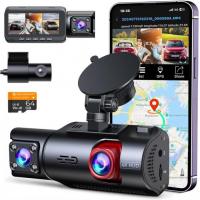
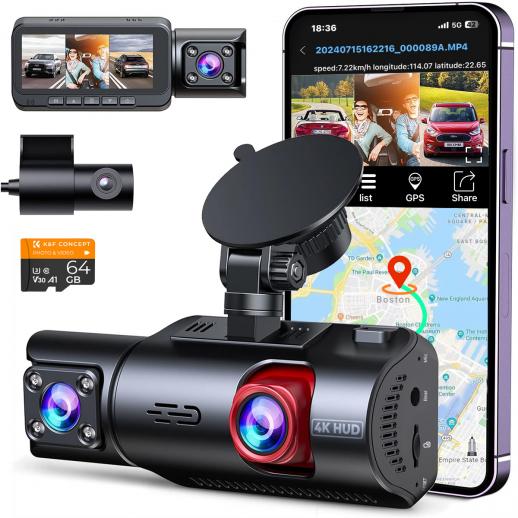
Dash cams, or dashboard cameras, have become increasingly popular among drivers for their ability to record video footage of the road ahead. This footage can be invaluable in the event of an accident, providing clear evidence of what occurred. However, many drivers are unsure about the best place to install their dash cam to ensure optimal performance and compliance with local laws. In this article, we will explore the various considerations for placing a dash cam, including legal requirements, visibility, and technical aspects, to help you make an informed decision.

Legal Considerations

Before installing a dash cam, it's crucial to understand the legal requirements in your area. Different regions have varying laws regarding the placement of dash cams, primarily to ensure they do not obstruct the driver's view. For instance, in some states in the U.S., dash cams must be placed within a specific area of the windshield, often near the rearview mirror, to comply with regulations. Failure to adhere to these laws can result in fines or other penalties.

Optimal Placement for Visibility

The primary purpose of a dash cam is to capture clear and comprehensive footage of the road ahead. Therefore, visibility is a key factor in determining its placement. Here are some common locations and their pros and cons:

1. Behind the Rearview Mirror: This is the most popular and recommended location for a dash cam. Placing the camera behind the rearview mirror ensures it captures a wide field of view without obstructing the driver's line of sight. Additionally, this position is less likely to be noticed by potential thieves.

2. Center of the Windshield: Mounting the dash cam in the center of the windshield can provide a balanced view of both sides of the road. However, this placement may obstruct the driver's view and could be illegal in some jurisdictions.

3. Dashboard: Some drivers prefer to place their dash cam on the dashboard. While this can be a convenient location, it often results in a lower field of view and may capture more of the car's interior than the road.

4. Rear Windshield: For those who want to capture footage from behind the vehicle, a secondary dash cam can be installed on the rear windshield. This can be particularly useful for recording rear-end collisions or incidents involving tailgating.

Technical Considerations

When installing a dash cam, there are several technical aspects to consider to ensure optimal performance:

1. Power Source: Dash cams typically require a constant power source. Most models come with a power cable that can be plugged into the car's cigarette lighter or USB port. For a cleaner installation, some drivers opt for hardwiring the dash cam to the car's fuse box. This not only hides the cables but also allows the dash cam to turn on and off with the vehicle.

2. Angle and Field of View: The angle at which the dash cam is mounted can significantly impact the quality of the footage. It's essential to adjust the camera to capture the entire width of the road without including too much of the car's interior. Most dash cams come with adjustable mounts to help achieve the optimal angle.

3. Vibration and Stability: A stable mount is crucial for clear footage. Ensure that the dash cam is securely attached to avoid vibrations and shaking, which can distort the video. Many dash cams come with adhesive mounts or suction cups for a secure fit.

4. Temperature and Weather Conditions: Dash cams are exposed to varying temperatures and weather conditions, which can affect their performance. Choose a dash cam that is designed to withstand extreme temperatures and has features like a heat-resistant casing or a built-in cooling system.

Practical Tips for Installation

To ensure a smooth installation process, follow these practical tips:

1. Clean the Mounting Area: Before attaching the dash cam, clean the area of the windshield or dashboard where it will be mounted. This ensures a secure attachment and prevents the camera from falling off.

2. Hide the Cables: Use cable clips or adhesive cable organizers to route the power cable along the edges of the windshield and down to the power source. This not only keeps the interior of your car tidy but also prevents the cable from obstructing your view.

3. Test the Camera: Before finalizing the installation, test the dash cam to ensure it captures the desired field of view and that the footage is clear. Make any necessary adjustments to the angle or position.

4. Regular Maintenance: Periodically check the dash cam to ensure it is securely mounted and functioning correctly. Clean the lens to remove any dust or debris that could affect the video quality.

Installing a dash cam is a practical and valuable addition to any vehicle, providing peace of mind and potential evidence in the event of an accident. By considering legal requirements, visibility, and technical aspects, you can ensure your dash cam is optimally placed for the best performance. Whether you choose to mount it behind the rearview mirror, on the dashboard, or on the rear windshield, following the tips outlined in this article will help you achieve a successful installation. Remember to regularly maintain your dash cam to ensure it continues to function effectively, providing you with reliable footage whenever you need it.
Leave your comment
Cancel reply
Note: HTML is not translated!
Related products
CarPlay for Motorcycle Android Auto Dash Cam Front and Rear GPS Navigation
12
$299.99 $209.99
Motorcycle Dash Cam with 2K Resolution 140° Wide Angle WiFi Control USB Power Kentfaith
10
$84.99 $67.99
4K Dash Cam Front and Rear with GPS WiFi Night Vision 24H Parking Mode Kentfaith
13
$124.99 $99.99
3-Channel Dash Cam Front and Rear Inside 4K 5G WiFi GPS Night Vision G-Sensor Kentfaith
10
$187.49 $169.99
4K Dash Cam Front and Rear with GPS, 5G WiFi, Starlight Night Vision, G-Sensor, 24H Parking Mode Kentfaith
15
$149.99 $119.99
2.7K Motorcycle Dash Cam with 140° Wide Angle, Built-in WiFi, USB Power, Emergency Lock, 3 Types of Mounts, Kentfaith
13
$93.74 $74.99
Dash Cam Hardwire Kit, Mini-USB Hard Wire Kit 11.5ft, 12-24V to 5V Car Dash Camera Charger Power Cord, Gift 5 Fuse Tap Cable with Battery Drain Protection for 24h Parking Monitor
$29.99 $20.99
Dash Cam Hardwire Kit, Micro-USB Hard Wire Kit 11.5ft, 12-24V to 5V Car Dash Camera Charger Power Cord, Gift 5 Fuse Tap Cable with Battery Drain Protection for 24h Parking Monitor
$29.99 $20.99
Dash Cam Hardwire Kit, Type-C Hard Wire Kit 11.5ft, 12-24V to 5V Car Dash Camera Charger Power Cord, Gift 5 Fuse Tap Cable with Battery Drain Protection for 24h Parking Monitor
NEW Arrival
Dash Cam Hardwire Kit, Type-C Hard Wire Kit 11.5ft, 12-24V to 5V Car Dash Camera Charger Power Cord, Gift 5 Fuse Tap Cable with Battery Drain Protection for 24h Parking Monitor
$29.99 $20.99
4G LTE Dash Cam Front Inside, Remote Live View, Instant Alert via App, 24/7 Parking Mode, GPS, 1080P IR Night Vision Kentfaith
11
$224.99 $179.99
Products You May Like
82mm Centerfield Split Diopter Filter Special Effect Camera Lens Filter Nano-B Series
16
$41.99 $32.99
K&F Concept 28 Slots Micro SD Card Case,Water-Resistant Anti-Shock Anti-Dust TF Card Holder,Micro SD/Micro SDHC/Micro SDXC Card Box Organizer Storage
$18.99 $9.99
77mm Black Pro-Mist 1/4 Filter Effect Filter 28-Layers-Coated Waterproof, Scratch-resistant with Metal Lens Cap Nano-X Series
101
$67.99 $34.00
62-77mm Brass Filter Adapter Ring, Step-Up Ring Compatible with All 62mm Camera Lens & 77mm Filters
32
$23.99
Minolta MD Lenses to Leica M Lens Mount Adapter K&F Concept M15151 Lens Adapter
31
$70.99 $39.99
49-82mm Brass Filter Adapter Ring, Step-Up Ring Compatible with All 49mm Camera Lens & 82mm Filters
64
$28.99
52mm Shimmer Diffusion 1 Filter Optical Glass Glimmer Effect Filter for Camera Lens Nano-X Series
$56.99 $34.99
82mm Single-sided Linear Pentaprism Filter Optical Glass Prism Special Effect Camera Lens Filter Nano-Basic Series
NEW Arrival
82mm Single-sided Linear Pentaprism Filter Optical Glass Prism Special Effect Camera Lens Filter Nano-Basic Series
$59.99 $44.99
86mm ND Filter ND1000 (10 Stop) Lens Filter 28 Multi-Layer Coatings Waterproof Scratch Resistant Super Slim for Camera Lens (Nano-Xcel Series)
88
$66.99 $52.99
37mm Black Mist Filter 1/4 Special Effects Filter Cinebloom Black Diffusion Effect Filter for Camera Lens Nano-Xcel Series
89
$49.99 $39.99
Related articles
What Do You Need In A Dash Cam?
Where Do You Put A Ring Light?
Can You Use Go Pro For Dash Cam?
Dash Cam Can Connect To Phone?
How Much Storage For Dash Cam?
How Does Car Dash Cam Work?
Which Sd Card For Dash Cam?
How Long Does Dash Cam Record?
Which Memory Card For Dash Cam?
How To Make A Chicken Coop Automatic Door?
Blog You May Like
Can You Record With A Selfie Stick?
Can You Hook Up Alexa To Bluetooth Speakers?
Can Camera Batteries Be Taken On A Plane?
Can I Download A Microphone For My Computer?
Can I Track Security Cameras Using Cellular?
How Do We Record In Car?
How To Record Sound From Laptop Speakers?
Nd Filter What Is It Used For?
Professional Photographers Use What Camera Strap?
House Party Where To Find Voice Recorder?
Related categories
On-Dash Camera 10 stop ND filter circular graduated neutral density filter DJI Mini 3 Pro filter DJI Mavic 3 classic filter Color Filters minolta a mount lenses
Popular products
dashcam 3 channel dual car dash camera dash cam with loop recording wireless camera for vehicle 4k dash cam front rear car camera hardwire kit hard wire kit dash cam car dash cam kit 1080p dual camera dash cam infrared dash camera
Related searches
Dash Cam Recorder Best Wireless Dash Cam Gps Tracking Dash Cam Best Parking Dash Cam Dash Cam With Bluetooth Wireless Rear Dash Cam Best Dual Dash Cam Dash Cam Motion Detection Dash Cam With App Motion Sensor Dash Cam
Related Scenes
Best Car Camera Dash Cam Best Camera For Dash Cam The Best Dash Camera Best Dash Camera For Car The Best Car Dash Camera Best In Car Dash Camera Best Dash Camera With Night Vision Best Wildlife Camera And Lens Best Microscope For Phone Best Outdoor Security Camera System With Night Vision
Blog Category
  • Activities
  • Guide
    • Filter Guide
    • Lens Adapter
    • Product Review
  • News & Reviews
    • Camera Reviews
    • Sample Gallery
    • News
  • Tutorials
    • Solar eclipse photography
    • Photography Basics
    • Landscape Photography
  • Inspiration
    • Travel
    • Travel Stories
Search Article
Latest from the Blog
How To Reduce Noise In Bluetooth Headphones?
How To Receive Notifications On Smartwatch?
How Smart Watch Measure Heart Rate?
What Is The Best Camera For Action Sports?
Smartwatch That Can Monitor Blood Pressure?
How To Build Security Camera System?
How To Take Pictures Through A Telescope?
How To See Cells In A Microscope?
What Is A Good Video Camera For Vlogging?
How To Use Your Phone As A Microphone?
  • Easy Payment Multilple Payment Options

  • Free Shipping Global WareHouse Shipment

  • No Risk 30-Day No Reason Return

  • Limited Deals Buy More, Save More

  • Tax Free No any surcharges or tax fee

Information
  • About us
  • Contact Us
  • Site Map
  • Blog
  • Video
  • Gallery
  • VIP Membership Rewards
Service
  • Privacy Policy
  • Terms & Conditions
  • Shipping & Delivery
  • Payment Info
  • Warranty, Return & Refund
  • Intellectual Property Rights
  • Ambassador
  • Affiliates
  • Wholesale
Support
  • My account
  • Order History
  • FAQs
  • Extend Warranty
  • Logistics Tracking
Follow us
NewsLetter

Get the latest product, K&F Concept respects your privacy.

Powered By KENTFAITH © 2026