kfconcept

KENTFAITH
K&F Concept    Blog >

Enjoy Your Selected Digital Life

Recently Viewed
  • Recently Viewed
  • Macro Lens for iPhone / Android, 100X Microscope with Fill Light / CPL Handheld Pocket Mobile Phone Microscope
    Macro Lens for iPhone / Android, 100X Microscope with Fill Light / CPL Handheld Pocket Mobile Phone Microscope
    $67.49 $47.99
Compare (0) 0
  • Compare
  • You have not chosen any products to compare.

  • Compare
Currency: USD
  • Currency
Shop by Scene Shop by Rank

Log Into Your Account

Account

Order History

Wish List

Login

Forgotten Password?

Or connect with

Register Account

Already have an Account?Log In

  • Shopping Cart
  • Your shopping cart is empty!

  • Register/Login to purchase, earn points
  • Favorite
  • Your wish list is empty.

  • Register/Login to like, earn points
  • Activities
  • Guide
    • Filter Guide
    • Lens Adapter
    • Product Review
  • News & Reviews
    • Camera Reviews
    • Sample Gallery
    • News
  • Tutorials
    • Solar eclipse photography
    • Photography Basics
    • Landscape Photography
  • Inspiration
    • Travel
    • Travel Stories
  • Home
  • Blog
  • How To Record From A Wifi Camera?

How To Record From A Wifi Camera?
Kentfaith 2025-02-04 02:23:41 0 Comments

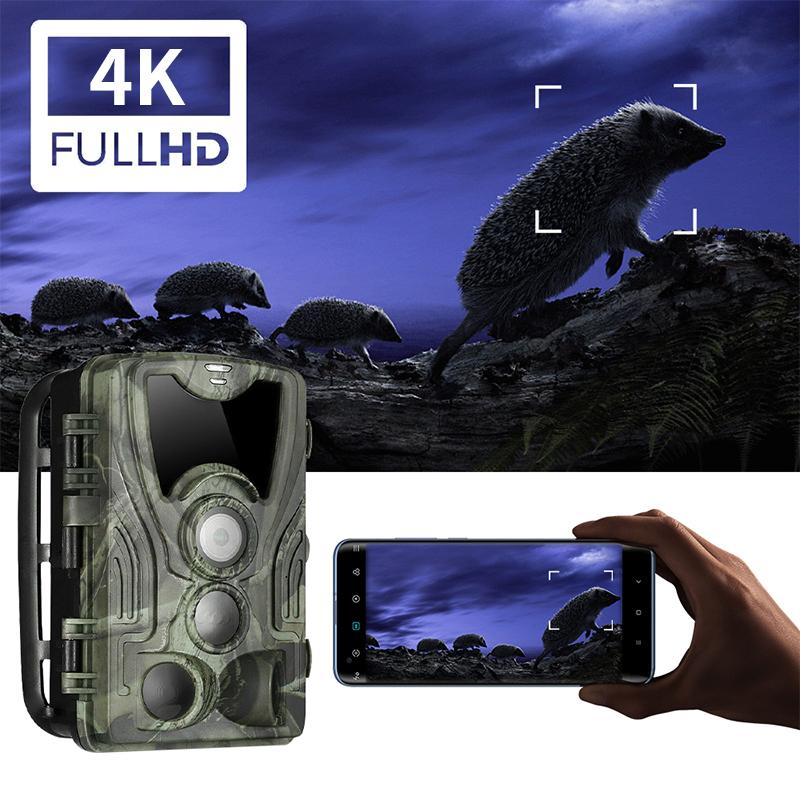
how to record from a wifi camera 1

WiFi cameras have revolutionized security and convenience in our homes and workplaces. With their ability to stream video wirelessly and store recordings, they are indispensable tools for surveillance, monitoring, and even creative tasks. However, understanding how to set up and manage recordings from a WiFi camera can be daunting. This guide will delve into the ultimate steps and solutions, covering everything from initial setup to advanced tips, ensuring you can record efficiently and confidently.

---

Understanding WiFi Cameras: An Overview

WiFi cameras are network-connected devices that capture video and transmit data wirelessly to a storage location or live feed application. Their portability, lack of extensive wiring, and flexibility make them popular for personal and professional use. The recordings from these cameras can be stored locally (e.g., SD cards) or remotely (e.g., cloud storage or networked devices).

Before recording from your WiFi camera, it’s essential to identify its capabilities:

- Does it support local storage via SD cards?

- Can it integrate with cloud services?

- What mobile or desktop applications does it use?

- Does it require a subscription for advanced features?

With these aspects clarified, let’s move on to the recording process.

---

Step 1: Setting Up Your WiFi Camera

To begin recording, ensure your WiFi camera is set up correctly. This involves:

1. Positioning the Camera: Choose a location with a strong WiFi signal. Weak connectivity can lead to interruptions in recording or live streaming.

2. Power Supply: Ensure the camera is connected to a stable power source or is fully charged if battery-operated.

3. Connecting to WiFi: Follow the manufacturer’s instructions to connect the camera to your home or office WiFi network. Typically, this involves:

- Downloading a companion app.

- Using the app to scan a QR code or manually entering the WiFi credentials.

4. Testing Connectivity: Use the app to check the live feed. This confirms that the camera is successfully connected and ready for use.

---

Step 2: Configuring the Recording Settings

WiFi cameras offer multiple recording options to suit various needs. These include:

- Continuous Recording: Records 24/7. Ideal for high-security areas but requires ample storage.

- Motion-Triggered Recording: Starts recording when motion is detected. This saves storage space and is great for general surveillance.

- Scheduled Recording: Lets you specify times for recording, which is helpful if you only need coverage during certain hours.

To configure these:

1. Access the App: Open the camera’s app or software interface.

2. Navigate to Recording Settings: Look for options like “Recording Modes” or “Video Settings.”

3. Set Preferences: Choose the desired mode, video quality (e.g., HD or SD), and storage location (local or cloud).

---

Step 3: Selecting the Storage Option

Where your recordings are saved plays a critical role in their accessibility and longevity. Let’s examine the options:

1. Local Storage (SD Card):

- Most WiFi cameras have an SD card slot. Insert a compatible card, ensuring it has enough capacity for your needs.

- Pros: No subscription fees, data remains in your control.

- Cons: Limited storage, vulnerable to theft or damage.

2. Cloud Storage:

- Many manufacturers offer cloud services for remote storage. Subscriptions typically include features like longer retention periods and enhanced security.

- Pros: Accessible from anywhere, secure backups.

- Cons: Recurring costs, potential data privacy concerns.

3. Network Video Recorder (NVR):

- Connects multiple cameras to a centralized recording system.

- Pros: Suitable for multiple cameras, large storage capacity.

- Cons: Higher initial cost, requires setup expertise.

---

Step 4: Initiating Recording

Once the camera is set up and storage is configured, start recording:

1. Via the App:

- Open the live feed.

- Tap the record button to manually start and stop recordings.

2. Automated Recording:

- Enable motion detection or schedules as configured earlier.

3. Confirm Functionality:

- Test the setup by triggering motion or checking a live feed during the scheduled period. Verify that the recordings are saved in the designated location.

---

Step 5: Accessing and Managing Recordings

After recording, you’ll need to access and manage your video files. Here’s how:

1. Viewing in the App:

- Navigate to the “Recordings” or “Library” section of the app.

- Select a file to view, download, or share.

2. Downloading to Devices:

- Save important recordings to your phone, computer, or external drive for easy access or backup.

3. Organizing Storage:

- Regularly delete unnecessary files, especially if using local storage, to prevent it from filling up.

---

Troubleshooting Common Issues

Even with a robust setup, issues can arise. Here’s how to tackle them:

1. Recording Not Saving:

- Check storage capacity (SD card or cloud).

- Ensure the camera has power and a stable WiFi connection.

2. Motion Detection Not Triggering:

- Adjust sensitivity settings in the app.

- Clean the camera lens and check its field of view.

3. Low-Quality Recordings:

- Switch to a higher resolution in the settings.

- Improve the WiFi signal strength at the camera’s location.

---

Advanced Tips for Optimal Use

1. Integrate with Smart Home Systems:

- Connect your WiFi camera to platforms like Google Home or Amazon Alexa for voice commands and automation.

2. Enable Encryption:

- Use WPA3 for your WiFi network and enable end-to-end encryption (if supported) to secure recordings.

3. Regular Firmware Updates:

- Update your camera’s firmware to access new features and fix vulnerabilities.

4. Expand Storage:

- If local storage fills up quickly, consider upgrading to a larger SD card or subscribing to additional cloud storage.

---

Conclusion

Recording from a WiFi camera can seem complex at first, but breaking it down into manageable steps simplifies the process. By setting up the camera properly, choosing the right storage option, and configuring recording preferences, you can ensure seamless and reliable video capture. Addressing issues promptly and leveraging advanced tips will further enhance your experience. Whether you’re using a WiFi camera for security or creative pursuits, mastering its recording features is an ultimate step toward maximizing its potential.

Make your WiFi camera a reliable companion by applying these strategies today!

Leave your comment
Cancel reply
Note: HTML is not translated!
Related products
5K Video Camera with 75MP Photos, 8X Optical Zoom, WiFi Transfer, Wireless Mic, Dual Batteries, Support PIP Record, Kentfaith
16
$274.99 $239.99
5K Video Camera with 75MP Photos, 8X Optical Zoom, WiFi Transfer, Foldable Tripod, Wireless Mic, Dual Batteries, Support PIP Record, Kentfaith
$312.49 $249.99
4K60FPS 48MP 66FT Waterproof Action Camera without a Case, Dual Screens, 64GB Card, EIS, WiFi Remote Control, Kentfaith
14
$191.24 $152.99
128G Mini Digital Voice Recorder with Color Screen Bluetooth Call Record 3072kbps Kentfaith
15
$119.99 $83.99
Minolta A / Sony A Lenses to Leica M Lens Mount Adapter K&F Concept M47151 Lens Adapter
31
$75.99 $39.99
Minolta A / Sony A Lenses to Pentax Q Lens Mount Adapter K&F Concept M22161 Lens Adapter
$45.99 $23.99
Sony Alpha Minolta AF A-Type Lens to NEX E-Mount Mirrorless Camera with Matting Varnish Design
146
$64.99 $35.99
Instant Cross-APP Translator Device for Business & Trade, Video Call Translation, Record, & Transcription, Kentfaith AI Translator Devices
12
$124.99 $99.99
Minolta A / Sony A Lenses to Pentax Q Lens Mount Adapter with Tripod Mount K&F Concept M22162 Lens Adapter
$55.99 $28.99
72mm ND8-ND2000 (3-11stop) Variable ND Filter Neutral Density Filter with Multi-Resistant Coating Nano-Dazzle
73
$74.99 $59.99
Products You May Like
67mm Variable ND2-400 (1-9 Stops) & Black Mist 1/4 Filter with 18 Multi-Coatings for Camera Lenses Nano-Klear Series
$45.99
Camera strap with quick release and safety cord, adjustable padded shoulder strap, suitable for Nikon, Canon, Sony, Olympus, Fujifilm
21
$19.69
Beach sand shovel, metal detector to detect gold and silver hunting tools
10
$33.74 $26.99
67mm ND8 (3 Stop) Neutral Density Filter + CPL Circular Polarising Filter 2 in 1 for Camera Lens, Ultra Clear Super Slim Waterproof
25
$59.99 $35.99
Portable Mini RGB Pocket Light, CRI95+, color temperature ranging from 2500K to 9900K, featuring 21 lighting effects. Rechargeable, magnetic, suitable for indoor camera shooting to enhance video and photo lighting.
28
$49.99 $29.99
Hidden Camera Detector, Bug Detector, GPS Detector RF Signal Scanner, Device Detector GPS Tracker Listening Device Camera Detector US
51
$33.99
K&F Concept 13L Camera Backpack Nature Wander 12 Black, Lightweight Photography Bag with Quick Access Front Opening, Tripod Strap & Dual-Purpose Design for Travel and Daily Use
52
$39.99
Digital Camera for Microscopes 5 Megapixel Color CMOS for Windows Mac OS Android Phones Kentfaith
12
$99.99 $79.99
67mm Spiral Halo Camera Lens Filter Premium Optical Glass Halo Swirl Special Effect Filter Nano-B Series
13
$33.99 $24.29
49mm Magnetic CPL Filter Circular Polarizer Lens Filter Optical Glass Ultra Slim with 18 Multi-Layer Coatings Nano-Klear Series
43
$27.99 $21.99
Related articles
How To Record Audio From A Video?
How To Record Wifi Security Camera?
How To Access Wifi Camera Away From Home ?
How To Wifi Transfer Videos From Camera Canon?
How To Record Sound From Desktop Capture?
How To Record Sounds From Your Computer?
How To Record Sound From Laptop Speakers?
How To Record The Sound From My Keyboard?
How To Connect A Wifi Smart Camera?
How To Watch Movies On Samsung Smart Tv?
Blog You May Like
How Do You Install A Wireless Backup Camera?
Binoculars Which Are Best?
How Do Records Record Sound?
How To Charge Nikon Camera Battery Without Charger ?
Where To Install Sd Card On Switch?
How To Pick Out A Digital Camera?
Does A Trail Camera Flash At Night?
How To Change Wifi On Wyze Cameras ?
What Lens To Buy For Dslr Camera?
How To Measure Camera Filter Size?
Related categories
Outdoor Security Camera Wifi A Mount Lens Adapter C mount lens adapter Sony A Mount Lens Adapters Wifi Trail Cameras minolta a mount lenses Baby Movement Monitor m4/3 adapter Camera Parts | Studio Camera Accessories
Popular products
video recording camera for youtube sony camera with microphone Mini Digital Voice Recorder​ led video light for camera video camera with stabilization fpv drone and goggles mini web camera wifi leica m sony e mount adapter sony minolta adapter digital camera 40
Related searches
Record Wifi Camera Best Microphones To Record Vocals Cameras That Record Audio Change Lens Mount From Minolta To Nikon Wireless Headphones From Tv Kipon Af Adapter From Canon Ef Best Microphone For Work From Home A Wireless Camera A Digital Camera Sony Camera To A Minolta Lens Adapter
Popular searches
1080p Mini Projector Canon 1300d Lens Mount Bluetooth Earphones Case Uv Filter For 35mm Lens Mft To Ef Mount Adapter Comix Cm-aef-mft Electronic Af Lens Mount M42 To E Trail Camera For Sale Time Lapse Camera Outdoor Minolta 58mm 1.4 Mount
Blog Category
  • Activities
  • Guide
    • Filter Guide
    • Lens Adapter
    • Product Review
  • News & Reviews
    • Camera Reviews
    • Sample Gallery
    • News
  • Tutorials
    • Solar eclipse photography
    • Photography Basics
    • Landscape Photography
  • Inspiration
    • Travel
    • Travel Stories
Search Article
Latest from the Blog
How Do Trail Cameras Work? The Ultimate Guide to Trail Cameras
Can I Charge Camera Battery With Power Bank?
Which Camera Is Best For Low Light Photography?
How To Remove Memory Card From Nikon Camera?
What Is The Best Wireless Outdoor Security Camera?
What Is The Difference Between Binoculars And Telescope?
How To Buy A Security Camera System?
Can You Zoom In With Binoculars?
Can Security Cameras Detect Motion Through Glass?
What Is Surveillance Camera Control System?
  • Easy Payment Multilple Payment Options

  • Free Shipping Global WareHouse Shipment

  • No Risk 30-Day No Reason Return

  • Limited Deals Buy More, Save More

  • Tax Free No any surcharges or tax fee

Information
  • About us
  • Contact Us
  • Site Map
  • Blog
  • Video
  • Gallery
  • VIP Membership Rewards
Service
  • Privacy Policy
  • Terms & Conditions
  • Shipping & Delivery
  • Payment Info
  • Warranty, Return & Refund
  • Intellectual Property Rights
  • Ambassador
  • Affiliates
  • Wholesale
Support
  • My account
  • Order History
  • FAQs
  • Extend Warranty
  • Logistics Tracking
Follow us
NewsLetter

Get the latest product, K&F Concept respects your privacy.

Powered By KENTFAITH © 2025