kfconcept

KENTFAITH
K&F Concept    Blog >

Enjoy Your Selected Digital Life

Recently Viewed
  • Recently Viewed
  • Recently Viewed list is empty.

Compare (0) 0
  • Compare
  • You have not chosen any products to compare.

  • Compare
Currency: USD
  • Currency
Shop by Scene Shop by Rank

Log Into Your Account

Account

Order History

Wish List

Login

Forgotten Password?

Or connect with

Register Account

Already have an Account?Log In

  • Shopping Cart
  • Your shopping cart is empty!

  • Register/Login to purchase, earn points
  • Favorite
  • Your wish list is empty.

  • Register/Login to like, earn points
  • Activities
  • Guide
    • Filter Guide
    • Lens Adapter
    • Product Review
  • News & Reviews
    • Camera Reviews
    • Sample Gallery
    • News
  • Tutorials
    • Solar eclipse photography
    • Photography Basics
    • Landscape Photography
  • Inspiration
    • Travel
    • Travel Stories
  • Home
  • Blog
  • How To Put The Straps On Camera?

How To Put The Straps On Camera?

Kentfaith 2024-10-04 01:42:58 0 Comments

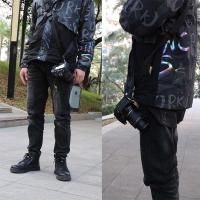
When it comes to carrying your camera securely and conveniently, understanding how to properly attach the straps is essential. Camera straps are not only functional in terms of portability but also crucial for safety, preventing accidental drops. Whether you're using a DSLR, mirrorless, or a compact camera, the method of attaching the strap tends to remain consistent across different models and brands. This article will provide a detailed guide on how to put straps on your camera, addressing practical challenges and ensuring optimal usage of your camera.
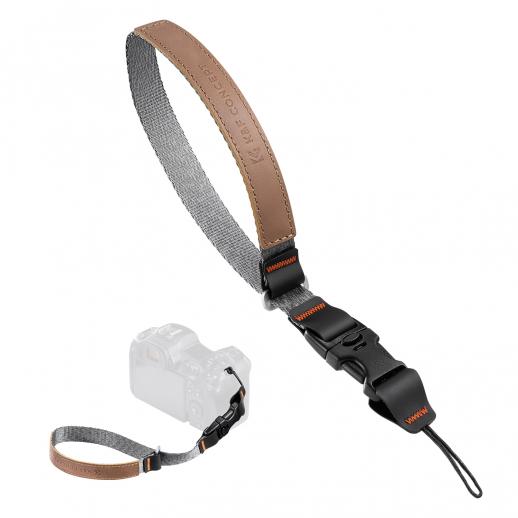

Choosing the Right Strap

Before diving into the process of attaching a strap, it's essential to choose one that suits your style of shooting and comfort needs. There are neck straps, wrist straps, and even shoulder straps. Neck straps are the most common and are perfect for all-day shoots, as they distribute the weight of the camera evenly. Wrist straps are more suitable for smaller cameras and casual shooting. Make sure that the strap you choose is compatible with your camera and can handle its weight securely.

Preparing Your Camera and Strap

Ensure that you are working in a clean environment to avoid any dust or particles getting into your camera lens or sensor. Have your camera, its strap, and any necessary tools ready. Most camera straps do not require specialized tools, but some might need small screwdrivers or fasteners.

Attaching the Strap

Step-by-Step Guide:

1. Locate the Strap Eyelets:

Find the strap eyelets on your camera body. These are typically metal or plastic loops situated on the sides of the camera, designed to attach the strap securely.

2. Threading the Strap:

Each strap typically has two ends that need to be threaded through the eyelets. The ends often have adjustable sections with buckles.

- Insert the Strap:

Take one end of the strap and thread it through the eyelet from the outside in. Pull a few inches of the strap through.

- Thread Through the Buckle:

Most camera straps come with a buckle to adjust the length. Thread the loose end of the strap through the bottom of the buckle. Then, pull it back over the crossbar and down through the top part of the buckle to secure it. This process creates a loop around the eyelet and fastens the strap securely in place.

- Repeat for the Other Side:

Repeat the same steps for the other side of the camera. Make sure to keep the strap untangled during threading to avoid any twists, as these can cause discomfort and instability.

3. Adjust the Length:

Once both sides of the strap are attached securely, adjust the length of the strap to fit your desired comfort level. Ensure that it is neither too loose nor too tight to avoid strain or accidental drops.

4. Check the Security:

After attaching the strap, give it a few tugs to ensure it is secured tightly. The strap should not come off the eyelets or buckle when pulled. This step is crucial for the safety of your camera.

Using Quick Release Systems

For those who frequently attach and detach their camera strap, a quick-release system can be extremely helpful. These systems usually involve small metal or plastic clips that can be easily attached and detached from the camera eyelets, providing flexibility and speed.

Attaching a Quick Release System:

1. Attach the Clips:

First, thread the small clip or anchor link through the camera eyelet. This clip stays on the camera body and acts as the connection point for the camera strap.

2. Connect the Strap:

Attach the main strap to the clip or anchor link. Most quick-release systems have a simple push-and-click mechanism that ensures a secure connection.

3. Detaching When Needed:

To detach, simply press the release button or mechanism to disconnect the strap from the camera eyelet.

Maintaining Your Camera Strap

Routine maintenance of your camera strap can ensure its longevity and reliability. Inspect the strap regularly for any signs of wear and tear such as fraying or weakening at the eyelets and buckles. Clean the strap using a damp cloth and mild soap if it gets dirty; avoid using harsh chemicals that could degrade the material. If you frequently use the strap in rugged conditions, consider replacing it every couple of years to ensure optimal safety and comfort.

Troubleshooting Common Issues

Strap Too Short/Long:

If you find that the strap length is not optimal, most straps come with an adjustable feature. Utilize the buckle to shift to an appropriate length. If the strap itself is inherently too short or too long, consider purchasing a different strap that better fits your body size and usage style.

Uncomfortable Strap:

Some straps may feel rough or too narrow, causing discomfort. In such cases, you can use additional padding or consider straps made from softer, wider materials designed for long-term use.

Loose Buckle:

Sometimes the buckle may slip, altering the strap length unpredictably. If this happens, check the threading through the buckle to ensure it's done correctly. If the buckle itself is faulty, replacing it might be necessary.

Attaching a camera strap might seem like a mundane task, but doing it correctly is critical for your camera’s safety and your comfort. By following the above steps and selecting the right type of strap for your needs, you can ensure that your camera is both secure and readily accessible whenever you need it. Whether you're a professional photographer or a casual shutterbug, understanding how to properly attach and maintain your camera strap can lead to a more enjoyable and worry-free shooting experience.

Remember, the key to effective strap usage lies not just in the initial attachment but also in regular maintenance and adjustments. With the correct approach, your camera strap will serve as a reliable companion throughout countless photography adventures.

Leave your comment
Cancel reply
Note: HTML is not translated!
Related products
Variable ND2-32 Filter Compatible with DJI Osmo Action 5 Pro/Osmo Action 4/Osmo Action 3, Snap-on Installation, no need to remove the original filter
$24.99
Variable ND32-512 Filter Compatible with DJI Osmo Action 5 Pro//Osmo Action 4/Osmo Action 3, Snap-on Installation, no need to remove the original filter
$24.99
Variable ND2-32 & ND32-512 Filter Kit Compatible with DJI Osmo Action 5 Pro/Osmo Action 4/Osmo Action 3, Snap-on Installation, no need to remove the original filter
$44.99
ND2-32 & PL & Black Mist 1/4 Filter Kit Compatible with DJI Osmo Action 5 Pro/Osmo Action 4/Osmo Action 3, Snap-on Installation, no need to remove the original filter
$49.99
67mm Clip-on CPL Phone Camera Lens Filter Kit Applicable to All Mobile Phone Models
24
$18.99
67mm Clip-on ND2-32 Phone Camera Lens Filter Kit Applicable to All Mobile Phone Models
24
$37.99
K&F Concept PL-60B 60W COB Photography light with Built-in 4500mAh Battery, supports Type-C PD Fast Charging, 12 Light Effects,  Video Light for Shooting on The Move with Handle and Storage Bag
K&F Concept PL-60B 60W COB Photography light with Built-in 4500mAh Battery, supports Type-C PD Fast Charging, 12 Light Effects, Video Light for Shooting on The Move with Handle and Storage Bag
41
$129.99
67mm Clip-on Black Mist 1/4 Phone Camera Lens Filter Kit Applicable to All Mobile Phone Models
24
$29.99
52mm Clip-on CPL Phone Camera Lens Filter Kit, Circular Polarizer Polarizing Filter Applicable to All Mobile Phone Models
24
$16.99
Products You May Like
Video Camera with 5K Videos, 10X Optical Zoom, Dual Batteries, WiFi Transfer, Remote Control, 6-axis Stabilization, Kentfaith
15
$287.49 $199.99
49mm-82mm Magnetic Lens Filter Adapter Ring
8
$22.99
78"/198cm Aluminum Camera Tripod, 3-section Central Axis Travel Tripod with 32mm Metal Ball Head Load Capacity 26.4lbs/12KG, Suitable for DSLR Cameras
81
$199.99 $89.99
52mm Lens Filter Kit Neutral Density ND4+UV+Circular Polarizing (CPL) Lens Filter with Cleaning Pen & Filter Pouch for DSLR Cameras
4
$39.99 $19.99
trail cameras with wifi
10
$135.99 $106.99
Smart CO2 Detector, Indoor Air Quality Monitor, NDIR Sensor Carbon Dioxide Detector, Temperature Humidity Air Tester for CO2 Alarm
22
$119.99 $89.99
82mm  HD Soft GND8 Lens Filter 3 Stop (0.9) Soft Graduated Neutral Density Filter K&F Concept Nano-Xcel Series
82mm HD Soft GND8 Lens Filter 3 Stop (0.9) Soft Graduated Neutral Density Filter K&F Concept Nano-Xcel Series
82
$78.99 $69.99
67mm Variable ND3-ND1000 ND Filter (1.5-10 Stops) Neutral Density Lens Filter with 24 Multi-Layer Coatings for Camera Lens Nano-Dazzle
48
$62.99 $49.99
D2 HD 1080P multi-function clip-on camera, body-worn camera with MP3, infrared night vision, recording function, support screen recording, suitable for sports, home, office
$29.99
Drone Filter DJI Mavic 4 Pro Filter Kit 3pcs (CPL+ND8+ND16) Multi Coated HD Optical Glass/Aluminum Frame
14
$44.99
Related articles
How To Fix The Straps On A Camera?
How To Make Camera Wrist Straps?
How To Make Custom Camera Straps?
How To Use Camera Hand Straps?
How To Put A Camera Lens On?
How To Put On Fuji Camera Strap?
How To Put Camera On Ring Light?
How To Put The Battery In My Camera?
How To Put On A Mirrorless Camera Strap?
Camera Bag That Can Hold Cameras And Books?
Blog You May Like
How To Connect Geeni Camera To New Wifi?
How To Password Protect A Memory Card?
Camera Backpack That You Can Check Flying?
How To Calculate Telescope Magnification?
What Is A Selfie Stick Made Of?
Baby Monitors You Can Use With Your Phone?
Where To Find Metal Detectors?
How To Use Your Mobile Camera As PC Webcam Discord?
How To Fix Camera Battery?
Can You Talk On A Smart Watch?
Related categories
On-Dash Camera digital camera strap flash the camera C mount lens adapter m4/3 adapter Camera Parts | Studio Camera Accessories streaming video camera digital camera for beginner Solar Cellular Trail Camera
Popular products
the wrist strap cam trail camera the quarry trail camera the hunting public trail camera motion trail camera Led Cob Light camera tripod pan head black camera straps
Related searches
Camera Straps Moment Camera Straps Camera Bag Straps Recommended Camera Straps Game Camera Straps Straps For Camera Camera Neck Straps On The Ear Wireless Headphones Camera Bags And Straps Best Trail Cameras On The Market
Popular searches
Update Lens Mount Adapter Nettar-anastigmat 1.1cm Lens Adapted Contax Zeiss Lens Mount C-mount Movie Lens To Canon Eos Sony A7s 4k Adapter Tokina 11-16mm F/2.8 Sony E Mount Smart Battery Camera 400mm K Mount Lens Lens Filter Nikon D3100 Large Camera Bag
Blog Category
  • Activities
  • Guide
    • Filter Guide
    • Lens Adapter
    • Product Review
  • News & Reviews
    • Camera Reviews
    • Sample Gallery
    • News
  • Tutorials
    • Solar eclipse photography
    • Photography Basics
    • Landscape Photography
  • Inspiration
    • Travel
    • Travel Stories
Search Article
Latest from the Blog
How Much Storage For Security Camera?
What Is Nd Filter On Video Camera?
What Tripod To Buy?
What Power Binoculars For Long Distance Viewing?
How To Remove Memory Card From Nikon Camera?
How Many Stops Is An Nd 8 Filter?
UV Filter: Everything You Need to Know About UV Protection Lens Filters
Where Can I Find Hidden Cameras?
What Is A Good Quality Dash Cam?
How To Wear Monocular?
  • Easy Payment Multilple Payment Options

  • Free Shipping Global WareHouse Shipment

  • No Risk 30-Day No Reason Return

  • Limited Deals Buy More, Save More

  • Tax Free No any surcharges or tax fee

Information
  • About us
  • Contact Us
  • Site Map
  • Blog
  • Video
  • Gallery
  • VIP Membership Rewards
Service
  • Privacy Policy
  • Terms & Conditions
  • Shipping & Delivery
  • Payment Info
  • Warranty, Return & Refund
  • Intellectual Property Rights
  • Ambassador
  • Affiliates
  • Wholesale
Support
  • My account
  • Order History
  • FAQs
  • Extend Warranty
  • Logistics Tracking
Follow us
NewsLetter

Get the latest product, K&F Concept respects your privacy.

Powered By KENTFAITH © 2025