How To Buy A Flash For Your Camera?
who this is for
a camera flash, or speedlight, as it’s more often called, gives you more control over the scene you’re trying to shoot. if you’ve ever been let down by the look of a photo because the light wasn’t great that day, a flash can help.
- with a flash or two, you can light almost any subject or scene.
- even when you’re shooting outside, using a flash can still come in handy for filling in shadows or helping to separate the subject from the background.
- regardless, working with speedlights is a great skill to have in your photography toolkit, even if you prefer to shoot using only natural light.
on-camera flash vs. in-camera flash
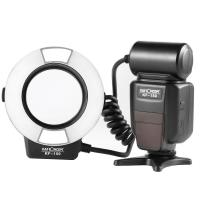
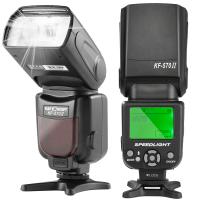
an on-camera flash is, quite simply, a type of strobe light that connects directly to your camera. while it is “on-camera” by name, this type of flash can be used interchangeably on or off-camera, affording users greater control and better lighting options. these lights notably have their own power supply, and many can accommodate external power sources to improve their overall performance.
- while that in-camera flash might suffice for illuminating a dark environment, it is less than ideal to have your flash pointed squarely at the scene at hand.
- because the built-in flash is stationary, you cannot control or direct it by angling or bouncing the flash off different surfaces, resulting in a final result that isn't quite what you envisioned.
- additionally, its location near the camera lens often produces the red-eye effect when photographing subjects in dimly lit conditions.
- by contrast, on-camera flashes can be tilted and swiveled, or taken off the camera completely for a more aesthetically pleasing effect.
basic features a camera flash should have
when you’re buying anything, not just a camera flash, you should look for a high-quality warranty program, a reliable company, and dependable customer service.
- manual mode: “the manual function is most often used by professional photographers” because it gives you precise control over the speedlight, said alex yuan of the school of visual arts.
- a variety of zoom settings: the zoom setting controls the spread of light that the flash emits so that it matches the focal length of the lens.
- that is, it either concentrates the light into a narrower beam for longer focal lengths or disperses the light to cover a wider area for shorter focal lengths.
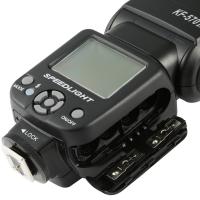
- a large screen with plenty of buttons: we favor a speedlight with a screen larger than 2 inches wide and more than two or three buttons.
- a flash with more buttons is likely to offer dedicated buttons for the most used and needed settings for ease of access, and navigating the settings menus of such a flash is faster.
- this feature is especially important for people who have dexterity issues or have trouble seeing tiny fonts.
does it work with your camera?
doing a simple search for “camera flash” yields hundreds of results, and while nearly all of them would physically fit in the hot shoe of your camera (the small metal bracket on top), you need one that can exchange information with your particular brand of camera.
- of course, you will want a flash that is compatible with your camera, especially when dealing with ttl.
- you will also want to get a flash that is proportional to your camera in size and weight.
- other factors, like triggering methods and overall build quality, will determine whether an on-camera flash will be a worthy long-term lighting solution.
- if you plan to work outside, you might want to get a weather-sealed flash that will withstand adverse conditions.
ttl flash metering
ttl, which stands for “through the lens.” in this mode, the camera’s metering system judges the light coming through the lens to make sure you’re using the right amount of flash for the picture you’re taking.
- ttl is helpful when you’re just getting started because it does a lot of the “thinking” for you.
- “we can consider it kind of an auto function,” said yuan.
- you set the camera’s shutter speed and/or aperture according to how you want it, and the camera increases or decreases the flash output accordingly to ensure that the picture still comes out well lit.
- automatic in-camera calculation of flash metering is usually done using a ttl, or through-the-lens method.
- this method of determining proper flash exposure is very similar to how a camera’s exposure meter works, but it accounts for more variables, including flash power and subject distance when used with a compatible lens.
- overall, ttl flash metering avoids much of the guesswork and experimentation you can expect when working with a manual flash.
guide numbers, manual usage, controlling flash power, and sync speeds
in general, understanding how to control an on-camera flash manually is the easiest way to integrate this nifty little gadget into your workflow. while auto-exposure metering is available and useful for determining the best exposure settings, you should know the ins and outs of your flash to truly make the most of it.
- we will start with guide numbers, which are the standardized quantification of a flash’s power, with a higher guide number representing a more powerful flash.
- a guide number is the product of multiplying the f/stop of an exposure with a given distance, at iso 100; or gn = f/number x distance.
- of course, these examples assume that you are using your flash at full power.
- you might opt to control the flash output of your strobe in increments to reserve your battery life, achieve faster recycle times, or to attune your exposure when working in closer situations.
- it bears mentioning that, when working with a flash, controlling your exposure in-camera should only be done by modifying your aperture.
- this brings us to sync speed, which is the fastest recommended speed at which your camera can record an image when using flash.
- if you make an exposure faster than the sync speed while using flash, the shutter will likely not have enough time to clear the image path, resulting in a partially blocked or blacked-out image.
can you tilt and swivel the flash head?
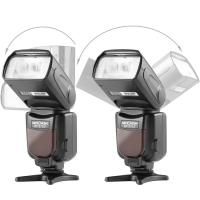
we’ve mentioned flexibility as one of the main draws of an on-camera flash, in part because they can be adjusted and moved around. while there are stationary flash heads, they offer little outside of compactness over their adjustable counterparts. rotating and tilting are the most common adjustments you can expect from an adjustable flash head, providing better control and variety to achieve your desired lighting effect.
- light that is pointed directly at your subject tends to be harsh, producing deep shadows and a steep, undesirable light fall-off.
- with an adjustable flash head, you can tilt or rotate your light to bounce off a nearby wall or the ceiling, broadening its directional quality and softening the overall cast.
- you can enhance this effect with flash accessories like light modifiers and bounce cards, but more on that later.
- get a flash like this that can angle up, or rotate left and right.
wireless control
wireless control allows you to place the speedlight away from your camera, creating off-camera lighting setups. wireless flash control comes in two forms:
- infrared: this technology works by emitting a beam of infrared light that is picked up by a receiver built into a flash.
- it is the less expensive of the two approaches and is often built into midlevel flash units such as the models we suggest above.
- but it isn’t as versatile as radio because it requires the receiver to be in a location where the infrared signal reaches it.
- radio: radio signals can pass through walls and other objects, which gives you more freedom in where you place the flashes you want to control.
- you pay more for radio flash control—exactly how much more varies from one manufacturer to the next—so consider whether the benefits are worth it to you before shelling out the cash.
- both types of flash control require either a flash mounted on your camera that can control the other flashes or a remote controller that tells the off-camera flashes what to do.
- the remote is another expense that you should keep in mind if you want wireless control.
wired flash control
- while mounting is great, on-camera flashes are especially flexible because they can function apart from your camera.
- using either a wired or wireless connection, you can deploy an on-camera flash pointing in any direction or angle you wish.
- a wired connection requires a sync cord between your flash and your camera, typically via your camera’s pc sync socket or an adapter.
- while some flashes support more standardized connections like a household plug or a sub-mini jack, others require their own proprietary connection, so take care to ensure everything is compatible.
- cables for a wired connection vary in length and design, so it is best to assess your off-camera configuration first before buying one.
- you might want a shorter cable if you don’t plan to stray too far from your camera, or a longer cable to allow more distance.
- other accessories, like stands and flash brackets, make using your flash off-camera easier when you don’t want to hold it in your hand.
additional battery power
earlier, we mentioned how on-camera flashes benefit from having a self-contained power source, usually aa batteries. by contrast, your typical portable strobe pack might require batteries that weigh upward of 20 lb. the real tradeoff here is power―with flash consuming more than your regular batteries can dish out.
- because of this, you might opt for an external battery pack, especially if you use flash on a regular basis.
- in addition to longer battery life, battery packs often enable faster recycling times, allowing you to fire your flash rapidly with less time between bursts.
- auxiliary battery packs, which connect to your flash via a dedicated cable, tend to be compact enough to carry in your pocket.
- if you really plan to put your on-camera flash to work, you might look at higher-end flashes that will support the use of an external battery pack, since they are designed with longer shooting times and more strenuous conditions in mind.
modeling light
- with a modeling light (sometimes called an led video light), you can visualize where and how the light is hitting your subject before taking the photo.
- “it’s not the real flash itself, just kind of a continuous light bulb built in,” said yuan.
- using it can help you take fewer photos and therefore streamline post-production, but the trade-off is that it will eat through your batteries faster.
flash accessories and light modifiers
there are many ways to outfit your on-camera flash to achieve your desired lighting effect.
- diffusers are one of the most common types of light modifiers, available in bounce, flat, dome, or wide-angle styles.
- by placing a translucent box or substrate in front of your flash, a diffuser will soften and spread the light more evenly than an undiffused flash head.
- mini softboxes are a smaller version of a softbox designed for an on-camera flash.
- this accessory enlarges and softens your light source, lessening the intensity of shadows and producing a more wrapped-light quality.
- bounce cards function as reflectors, producing a larger, softer light effect much like bouncing your flash off a ceiling or wall.
- many flashes feature a built-in bounce card that slides out over the flash head, blocking light from spilling in all directions.
- color filters and gels are applied over your flash head to alter your light’s color.
- they are useful when working under mixed lighting, such as fluorescent or tungsten-lit rooms, by getting closer to the room’s approximate color temperature for more balanced lighting.
price
- you do not have to spend hundreds of dollars on a flash either.
- if you opt for a brand name one to match your camera (i.e. canon, nikon, etc.) you’ll pay a lot more than if you go for a third-party one.
- if you include all of the above essential features, you end up spending around $250 for a third-party designed flash or $350 for a flash from your camera’s manufacturer.
- anything more than that, and you’re likely paying for features you don’t need; anything less, and you’ll probably outgrow the camera flash too quickly.