What Is The Best Surveillance Camera For Home?
When it comes to home security, choosing the best surveillance camera can be a daunting task. With the plethora of options available in the market, each boasting unique features and specifications, it’s easy to feel overwhelmed. However, understanding your specific needs and the key features to look for in a surveillance camera can simplify the decision-making process. In this article, we’ll explore the essential factors to consider when selecting a home surveillance camera, highlight some of the top options available, and provide practical advice to help you make an informed choice.
Key Features to Consider in a Home Surveillance Camera

Before diving into specific camera recommendations, it’s important to understand the features that matter most when it comes to home surveillance. Here are the key aspects to evaluate:
1. Video Quality

The clarity of the footage is crucial for identifying faces, license plates, or other details. Look for cameras that offer at least 1080p resolution. Some high-end models even provide 2K or 4K resolution for ultra-clear video.
2. Field of View

The field of view determines how much area the camera can cover. A wider field of view (e.g., 120° or more) is ideal for monitoring large spaces, while a narrower field of view may suffice for smaller areas.
3. Night Vision
Since many security incidents occur at night, a camera with good night vision is essential. Infrared (IR) LEDs or color night vision technology can enhance visibility in low-light conditions.
4. Motion Detection
Motion detection alerts you to activity in the camera’s field of view. Advanced models offer customizable motion zones and sensitivity settings to reduce false alarms caused by pets, wind, or other non-threatening movements.
5. Two-Way Audio
Two-way audio allows you to communicate with people near the camera, such as delivery personnel or visitors. This feature is particularly useful for doorbell cameras.
6. Storage Options
Surveillance cameras typically offer two types of storage: local (via SD card or hard drive) and cloud storage. Local storage is cost-effective, while cloud storage provides remote access and backup in case the camera is damaged or stolen.
7. Connectivity
Wi-Fi-enabled cameras are the most common, but some models also offer Ethernet or cellular connectivity for more reliable performance. Ensure the camera is compatible with your home network.
8. Smart Home Integration
If you use smart home devices like Amazon Alexa, Google Assistant, or Apple HomeKit, choose a camera that integrates seamlessly with your ecosystem.
9. Power Source
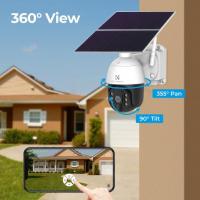
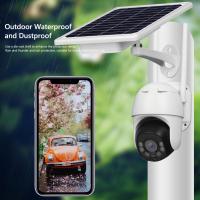
Surveillance cameras can be wired, battery-powered, or solar-powered. Battery-powered cameras offer flexibility in placement, while wired cameras provide consistent power without the need for recharging.
10. Durability
For outdoor cameras, weather resistance is a must. Look for cameras with an IP rating (e.g., IP65 or higher) to ensure they can withstand rain, snow, and extreme temperatures.
Top Surveillance Cameras for Home Use
Based on the above criteria, here are some of the best surveillance cameras currently available for home security:
1. Arlo Pro 4
The Arlo Pro 4 is a versatile, high-performance camera that offers 2K video resolution, a 160° field of view, and color night vision. It’s wireless and battery-powered, making it easy to install anywhere. The camera also supports two-way audio and integrates with Alexa, Google Assistant, and Apple HomeKit. While it requires a subscription for cloud storage, the advanced features and reliable performance make it a top choice.
2. Ring Stick Up Cam Battery
The Ring Stick Up Cam Battery is an excellent option for those already using Ring products. It offers 1080p video, motion detection, and two-way audio. The camera is battery-powered, weather-resistant, and can be used indoors or outdoors. It integrates seamlessly with the Ring app and Alexa, but like Arlo, it requires a subscription for cloud storage.
3. Google Nest Cam (Battery)
The Google Nest Cam is a smart, battery-powered camera that offers 1080p video, night vision, and intelligent motion detection. It can differentiate between people, animals, and vehicles, reducing false alerts. The camera integrates well with Google Assistant and offers free event video history for up to three hours, with additional storage available via subscription.
4. EufyCam 2C Pro
The EufyCam 2C Pro is a budget-friendly option that doesn’t skimp on features. It offers 2K video resolution, a 135° field of view, and color night vision. The camera is wireless, weather-resistant, and includes local storage, eliminating the need for a subscription. It also supports two-way audio and integrates with Alexa and Google Assistant.
5. Wyze Cam v3
For those on a tight budget, the Wyze Cam v3 is a fantastic choice. Despite its low price, it offers 1080p video, color night vision, and motion detection. The camera is weather-resistant and supports local storage via microSD card. While it lacks some advanced features, it’s an excellent entry-level option for basic home security.
6. Reolink Argus 3 Pro
The Reolink Argus 3 Pro is another affordable option that offers 2K video resolution, a 122° field of view, and color night vision. It’s battery-powered and supports both local and cloud storage. The camera also features two-way audio and integrates with Alexa and Google Assistant.
How to Choose the Right Camera for Your Needs
With so many excellent options available, how do you decide which camera is right for you? Here are some tips to help you narrow down your choices:
1. Assess Your Security Needs
Consider the areas you want to monitor and the specific features you need. For example, if you want to monitor your front door, a doorbell camera with two-way audio might be ideal. For large outdoor areas, look for a camera with a wide field of view and weather resistance.
2. Set a Budget
Surveillance cameras range from under $50 to several hundred dollars. Determine how much you’re willing to spend and prioritize features that matter most to you.
3. Check Compatibility
If you already use smart home devices, ensure the camera you choose is compatible with your existing ecosystem. This will allow you to control the camera and receive alerts through your preferred platform.
4. Consider Installation
Some cameras are easier to install than others. If you’re not comfortable with wiring, opt for a wireless, battery-powered model. For a more permanent solution, consider a wired camera.
5. Evaluate Storage Options
Decide whether you prefer local storage, cloud storage, or a combination of both. Keep in mind that cloud storage often requires a subscription, so factor this into your budget.
6. Read Reviews
Before making a purchase, read customer reviews and expert opinions to get a sense of the camera’s performance, reliability, and ease of use.
Choosing the best surveillance camera for your home involves balancing your security needs, budget, and desired features. Whether you opt for a high-end model like the Arlo Pro 4 or a budget-friendly option like the Wyze Cam v3, the key is to select a camera that provides reliable performance and peace of mind. By considering factors such as video quality, night vision, motion detection, and storage options, you can find a camera that meets your specific requirements and enhances the safety of your home.