Outdoor Surveillance Cameras Which Work With Cloud?
Outdoor surveillance cameras that work with cloud storage have become an essential tool for homeowners and businesses alike. These devices offer a seamless way to monitor properties, ensuring safety and security while providing the convenience of remote access and storage. With the growing demand for smart home technology and the increasing need for reliable security solutions, cloud-enabled outdoor cameras are now more popular than ever. However, choosing the right camera can be a daunting task, given the variety of features, brands, and price points available. This article will guide you through the key considerations, benefits, and practical tips for selecting the best outdoor surveillance cameras that integrate with cloud storage.
Why Choose Cloud-Enabled Outdoor Surveillance Cameras?
Cloud-enabled outdoor surveillance cameras offer several advantages over traditional systems that rely on local storage or closed-circuit setups. Here are some of the key benefits:
1. Remote Access and Monitoring: With cloud integration, you can access live feeds and recorded footage from anywhere in the world using a smartphone, tablet, or computer. This is particularly useful for frequent travelers or those managing multiple properties.
2. Secure Storage: Cloud storage eliminates the risk of losing footage due to theft or damage to local storage devices like SD cards or DVRs. Even if the camera is tampered with, your recordings remain safe in the cloud.
3. Scalability: Cloud-based systems allow you to easily add more cameras to your setup without worrying about storage limitations. This is ideal for growing businesses or expanding home security needs.
4. Smart Features: Many cloud-enabled cameras come with advanced features like motion detection, facial recognition, and integration with smart home ecosystems. These features enhance the overall functionality and convenience of the system.
5. Automatic Updates: Cloud-connected cameras often receive firmware updates automatically, ensuring that your device stays up-to-date with the latest security patches and features.
Key Features to Look for in Cloud-Enabled Outdoor Cameras
When selecting an outdoor surveillance camera that works with cloud storage, it’s important to consider the following features:
1. Video Quality
The resolution of the camera plays a crucial role in capturing clear and detailed footage. Look for cameras with at least 1080p Full HD resolution. For even better clarity, especially for larger properties, consider 2K or 4K cameras.
2. Weather Resistance
Since these cameras are installed outdoors, they must be able to withstand various weather conditions. Check for an IP (Ingress Protection) rating of at least IP65, which ensures protection against dust and water.
3. Night Vision
Good night vision is essential for 24/7 surveillance. Infrared (IR) LEDs or color night vision capabilities can help capture clear footage even in low-light conditions.
4. Motion Detection and Alerts
Advanced motion detection can differentiate between humans, animals, and other moving objects, reducing false alarms. Real-time alerts sent to your smartphone can help you respond quickly to potential threats.
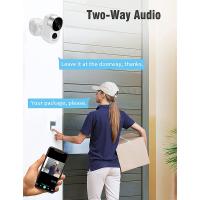
5. Two-Way Audio
Two-way audio allows you to communicate with visitors or deter intruders through the camera. This feature is particularly useful for front door or driveway cameras.
6. Cloud Storage Plans
Different cameras offer varying cloud storage options. Some provide free storage for a limited period or limited footage, while others require a subscription for extended storage and advanced features. Evaluate the cost and terms of the cloud storage plan before making a decision.
7. Power Source
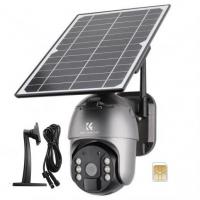
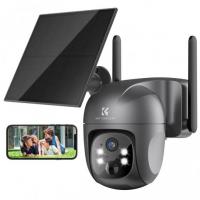
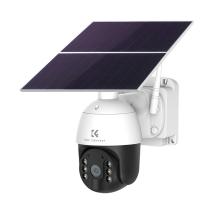
Outdoor cameras can be wired, battery-powered, or solar-powered. Choose a power source that aligns with your installation preferences and maintenance capabilities.
8. Integration with Smart Home Systems
If you already use smart home devices, look for cameras that are compatible with platforms like Amazon Alexa, Google Assistant, or Apple HomeKit. This allows for seamless integration and voice control.
Popular Cloud-Enabled Outdoor Surveillance Cameras
Here are some of the top-rated outdoor surveillance cameras that work with cloud storage:
1. Arlo Pro 4
- Features: 2K resolution, color night vision, two-way audio, and compatibility with Alexa and Google Assistant.
- Cloud Storage: Offers a free trial of Arlo Secure, with subscription plans for extended storage and advanced features.
2. Ring Spotlight Cam
- Features: 1080p resolution, built-in spotlight, motion-activated alerts, and two-way audio.
- Cloud Storage: Requires a Ring Protect subscription for cloud storage and video history.
3. Google Nest Cam (Battery)
- Features: 1080p resolution, intelligent alerts, and integration with Google Home.
- Cloud Storage: Includes free event video history for three hours; Nest Aware subscription required for extended storage.
4. EufyCam 2C
- Features: 1080p resolution, 180-day battery life, and local storage with optional cloud storage.
- Cloud Storage: Offers optional cloud storage plans, but local storage is free and secure.
5. Reolink Argus 3 Pro
- Features: 2K resolution, solar power option, and smart motion detection.
- Cloud Storage: Free basic cloud plan available, with paid plans for additional storage.
Practical Tips for Installation and Maintenance

Once you’ve selected the right camera, proper installation and maintenance are crucial for optimal performance. Here are some tips:
1. Choose the Right Location: Install the camera at a height of 8-10 feet for a wide field of view and to prevent tampering. Ensure it covers entry points like doors, windows, and driveways.
2. Optimize Wi-Fi Connectivity: A strong and stable Wi-Fi connection is essential for cloud-enabled cameras. Consider using a Wi-Fi extender if the camera is installed far from the router.
3. Secure the Camera: Use mounting brackets and screws to secure the camera firmly. For added security, consider using anti-theft mounts.
4. Regularly Check the Footage: Periodically review the footage to ensure the camera is functioning correctly and capturing clear images.
5. Update Firmware: Keep the camera’s firmware updated to benefit from the latest features and security enhancements.
6. Clean the Lens: Dust, dirt, and water droplets can obstruct the camera’s view. Clean the lens regularly with a soft, dry cloth.
Addressing Common Concerns
1. Privacy
Some users worry about the privacy implications of cloud storage. To address this, choose a camera from a reputable brand that offers end-to-end encryption and robust data protection measures.
2. Subscription Costs
While cloud storage subscriptions can add to the overall cost, many cameras offer free basic plans or local storage options. Evaluate your needs and choose a plan that provides the best value.
3. Power Outages
Battery-powered or solar-powered cameras can continue functioning during power outages, ensuring uninterrupted surveillance.
Cloud-enabled outdoor surveillance cameras are a powerful tool for enhancing security and peace of mind. By offering remote access, secure storage, and advanced features, these devices cater to a wide range of user needs. When choosing a camera, consider factors like video quality, weather resistance, and cloud storage options to find the best fit for your requirements. With proper installation and maintenance, these cameras can provide reliable and long-lasting security for your home or business. Whether you’re a tech-savvy homeowner or a business owner looking to safeguard your property, investing in a cloud-enabled outdoor surveillance camera is a smart and practical choice.