How To Charge Camera With Battery Inside It?
Charging a Camera with the Battery Inside: A Comprehensive Guide
When it comes to using a camera, one of the fundamental aspects every photographer or videographer must understand is how to correctly charge the device. Whether you're a beginner capturing family moments or a professional taking breathtaking shots in extreme conditions, ensuring your camera battery is always charged and ready is essential to uninterrupted shooting. This guide provides clarity and detailed practical steps for charging your camera with the battery inside it.
Why Charge with the Battery Inside?

In the camera industry, technological advancements have made charging more efficient and user-friendly. Most modern cameras are equipped with built-in charging capabilities that allow you to recharge the battery without removing it. This feature is beneficial for several reasons:
Convenience: You can charge the camera without having to fiddle with the battery compartment.
Portability: It decreases the chance of losing batteries when you're on the go.
Extended Battery Life: Reducing the frequency of removing and inserting the battery minimizes wear and tear on the contacts.
Simplified Workflow: If you're charging the device directly, you’re less likely to interrupt a project or workflow.
Let’s take a closer look at how you can effectively charge your camera with the battery still inside.
Step-by-Step Guide to Charging Your Camera Battery Inside the Camera

The process of charging a camera while leaving the battery inside is generally straightforward. However, it does require adherence to correct procedures to avoid any damage, maximize battery life, and prevent inconvenient interruptions.
Step 1: Check Your Camera Model for Compatibility

Not all cameras support this feature. While most modern DSLR, mirrorless, and compact cameras include an in-camera USB or USB-C charging option, others may require you to remove the battery and use an external charger. To check whether your device supports in-camera charging, refer to your camera’s user manual or look for the following indicators:
- An onboard USB port marked with a charging icon.
- Manufacturer confirmation of in-camera charging in the product specifications.
Cameras from brands like Sony, Canon, Nikon, Panasonic, and Fujifilm often support in-camera charging for their recent models.
Step 2: Choose the Right Charging Cable

Different cameras have varying charging cable requirements, such as USB-A, Micro-USB, or USB-C. Using the wrong cable or a poorly made third-party alternative can damage the internal charging circuitry. Ideally, stick with the manufacturer-provided cable, or ensure your third-party cable meets the necessary specifications.
- Micro-USB is common in older cameras but supports slower charging speeds.
- USB-C, used in newer cameras, offers faster and more reliable connections for both charging and data transfers.
Step 3: Connect to a Power Source
Once you’ve selected the correct charging cable, connect it to an appropriate power source. Here are common options:
1. Wall Adapter: Use a wall adapter plugged into a standard electrical outlet. Several cameras require specific power delivery (PD) levels, so be sure the adapter meets the manufacturer recommendation for voltage and amperage.
2. Power Bank: For photographers on the go, portable power banks are a lifesaver. They let you charge your camera in remote locations where power outlets aren’t accessible.
3. Laptop or Desktop Computer: Charging via a computer’s USB port is also possible, though it tends to be slower compared to other options.
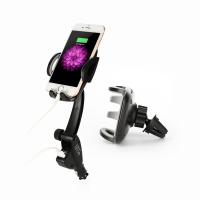
4. Car Chargers: For travel photographers, car chargers can keep your gear powered up while on the road.
Step 4: Monitor the Camera Status
Once connected to the power source, the camera should indicate that charging is in progress. Indicators vary depending on the model, but common signals include:
- A blinking light near the port or on the battery level indicator.
- A battery icon on the camera screen showing a charging animation.
If these indicators don’t appear, make sure the cable is properly connected, and check that your power source is functioning correctly.
Step 5: Maintain Safety During Charging
To protect your camera and battery, observe these guidelines during charging:
Avoid Overcharging: Most modern cameras stop charging automatically once the battery reaches full capacity, but it's still good practice to unplug the device once it is charged.
Charge in a Cool Environment: Excess heat can reduce battery life, so avoid charging your camera in hot or poorly ventilated areas.
Monitor for Faults: If the camera feels unusually hot or fails to charge properly, disconnect it and check for problems.
Step 6: Disconnect and Resume Shooting
Once the battery is charged to full capacity, disconnect the cable from the power supply. This is the best time to plan your next photography session or ensure your camera settings are ready for use. With a fully charged battery, you’re ready to continue capturing stunning images and videos.
Tips for Prolonging Battery Life
While focusing on charging methods, photographers should also adopt good habits to prolong camera battery life. Let’s consider some useful tips:
1. Turn Off the Camera When Not in Use: Cameras left idle still consume battery power.
2. Keep Spare Batteries: If you anticipate a long day of shooting, having at least one or two extra fully charged batteries can save you from interruptions.
3. Avoid Complete Battery Depletion: Lithium-ion batteries, common in modern cameras, perform better when charged before they’re completely depleted.
4. Use ECO Modes or Lower Screen Brightness Settings: Many cameras have energy-saving features to reduce battery drain.
5. Charge Regularly: Leaving batteries discharged for long periods can lead to degradation.
Troubleshooting Common Issues
If your camera or battery is not charging despite following the outlined steps, there could be a number of reasons causing this issue. Below are some possible problems and troubleshooting tips:
Issue: The battery is too old or degraded.
Solution: Consider replacing the battery with a manufacturer-recommended model.
Issue: Faulty or incompatible charging cable.
Solution: Use an original cable or verify that the third-party option is certified.
Issue: Overheating during the charging process.
Solution: Make sure you charge your camera in a cooler, well-ventilated area.
Issue: Power source issues.
Solution: Test an alternate wall adapter, power bank, or USB port.
Final Thoughts
Charging your camera with the battery inside is an incredibly convenient feature that enhances usability and saves time. This functionality, however, requires careful attention to detail—ensuring compatibility, using the correct accessories, and charging properly will help maximize your device’s performance over time.
By following the step-by-step guide outlined here and taking a proactive approach to care for your camera, you can prolong the lifespan of both your camera and its battery. Whether you're preparing for a professional shoot or planning to document your travels, maintaining an effective charging routine ensures your camera is always ready to produce exceptional results.