kfconcept

KENTFAITH
K&F Concept    Blog >

Enjoy Your Selected Digital Life

Recently Viewed
  • Recently Viewed
  • Recently Viewed list is empty.

Compare (0) 0
  • Compare
  • You have not chosen any products to compare.

  • Compare
Currency: USD
  • Currency
Shop by Scene Shop by Rank

Log Into Your Account

Account

Order History

Wish List

Login

Forgotten Password?

Or connect with

Register Account

Already have an Account?Log In

  • Shopping Cart
  • Your shopping cart is empty!

  • Register/Login to purchase, earn points
  • Favorite
  • Your wish list is empty.

  • Register/Login to like, earn points
  • Activities
  • Guide
    • Filter Guide
    • Lens Adapter
    • Product Review
  • News & Reviews
    • Camera Reviews
    • Sample Gallery
    • News
  • Tutorials
    • Solar eclipse photography
    • Photography Basics
    • Landscape Photography
  • Inspiration
    • Travel
    • Travel Stories
  • Home
  • Blog
  • How Do You Have Sound On Screen Record?

How Do You Have Sound On Screen Record?

Kentfaith 2024-10-15 00:55:13 0 Comments

Screen recording has become an essential tool in our digital lives, whether for creating tutorials, capturing online content, or saving video calls. However, while most people find recording the visuals straightforward, capturing audio alongside video often presents a challenge. In this comprehensive guide, we will explore various methods to record sound with your screen recordings across multiple platforms, analyzing best practices to ensure high-quality results.
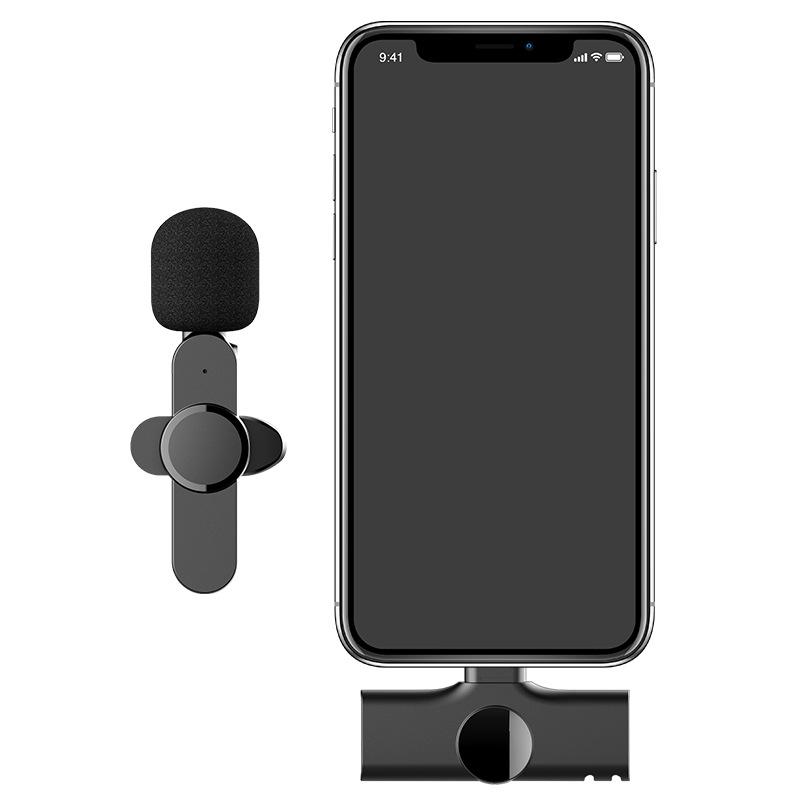

To begin with, let us understand the importance and nuances of screen recording with sound. For educators and content creators, the voice-over or system sound is not just an accessory but an integral part of the media that conveys complete information. Without audio, the context could be lost, leaving the viewer confused or uninterested. Now, let’s dive into practical solutions for capturing sound along with your screen recordings on different devices and operating systems.

Using Built-In Tools

1. Windows 10/11: Xbox Game Bar

Windows 10 and 11 come with an integrated tool named Xbox Game Bar, primarily designed for gamers but equally useful for general screen recording needs:

- Accessing Xbox Game Bar: Use the shortcut `Win + G` to open the Game Bar.

- Starting Recording: Click on the ‘Record’ button or use the shortcut `Win + Alt + R`. Make sure to enable the microphone if you want to capture your voice alongside system sounds.

- Settings: Navigate to Settings > Capture, where you can adjust the audio settings for capturing all system sounds, or just the microphone audio.

2. macOS: QuickTime Player

Mac users can rely on QuickTime Player, a versatile media tool bundled within macOS:

- Recording with QuickTime: Open QuickTime Player and select `File > New Screen Recording`.

- Audio Settings: Click on the arrow next to the record button to select the microphone, ensuring both your voice and system sounds are captured.

- Recording: Press the record button to start and use the same button to end the recording.

Third-Party Software Solutions

When built-in tools do not suffice, third-party applications can provide advanced features and better control over your recordings.

1. OBS Studio (Open Broadcaster Software)

OBS Studio is a free and open-source tool that offers comprehensive screen recording capabilities:

- Installation and Setup: Download OBS Studio from the official website, and follow prompts to install.

- Configuring Audio: In OBS, you can add multiple audio sources, such as your system sound and microphone. Navigate to `Settings > Audio` to configure the sample rate, channels, and other audio properties.

- Scene Setup: Create a new scene and add `Display Capture` to include your screen, and `Audio Input Capture` for capturing your microphone.

- Recording: Start recording by hitting the `Start Recording` button on the OBS interface.

2. Camtasia

Camtasia by TechSmith offers a user-friendly experience with advanced editing features:

- Setup: Install Camtasia and open the application.

- Audio Capture: In the Camtasia Recorder section, ensure both `Record System Audio` and `Record Microphone` are selected.

- Start Recording: Hit the start button, and Camtasia will record both your screen and audio inputs.

Mobile Devices

Both Android and iOS platforms provide methods to record screen activity with sound.

1. Android Devices

Most modern Android devices have built-in screen recording functions:

- Screen Recorder Access: Pull down the notification shade and find the `Screen Recorder` option.

- Audio Settings: Choose if you want to record audio from the microphone, system, or both.

- Recording: Tap the record button. Once finished, stop the recording from the notification shade.

2. iOS Devices

Apple devices running iOS 11 or later include a screen recording feature:

- Enable Screen Recording: Go to `Settings > Control Center > Customize Controls` and add `Screen Recording`.

- Starting Recording: Open the Control Center and long-press the screen recording button to access audio settings.

- Choosing Audio: Select `Microphone Audio On` to record sound and start recording.

Best Practices for High-Quality Audio

Ensuring high-quality sound in your screen recordings requires attention to a few best practices:

- Quiet Environment: Record in a quiet environment to minimize background noise.

- External Microphones: Use an external microphone for better voice quality compared to built-in device microphones.

- System Sound: If you need to capture system sound, close unnecessary applications to avoid unwanted noises or notifications.

- Audio Settings: Use software settings to adjust audio input levels and gain to optimal levels to avoid distortion or clipping.

Final Thoughts

Screen recording with sound is not merely about the tools you use but also how you use them. Whether leveraging built-in utilities or sophisticated third-party software, the goal remains to produce clear and informative content. By following our guide, you can effectively capture both video and audio, enhancing the overall quality and professionalism of your screen recordings. Practice and experimentation with different tools and settings will help you find the perfect balance for your specific needs, ensuring your presentations, tutorials, or shared moments are as engaging and effective as possible.


Leave your comment
Cancel reply
Note: HTML is not translated!
Related products
128G Mini Digital Voice Recorder with Color Screen Bluetooth Call Record 3072kbps Kentfaith
15
$119.99 $83.99
Mini Sound Recorder 128GB 1600H Recording Capacity with 1.4" Screen, Voice Activated Mode Kentfaith
12
$99.99 $79.99
A Camping Lantern That Dances with You, Rechargeable, Telescoping & Compact with Bluetooth Speaker, Emergency Power Bank 14000mAh Battery Kentfaith
116
$199.99 $94.99
Instant Cross-APP Translator Device for Business & Trade, Video Call Translation, Record, & Transcription, Kentfaith AI Translator Devices
12
$124.99 $99.99
Mini Voice Recorder, Sound-activated & Magnetic, 128GB 1600H Capacity with AI Noise Cancelling Kentfaith
13
$94.99 $53.99
5K Video Camera with 75MP Photos, 8X Optical Zoom, WiFi Transfer, Wireless Mic, Dual Batteries, Support PIP Record, Kentfaith
16
$274.99 $239.99
Children’s Entry-Level Metal Detector, High Sensitivity, With LCD Display and Sound Indication, Suitable for Beginners
144
$64.49 $50.99
Indoor security camera, 2.4Ghz WiFi, infrared night vision, human detection, intelligent motion tracking, sound alarm, two-way talk, monitor for babies, pets, elderly, with 64G Memory Card
$49.99
Over Ear Headphones 7.1 Surround Sound Gaming Headset Works with PC, PS4 PRO, Xbox One S, Cell Phone SOMIC Active Noise Canceling with Mic HI-FI USB Jack Game Earphones
23
$65.99
GOPRO 13 Silicone Protective Case Set Screen Protector Lens Film Screen Film Suitable for GOPRO Hero13
$14.99
Products You May Like
82mm Fader ND2-32 (1-5 Stop) Variable ND Lens Filter Neutral Density Filter for Camera Lens NO X Spot Nanotec Ultra-Slim Weather-Sealed
121
$112.99 $89.99
Portable Laser Engraver with 0.05mm Accuracy Protective Cover Engraving Preview 3W Entry Level
$374.99 $262.99
HD 8 X 25 Binocular Waterproof Fogproof for Outdoor Watching
2
$39.99 $25.39
MS03 13''/33cm Phone Tripod Selfie Stick Desktop Stand (Small Size) For Gopro, Action, And Insta Black Orange
$19.99 $14.99
E39 Interface 50W High-Power LED Corn Lamp Bulbs AC85-265V Wide Voltage 3300LM -  Warm White
E39 Interface 50W High-Power LED Corn Lamp Bulbs AC85-265V Wide Voltage 3300LM - Warm White
$29.99
12x42 Professional HD Binoculars with Phone Clip and Tripod Low Light Night Vision Waterproof & Lightweight for Bird Watching Hunting Travel
61
$83.99 $41.99
M9 Pro Wireless Lavalier Microphone Plug-Play Noise Reduction Auto-Sync
40
$29.99
K&F Concept Aluminium Quick Release Plate with Standard 1/4" Screw for Arca Swiss Camera Tripod Ball Head Pack of 2
33
$39.99 $29.99
67mm Black Mist 1/4 and ND2-32 (1-5 Stop) Variable ND Lens Filter 2 in 1 with 28 Multi-Layer Coatings Nano-Xcel Series
36
$106.99 $86.99
Dual-Speaker Bluetooth Headset Waterproof Sports Earbuds LED Power Display
109
$23.99
Related articles
How Do You Get Sound With Screen Record?
How To Make A Screen Record Have Sound?
How Do You Get Sound In Screen Recording?
How To Record Video On Screen With Sound?
How Do I Get Sound On Screen Recording?
Does Screen Record Include Sound?
How To Screen Record Including Sound?
How To Screen Record Internal Sound?
How Do Records Record Sound?
Which Program To Record My Computer Sound?
Blog You May Like
How To Clean Mobile Camera Lens Glass?
How To Install Security Cameras Hidden Outdoors?
How Long Will A Trail Camera Last?
How To Mount Ring Security Camera?
What Is The Use Of Tripod In Camera?
How To Find The Right Camera?
Can You Save Apps On An Sd Card?
What Is 16 Stop Filter In Nd?
Double Filter Camera How It Works?
What Does the ND (Neutral Density) Filter Number Mean and How to Purchase One?
Related categories
On-Dash Camera trail camera with screen Square Filter System soft edge GND filter​ Samsung NX M Mount Adapter nikon z mount lenses special effect lens filter underwater fishing camera
Popular products
Mini Digital Voice Recorder​ best camping rechargeable lantern infrared hd video camera bluetooth stereo earbuds entry level metal detector iphone 15 selfie stick simple golf rangefinder Smart Home Hd Wifi Camera led hidden camera detector Center Pinch Lens Cap
Related searches
Record Wifi Camera Cameras That Record Audio Digital Camera With Screen On Front Best Microphones To Record Vocals Dji Mini 4 Pro Accessories Must Have Sound Recorder Usb Video Sound Recorder Smart Sound Recorder Tiny Sound Recorder Advanced Sound Recorder
Popular searches
Digital Video Microscope Smart Watch For 9 Year Old Camera Backpack Clip Bushnell To Canon Eos Adapter Fujifilm Xa3 Lens Adapter Minolta Srt 101 Lenses Mount Nikon D5200 Wireless Mobile Adapter Tripod Mount Light Canon To Gfx Adapter Longest Focal Length For Sony E Mount
Blog Category
  • Activities
  • Guide
    • Filter Guide
    • Lens Adapter
    • Product Review
  • News & Reviews
    • Camera Reviews
    • Sample Gallery
    • News
  • Tutorials
    • Solar eclipse photography
    • Photography Basics
    • Landscape Photography
  • Inspiration
    • Travel
    • Travel Stories
Search Article
Latest from the Blog
Where Can I Find Hidden Cameras?
How Do Metal Detectors Work? A Complete Guide for Beginners and Pros
How To Find Camera Roll On Iphone 5s?
Best Metal Detector for Kids in 2025
How Much Storage For Security Camera?
How To Find A Good Digital Camera?
How To Fix The Straps On A Camera?
How To Put Sd Card In Camera?
What To Look For In A Dash Cam?
How Do Trail Cameras Work? The Ultimate Guide to Trail Cameras
  • Easy Payment Multilple Payment Options

  • Free Shipping Global WareHouse Shipment

  • No Risk 30-Day No Reason Return

  • Limited Deals Buy More, Save More

  • Tax Free No any surcharges or tax fee

Information
  • About us
  • Contact Us
  • Site Map
  • Blog
  • Video
  • Gallery
  • VIP Membership Rewards
Service
  • Privacy Policy
  • Terms & Conditions
  • Shipping & Delivery
  • Payment Info
  • Warranty, Return & Refund
  • Intellectual Property Rights
  • Ambassador
  • Affiliates
  • Wholesale
Support
  • My account
  • Order History
  • FAQs
  • Extend Warranty
  • Logistics Tracking
Follow us
NewsLetter

Get the latest product, K&F Concept respects your privacy.
Powered By KENTFAITH © 2025