kfconcept

KENTFAITH
K&F Concept    Blog >

Enjoy Your Selected Digital Life

Recently Viewed
  • Recently Viewed
  • Recently Viewed list is empty.

Compare (0) 0
  • Compare
  • You have not chosen any products to compare.

  • Compare
Currency: USD
  • Currency
Shop by Scene Shop by Rank

Log Into Your Account

Account

Order History

Wish List

Login

Forgotten Password?

or connect with

Register Account

Already have an Account?Log In

  • Shopping Cart
  • Your shopping cart is empty!

  • Register/Login to purchase, earn points
  • Favorite
  • Your wish list is empty.

  • Register/Login to like, earn points
  • Activities
  • Guide
    • Filter Guide
    • Lens Adapter
    • Product Review
  • News & Reviews
    • Camera Reviews
    • Sample Gallery
    • News
  • Tutorials
    • Solar eclipse photography
    • Photography Basics
    • Landscape Photography
  • Inspiration
    • Travel
    • Travel Stories
  • Home
  • Blog
  • Where Do You Put Dash Cam?

Where Do You Put Dash Cam?

Kentfaith 2024-09-18 03:53:45 0 Comments

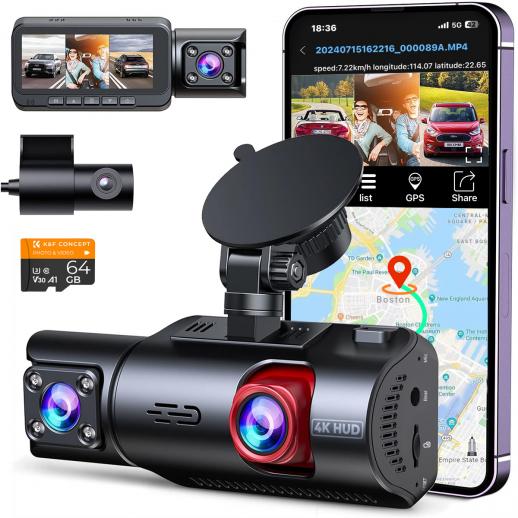
Dash cams, or dashboard cameras, have become increasingly popular among drivers for their ability to record video footage of the road ahead. This footage can be invaluable in the event of an accident, providing clear evidence of what occurred. However, many drivers are unsure about the best place to install their dash cam to ensure optimal performance and compliance with local laws. In this article, we will explore the various considerations for placing a dash cam, including legal requirements, visibility, and technical aspects, to help you make an informed decision.

Legal Considerations

Before installing a dash cam, it's crucial to understand the legal requirements in your area. Different regions have varying laws regarding the placement of dash cams, primarily to ensure they do not obstruct the driver's view. For instance, in some states in the U.S., dash cams must be placed within a specific area of the windshield, often near the rearview mirror, to comply with regulations. Failure to adhere to these laws can result in fines or other penalties.

Optimal Placement for Visibility

The primary purpose of a dash cam is to capture clear and comprehensive footage of the road ahead. Therefore, visibility is a key factor in determining its placement. Here are some common locations and their pros and cons:

1. Behind the Rearview Mirror: This is the most popular and recommended location for a dash cam. Placing the camera behind the rearview mirror ensures it captures a wide field of view without obstructing the driver's line of sight. Additionally, this position is less likely to be noticed by potential thieves.

2. Center of the Windshield: Mounting the dash cam in the center of the windshield can provide a balanced view of both sides of the road. However, this placement may obstruct the driver's view and could be illegal in some jurisdictions.

3. Dashboard: Some drivers prefer to place their dash cam on the dashboard. While this can be a convenient location, it often results in a lower field of view and may capture more of the car's interior than the road.

4. Rear Windshield: For those who want to capture footage from behind the vehicle, a secondary dash cam can be installed on the rear windshield. This can be particularly useful for recording rear-end collisions or incidents involving tailgating.

Technical Considerations

When installing a dash cam, there are several technical aspects to consider to ensure optimal performance:

1. Power Source: Dash cams typically require a constant power source. Most models come with a power cable that can be plugged into the car's cigarette lighter or USB port. For a cleaner installation, some drivers opt for hardwiring the dash cam to the car's fuse box. This not only hides the cables but also allows the dash cam to turn on and off with the vehicle.

2. Angle and Field of View: The angle at which the dash cam is mounted can significantly impact the quality of the footage. It's essential to adjust the camera to capture the entire width of the road without including too much of the car's interior. Most dash cams come with adjustable mounts to help achieve the optimal angle.

3. Vibration and Stability: A stable mount is crucial for clear footage. Ensure that the dash cam is securely attached to avoid vibrations and shaking, which can distort the video. Many dash cams come with adhesive mounts or suction cups for a secure fit.

4. Temperature and Weather Conditions: Dash cams are exposed to varying temperatures and weather conditions, which can affect their performance. Choose a dash cam that is designed to withstand extreme temperatures and has features like a heat-resistant casing or a built-in cooling system.

Practical Tips for Installation

To ensure a smooth installation process, follow these practical tips:

1. Clean the Mounting Area: Before attaching the dash cam, clean the area of the windshield or dashboard where it will be mounted. This ensures a secure attachment and prevents the camera from falling off.

2. Hide the Cables: Use cable clips or adhesive cable organizers to route the power cable along the edges of the windshield and down to the power source. This not only keeps the interior of your car tidy but also prevents the cable from obstructing your view.

3. Test the Camera: Before finalizing the installation, test the dash cam to ensure it captures the desired field of view and that the footage is clear. Make any necessary adjustments to the angle or position.

4. Regular Maintenance: Periodically check the dash cam to ensure it is securely mounted and functioning correctly. Clean the lens to remove any dust or debris that could affect the video quality.

Installing a dash cam is a practical and valuable addition to any vehicle, providing peace of mind and potential evidence in the event of an accident. By considering legal requirements, visibility, and technical aspects, you can ensure your dash cam is optimally placed for the best performance. Whether you choose to mount it behind the rearview mirror, on the dashboard, or on the rear windshield, following the tips outlined in this article will help you achieve a successful installation. Remember to regularly maintain your dash cam to ensure it continues to function effectively, providing you with reliable footage whenever you need it.
Leave your comment
Cancel reply
Note: HTML is not translated!
Related products
CarPlay for Motorcycle Android Auto Dash Cam Front and Rear GPS Navigation
12
$299.99 $209.99
Motorcycle Dash Cam with 2K Resolution 140° Wide Angle WiFi Control USB Power Kentfaith
10
$84.99 $67.99
4K Dash Cam Front and Rear with GPS WiFi Night Vision 24H Parking Mode Kentfaith
13
$124.99 $99.99
3-Channel Dash Cam Front and Rear Inside 4K 5G WiFi GPS Night Vision G-Sensor Kentfaith
10
$187.49 $169.99
4K Dash Cam Front and Rear with GPS, 5G WiFi, Starlight Night Vision, G-Sensor, 24H Parking Mode Kentfaith
15
$149.99 $119.99
2.7K Motorcycle Dash Cam with 140° Wide Angle, Built-in WiFi, USB Power, Emergency Lock, 3 Types of Mounts, Kentfaith
13
$93.74 $74.99
Dash Cam Hardwire Kit, Mini-USB Hard Wire Kit 11.5ft, 12-24V to 5V Car Dash Camera Charger Power Cord, Gift 5 Fuse Tap Cable with Battery Drain Protection for 24h Parking Monitor
$29.99 $20.99
Dash Cam Hardwire Kit, Micro-USB Hard Wire Kit 11.5ft, 12-24V to 5V Car Dash Camera Charger Power Cord, Gift 5 Fuse Tap Cable with Battery Drain Protection for 24h Parking Monitor
$29.99 $20.99
Dash Cam Hardwire Kit, Type-C Hard Wire Kit 11.5ft, 12-24V to 5V Car Dash Camera Charger Power Cord, Gift 5 Fuse Tap Cable with Battery Drain Protection for 24h Parking Monitor
NEW Arrival
Dash Cam Hardwire Kit, Type-C Hard Wire Kit 11.5ft, 12-24V to 5V Car Dash Camera Charger Power Cord, Gift 5 Fuse Tap Cable with Battery Drain Protection for 24h Parking Monitor
$29.99 $20.99
4G LTE Dash Cam Front Inside, Remote Live View, Instant Alert via App, 24/7 Parking Mode, GPS, 1080P IR Night Vision Kentfaith
11
$224.99 $179.99
Products You May Like
49mm MCUV Lens Protection Filter with Lens Cap Optical Glass Ultra Slim 18 Multi-Layer Coatings UV Filter for Camera Lens Nano-Klear Series
83
$15.99 $11.99
4K Bike Camera 2" Display 1000LM Bicycle Light IP67 Waterproof WIFI Connection
30
$149.99 $125.99
H200 Webcam with Microphone & Speaker 1080p 3 in 1 HD Streaming Business Webcam Meeting USB Webcam for YouTube Skype Facetime PC Mac Laptop Desktop
411
$50.99
V13 Bluetooth Speaker Mini Wireless Subwoofer Stereo Music Surround Speaker
263
$34.99
49mm White Pro Mist Filter Cinematic Effect Filter with 18 Multi-Layer Coatings for Portrait and Landscape Photography Nano-Klear Series
33
$34.49 $22.99
K&F CONCEPT 4-Slot Battery Charger for NP-FZ100 & LP-E6NH Batteries, 40W USB-C Fast Charger Compatible with Sony A7iii, A7iv, FX30, FX3, A6700, A6600, EOS R5 R6 R7 5D 6D 7D Mark II Cameras
23
$49.99
K&F Concept Camera Sling Bag Small Camera Crossbody Shoulder Backpack DSLR/SLR/Mirrorless Camera Compact Case Photography Bags 5L, Urban Wander 05 Light Pink
88
$37.99 $37.99
Big Rack Trail Camera
10
$135.99 $74.99
62mm Snap-On Center Pinch Lens Cap 7 in 1 with Anti-Loss Keeper Leash Compatible with Nikon, Canon, Sony, Fujifilm Camera Lenses
$7.49
82mm True Color & Ultra-Low Reflection Variable ND Lens Filter, ND2-32 (1-5 Stops) HD Adjustable Neutral Density Filter with 28 Multi-Layer Coatings for Camera Lenses - Nano-X Series
NEW Arrival
82mm True Color & Ultra-Low Reflection Variable ND Lens Filter, ND2-32 (1-5 Stops) HD Adjustable Neutral Density Filter with 28 Multi-Layer Coatings for Camera Lenses - Nano-X Series
19
$167.99 $156.99
Related articles
What Do You Need In A Dash Cam?
Where Do You Put A Ring Light?
Can You Use Go Pro For Dash Cam?
Why Dash Cam Is Important?
Dash Cam Record When Parked?
Dash Cam Can Connect To Phone?
How Much Storage For Dash Cam?
How Does Car Dash Cam Work?
Which Sd Card For Dash Cam?
What Is Best Microphone For Voice Recording?
Blog You May Like
Sony Camera How To Download Time Lapse?
How Far Will A Baby Monitor Work?
How To Backup A Micro Sd Card?
Which Sony E Mount Lens?
Camera Settings When Wifi Protected?
What Is Largest Micro Sd Card?
How To Solar Power A 9 Volt Camera?
How To Remove Sound From A Recorded Video?
How To Record Audio On Xbox Clips?
How To Charge Wireless Earbuds Without A Case?
Related categories
On-Dash Camera filter mcuv Video fill light camera lens adapter iphone lens filter ND2-ND2000 Filters Contax Yashica Mount Lens Adapters Aluminum Tripods GPS monitor detector
Popular products
pocket camera for video high speed micro sd card outdoor security camera system wireless indoor security camera wireless dash cam with night vision cam trail camera nikon to pentax lens adapter capture trail camera alpha mount adapter black pro mist square filter
Related searches
Dash Cam Recorder Best Wireless Dash Cam Gps Tracking Dash Cam Best Parking Dash Cam Dash Cam With Bluetooth Wireless Rear Dash Cam Best Dual Dash Cam Dash Cam Motion Detection Dash Cam With App Motion Sensor Dash Cam
Related Scenes
Best Car Camera Dash Cam Best Camera For Dash Cam The Best Dash Cam Camera The Best Dash Camera Best Dash Camera Front Best Dash Camera For Car The Best Car Dash Camera Best In Car Dash Camera Best Dual Car Dash Camera Best Gps With Dash Camera
Blog Category
  • Activities
  • Guide
    • Filter Guide
    • Lens Adapter
    • Product Review
  • News & Reviews
    • Camera Reviews
    • Sample Gallery
    • News
  • Tutorials
    • Solar eclipse photography
    • Photography Basics
    • Landscape Photography
  • Inspiration
    • Travel
    • Travel Stories
Search Article
Latest from the Blog
How To Insert Headphones In Ear?
How To Ship Lithium Batteries?
Best Noise Cancelling Headphones What Hi Fi?
How To Use Earbuds As Mic And Headphones?
What Are The Most Comfortable True Wireless Earbuds?
How To Take Photos Without A Tripod?
How To Choose Security Camera For Home?
Can Trail Cameras Record Video?
How To Get Night Vision Goggles?
How To Save Video From Ring Camera?
  • Easy Payment Multilple Payment Options

  • Free Shipping Global WareHouse Shipment

  • No Risk 30-Day No Reason Return

  • Limited Deals Buy More, Save More

  • Tax Free No any surcharges or tax fee

Information
  • About us
  • Contact Us
  • Site Map
  • Blog
  • Video
  • Gallery
  • VIP Membership Rewards
Service
  • Privacy Policy
  • Terms & Conditions
  • Shipping & Delivery
  • Payment Info
  • Warranty, Return & Refund
  • Intellectual Property Rights
  • Ambassador
  • Affiliates
  • Wholesale
Support
  • My account
  • Order History
  • FAQs
  • Extend Warranty
  • Logistics Tracking
Follow us
NewsLetter

Get the latest product, K&F Concept respects your privacy.

Powered By KENTFAITH © 2026