kfconcept

KENTFAITH
K&F Concept    Blog >

Enjoy Your Selected Digital Life

Recently Viewed
  • Recently Viewed
  • 77mm ND8 (3 Stop) ND Lens Filter HD Fixed Neutral Density Filter, Ultra Slim Frame Import Optical Glass Nano-Xcel Series for Camera Lens
    77mm ND8 (3 Stop) ND Lens Filter HD Fixed Neutral Density Filter, Ultra Slim Frame Import Optical Glass Nano-Xcel Series for Camera Lens
    $49.99 $39.99
    50mm Solar Eclipse & Astronomical Telescope for Children, Beginners 360mm Focal Length, 90X Magnification with 2 Eyepieces & Aluminum Alloy Tripod
    50mm Solar Eclipse & Astronomical Telescope for Children, Beginners 360mm Focal Length, 90X Magnification with 2 Eyepieces & Aluminum Alloy Tripod
    $86.39 $40.99
    58mm Black Mist Filter 1/8 + 3pcs Cleaning Cloth with 18 Multi-Layer Coatings Nano-Klear Series
    58mm Black Mist Filter 1/8 + 3pcs Cleaning Cloth with 18 Multi-Layer Coatings Nano-Klear Series
    $31.99 $24.99
    24MP*1296P Night VisionTrail Camera 120° Wide Angle*0.2s Trigger 2” Screen with AA Alkaline Battery and 64G High Speed SD Card
    24MP*1296P Night VisionTrail Camera 120° Wide Angle*0.2s Trigger 2” Screen with AA Alkaline Battery and 64G High Speed SD Card
    $79.99 $74.99
    S11 mini flashlight, 400 lumens outdoor EDC rechargeable high-brightness multi-function keychain flashlight, with night light, ultraviolet light and warning light, P65 waterproof, EDC essential items
    S11 mini flashlight, 400 lumens outdoor EDC rechargeable high-brightness multi-function keychain flashlight, with night light, ultraviolet light and warning light, P65 waterproof, EDC essential items
    $16.99
    LW07 Full Circle Full Touch Female Smart Watch Bracelet DIY Dial Health Monitoring Support Android IOS Silver
    LW07 Full Circle Full Touch Female Smart Watch Bracelet DIY Dial Health Monitoring Support Android IOS Silver
    $31.99
    58mm Magnetic Variable ND2-ND32 (1-5 Stop) Lens Filters NO X Spot, Nano-Xcel Series (Compatible with 62mm magnetic cap)
    58mm Magnetic Variable ND2-ND32 (1-5 Stop) Lens Filters NO X Spot, Nano-Xcel Series (Compatible with 62mm magnetic cap)
    $74.99 $59.99
    trail game cameras
    trail game cameras
    $135.99 $106.99
    Motorcycle Dash Cam with 2K Resolution 140° Wide Angle WiFi Control USB Power Kentfaith
    Motorcycle Dash Cam with 2K Resolution 140° Wide Angle WiFi Control USB Power Kentfaith
    $84.99 $67.99
    NP-FZ100 Camera Battery Charger Set with 64G Micro SD Card for Sony Alpha A7 III、A7R III (A7R3)、A9、a6600、a7R IV、Alpha a9 II (2-Pack, Micro USB Port, 2280mAH)
    NP-FZ100 Camera Battery Charger Set with 64G Micro SD Card for Sony Alpha A7 III、A7R III (A7R3)、A9、a6600、a7R IV、Alpha a9 II (2-Pack, Micro USB Port, 2280mAH)
    $79.99 $51.99
Compare (0) 0
  • Compare
  • You have not chosen any products to compare.

  • Compare
Currency: USD
  • Currency
Shop by Scene Shop by Rank

Log Into Your Account

Account

Order History

Wish List

Login

Forgotten Password?

Or connect with

Register Account

Already have an Account?Log In

  • Shopping Cart
  • Your shopping cart is empty!

  • Register/Login to purchase, earn points
  • Favorite
  • Your wish list is empty.

  • Register/Login to like, earn points
  • Activities
  • Guide
    • Filter Guide
    • Lens Adapter
    • Product Review
  • News & Reviews
    • Camera Reviews
    • Sample Gallery
    • News
  • Tutorials
    • Solar eclipse photography
    • Photography Basics
    • Landscape Photography
  • Inspiration
    • Travel
    • Travel Stories
  • Home
  • Blog
  • How To Run Sd Card On Laptop?

How To Run Sd Card On Laptop?

Kentfaith 2024-11-28 01:13:26 0 Comments

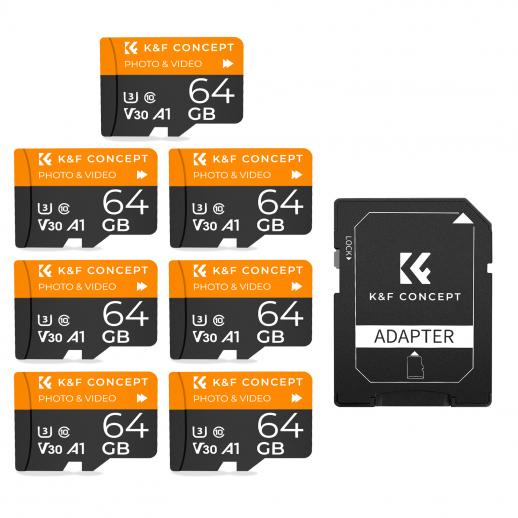
Using an SD card with your laptop can be immensely useful for several reasons, including expanding storage, transferring files, and creating backup solutions. However, many users frequently run into issues or become unsure about the correct process to effectively use an SD card on a laptop. In this comprehensive guide, I’ll demystify the topic and provide clear, actionable steps for using an SD card on your laptop, ensuring that you can effortlessly manage this storage medium.

1. Understanding the SD Card Basics

Before we delve into the steps, it’s crucial to understand the different types of SD cards you might encounter. SD cards come in various sizes and capacities:

- Standard SD: The original SD card size, measuring 32x24x2.1 mm.

- MiniSD: Smaller variant, measuring 21.5x20x1.4 mm.

- MicroSD: The most compact size, measuring 15x11x1 mm.

Laptops generally have built-in slots for standard SD cards or microSD cards using an adapter. Make sure you know the card type suitable for your device.

2. Checking Compatibility

First, verify if your laptop has an SD card slot. This slot is generally identified by a small, rectangular opening on the side or front of your laptop, often labeled with the SD card symbol. If your laptop doesn't have a built-in SD slot, you can use an external SD card reader, which connects to your laptop via a USB port.

3. Inserting the SD Card

Follow these steps to insert your SD card correctly:

- Power Off: While it’s generally safe to insert an SD card while your laptop is powered on, doing it with the laptop off minimizes risk.

- Orient Correctly: Ensure the card is oriented correctly based on the diagram usually located near the slot. Typically, the metal contacts should face downwards.

- Insert Carefully: Insert the SD card gently into the slot until it clicks into place. If you use excessive force, it could damage the card or the slot.

4. Accessing the SD Card

Once inserted, power on your laptop if it was off:

- Automatic Recognition: Most modern operating systems will automatically recognize the SD card. You should see a notification pop up indicating a new storage device has been inserted.

- Manual Access: If no notification appears, you can manually access the card. Open your file manager (File Explorer on Windows, Finder on Mac), and you will see your SD card listed as a new drive. Double-click to open it.

5. Transferring Files

Transferring files to and from an SD card is straightforward:

- Drag and Drop: Open the folder containing the files you want to transfer. Drag the files into the SD card window.

- Copy-Paste: Alternatively, you can use the right-click context menu to copy files from your hard drive and paste them into the SD card directory.

6. Safety Ejection

It’s essential to safely eject the SD card to prevent data corruption:

- Windows: Click on the “Safely Remove Hardware and Eject Media” icon in the taskbar. Select the SD card and wait for the system to notify you that it’s safe to remove.

- Mac: Drag the SD card icon from the desktop to the trash bin, which will change to an eject symbol. Wait for it to disappear before removing the card.

7. Troubleshooting Common Issues

If you encounter issues while using your SD card, here are some common problems and solutions:

- Card Not Recognized: Ensure the card is properly inserted. Try inserting it again or use a different slot/adapter.

- Read/Write Errors: This might indicate a corrupted card. Use the disk utility tool on your OS to scan and repair the card.

- Slow Performance: Performance issues can stem from a low-grade card. High-speed SD cards (Class 10 or UHS) perform better for tasks requiring high data transfer rates.

8. Utilizing SD Card Software

Certain software can enhance your SD card’s functionality:

- Formatting Tools: Use built-in OS tools or third-party software to format your SD card for different file systems (e.g., exFAT, NTFS).

- Recovery Software: In case of data loss, recovery tools can help retrieve lost files.

- Backup Solutions: Automate backups with tools that sync data between your hard drive and SD card.

9. Advanced Tips and Tricks

For advanced users, here are some additional tips:

- Bootable SD Cards: You can create bootable SD cards for installing operating systems. Software like Rufus can help craft a bootable drive.

- Encryption: Protect sensitive data on your SD card using encryption tools.

- Optimized Usage: Periodically format your SD card to ensure optimal performance and longevity.

Conclusion

Effectively using an SD card on your laptop can significantly enhance your productivity, expand your storage options, and provide a reliable medium for data transfer and backup. By following the steps outlined in this guide—from choosing the appropriate SD card type and ensuring compatibility, to safely transferring and ejecting files—you’ll be equipped to handle all your SD card-related tasks with ease and confidence.

Always remember to handle your SD card with care, keep it free from physical damage, and use software tools when necessary to maintain its optimal performance. Happy computing!


Leave your comment
Cancel reply
Note: HTML is not translated!
Related products
SD Card Reader for iPhone/iPad/Android/Mac/Computer/Camera, 4 in 1 Micro SD Card Reader Tracking Camera Viewer, Portable Memory Card Reader SD Card Adapter Compatible with SD and Micro SD Card/TF Card ( black)
$14.99
K&F Concept 36 Slots SD Micro SD Memory Card Case, Water-Resistant SD Card Holder, Anti-Shock Card Carrying Storage Box for 24 Micro SD SDXC SDHC TF Cards and 12 SD SDXC SDHC Cards
$18.99 $9.99
K&F Concept 28 Slots Micro SD Card Case,Water-Resistant Anti-Shock Anti-Dust TF Card Holder,Micro SD/Micro SDHC/Micro SDXC Card Box Organizer Storage
$18.99 $9.99
128GB MicroDrive Micro SD UHS-I Memory Card
2
$31.99
K&F Concept 24 Slots SD Card Holder Memory Card Case, Water-Resistant Shockproof Memory Card Storage Carrying Case for 12 SD SDXC SDHC Cards, 12 CFexpress Type A Cards
$18.99 $9.99
32GB Micro SD Card U3/V30/A1 with Adapter, Memory Card for Cameras, Borescopes,  Microscopes, Night Vision Goggles, Kentfaith
32GB Micro SD Card U3/V30/A1 with Adapter, Memory Card for Cameras, Borescopes, Microscopes, Night Vision Goggles, Kentfaith
$19.99 $15.99
64GB Micro SD Card U3/V30/A1 with Adapter, Memory Card for Cameras, Borescopes,  Microscopes, Night Vision Goggles, Kentfaith
64GB Micro SD Card U3/V30/A1 with Adapter, Memory Card for Cameras, Borescopes, Microscopes, Night Vision Goggles, Kentfaith
$23.75 $23.73
4K 32MP Hunting Camera, 100° Wide Motion Sensor 0.2s Trigger IP67 Waterproof, 2.31" Display, with 64G SD Card +Card Reader
$114.99
Digital Mini Microscope for Kids, 100x-1000x Handheld Microscope with 32GB SD Card & Battery
32
$92.99 $65.99
Products You May Like
82mm MCUV+CPL+ND4 Lens Filter Kit with Lens Cleaning Cloth and Filter Bag Nano-Klear
78
$56.99 $49.99
77mm MCUV+CPL+ND1000+Adapter Ring Magnetic 4 in 1 Lens Filter Kit Waterproof Scratch-Resistant Anti-Reflection with Filter Pouch
41
$156.99 $124.99
KW19 Pro Full Screen Touch Smart Watch Blood Pressure Heart Rate Monitor Fitness Tracker-Pink
5
$29.99
95mm Variable ND2-ND32 (1-5 Stop)  Lens Filter Neutral Density Filter Waterproof Scratch Resistant with 28 Layers of Nano-coating Nano-X Series
95mm Variable ND2-ND32 (1-5 Stop) Lens Filter Neutral Density Filter Waterproof Scratch Resistant with 28 Layers of Nano-coating Nano-X Series
$159.99 $109.99
SJCAM SJ8 Air 2.33 inch 1296P WiFi Action Camera
$89.99
37mm Lens Filter Kit Neutral Density ND8+ND64+CPL Circular Polarizer for Professional Camera Lens with Multiple Layer Nano Coated
12
$69.99 $41.99
Microphone handheld stick
$10.99
55mm True Color & Ultra-Low Reflection Variable ND Lens Filter, ND2-32 (1-5 Stops) HD Adjustable Neutral Density Filter with 28 Multi-Layer Coatings for Camera Lenses - Nano-X Series
$107.99 $80.99
86mm Fader ND2-ND32 (1-5 Stop) Variable ND Lens Filter Neutral Density Filter for Camera Lens NO X Spot Nanotec Ultra-Slim Weather-Sealed
$129.99 $86.99
Canon FD Mount Body Cap*2 + Lens Rear Cap*2 + Hot Shoe Cap*2 + Cleaning Cloth*1 Compatible with Canon F-1, FTb, AE-1, A-1, AT-1, AV-1, AL-1, T60, T70, T80, T90
$17.99 $8.99
Related articles
How Do I Access Sd Card On Laptop?
How Insert Sd Card In Laptop?
How To Format Sd Card On Mobile?
How To Format Sd Card On Tablet?
How To Open Sd Card On Macbook Pro?
How To Store Switch Games On Sd Card?
How To Transfer Photos On Sd Card Android?
How To Free Space On 3ds Sd Card?
How To Manage Sd Card On Android Phone?
How To Make An Sd Card Work?
Blog You May Like
How To Put The Battery In My Camera?
How Big Of An Sd Card For Switch?
What Is The Use Of Tripod In Camera?
Can You Remove Solar Panels?
How To Run Wires For Outdoor Security Cameras?
How To Use Nd Filters With Lens Hood?
How Far Back Do Security Cameras Record?
How To Make Your Own Bluetooth Earphones?
What is the best cellular trail camera?
Where To Use My Metal Detector?
Related categories
On-Dash Camera camera card memory C mount lens adapter m4/3 adapter battery operated outdoor security camera
Popular products
portable sd card reader 64Gb Micro Sd Memory Card 32gb sd flash memory card 4k sd memory card Full Size Sd Memory Card sd memory card carrying case 64gb memory card micro surveillance memory card magnetic memory card 3 light video kit
Related searches
Micro To Sd Card Adapter Sd Card Cameras Sd Card Recorder Standard Sd Card Internal Sd Card Sd Card Security Cameras Camera Sd Card Holder Micro Sd Card Adapters Canon Sd Card Adapter Sd Card For Cameras
Popular searches
Arri B-mount To Canon Pixco Pentax 67 To Pk Adapter Camera Bag For Nikon Z8 Film Camera With Lens Sony Camera With Tripod Bluetooth Smart Watch Phone Pentax 67 Lenses On Nikon F Mount Best Earbuds For Metal Wifi Security Camera And Light Best Power Monocular For Bird Watching
Blog Category
  • Activities
  • Guide
    • Filter Guide
    • Lens Adapter
    • Product Review
  • News & Reviews
    • Camera Reviews
    • Sample Gallery
    • News
  • Tutorials
    • Solar eclipse photography
    • Photography Basics
    • Landscape Photography
  • Inspiration
    • Travel
    • Travel Stories
Search Article
Latest from the Blog
UV Filter: Everything You Need to Know About UV Protection Lens Filters
How To Stream Live From Surveillance Camera?
Neutral Density Filter: The Ultimate Guide for Photographers and Videographers
Camera That Can Wifi Photos To Phone?
How To Make Your Eyes Flash On Camera?
What Power Binoculars For Long Distance Viewing?
How Do Night Vision Goggles Work?
How To Find A Good Digital Camera?
How To Make A Camera Flash After Effects?
Dash Cam That Can Connect To Phone?
  • Easy Payment Multilple Payment Options

  • Free Shipping Global WareHouse Shipment

  • No Risk 30-Day No Reason Return

  • Limited Deals Buy More, Save More

  • Tax Free No any surcharges or tax fee

Information
  • About us
  • Contact Us
  • Site Map
  • Blog
  • Video
  • Gallery
  • VIP Membership Rewards
Service
  • Privacy Policy
  • Terms & Conditions
  • Shipping & Delivery
  • Payment Info
  • Warranty, Return & Refund
  • Intellectual Property Rights
  • Ambassador
  • Affiliates
  • Wholesale
Support
  • My account
  • Order History
  • FAQs
  • Extend Warranty
  • Logistics Tracking
Follow us
NewsLetter

Get the latest product, K&F Concept respects your privacy.

Powered By KENTFAITH © 2025