How To Focus An Image On A Microscope?
If the image in a microscope looks blurry, the fix is usually not “turn the knob harder.” Good focusing is a small routine: start with the lowest-power lens, bring the specimen into view safely, sharpen it gradually, then move up in magnification only after the image is centered and clear. Most focusing problems come from skipping one of those steps.
Start with the lowest-power objective
Before touching the focus knobs, rotate the nosepiece to the lowest-power objective, usually 4x or 10x. You should feel it click into place. This matters because low power gives you the widest field of view and the greatest working distance between the lens and the slide. In plain terms, it is much easier to find the specimen, and you are far less likely to crash the objective into the slide. A common beginner mistake is starting on 40x because they want to “zoom in” right away. That usually leads to a blank field, a blurry smear, or a broken coverslip. Find the specimen first, then increase magnification.
Place the slide correctly

Put the slide on the stage with the coverslip facing up. The specimen should sit over the opening in the stage where light passes through. Use the stage clips or mechanical stage holder to secure it. If your microscope has stage control knobs, use them to move the slide instead of pushing the slide with your fingers. Hand-moving a slide at higher magnification is usually too jerky, and the specimen disappears from view easily. Turn on the light, or adjust the mirror if you are using a basic school microscope. Start with moderate brightness. Too much light can make transparent specimens look washed out; too little makes focusing frustrating because you cannot see edges clearly.
Look from the side before raising the stage
This is a small habit that prevents a lot of damage. While looking at the microscope from the side, raise the stage or lower the objective until the low-power lens is close to the slide — but not touching it. On many microscopes, the coarse focus knob moves the stage up and down. On others, it moves the head or objective assembly. Do this while watching the gap between the objective lens and slide, not while looking through the eyepiece. Once the lens is close to the slide, then look through the eyepiece and focus by moving the stage away from the lens. This way, if you overshoot, you are increasing the distance rather than smashing glass into glass.
Use the coarse focus first

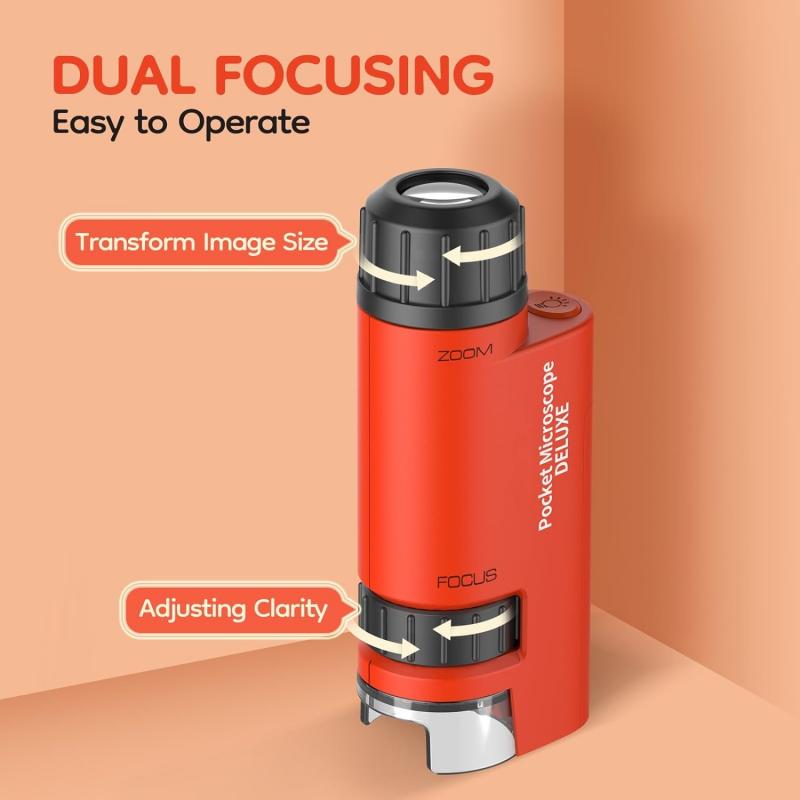
With the low-power objective in place, look through the eyepiece and slowly turn the coarse focus knob. The image may appear suddenly, often as a faint shape before it becomes sharp. Once you see something, stop using big turns. Coarse focus is for finding the general focal plane, not for final sharpness. If you pass through focus, the specimen may appear clear for a second and then blur again. Turn back slowly. Many beginners keep turning in one direction because they assume the image will get better eventually. Focus has a narrow “sweet spot”; once you pass it, the image gets worse.
After the specimen is visible, switch to the fine focus knob. Make small adjustments. Fine focus is especially useful with thin specimens, prepared slides, and higher magnification. At 40x objective power, tiny movements make a big difference. If you turn the fine focus knob too quickly, you can skip right past the sharpest point. A properly focused image should have crisp edges. Cells should not look like soft clouds unless the specimen itself is poorly stained, too thick, or out of the focal plane.
Before changing to a stronger objective, move the specimen so the area of interest is centered in the field of view. This step is easy to forget. The higher the magnification, the smaller the visible area. Something near the edge at low power may disappear completely when you switch to 40x. If you are looking at a cheek cell, onion skin, pond water, or a stained tissue section, center the actual structure you want to examine — not just the general blob of material.
Once the specimen is sharp and centered at low power, rotate the next objective into place. Most modern microscopes are parfocal, meaning the image should remain close to focus when you change objectives. “Close” does not mean perfect. You will usually need a small fine-focus adjustment. Avoid using the coarse focus knob at high power unless your microscope instructions specifically allow it and you know there is enough clearance. On many student microscopes, coarse focus at 40x can drive the lens into the slide quickly. At higher power, the working distance becomes very small. The 40x objective may sit just above the coverslip. This is normal, but it leaves little room for rough focusing.
If the image is technically focused but still hard to see, the issue may be lighting rather than focus. Many microscopes have an iris diaphragm or rotating disk under the stage. This controls how much light reaches the specimen. Opening it fully gives a bright image, but transparent specimens may lose contrast. Closing it slightly can make cell boundaries, fibers, or small organisms easier to see. Too little light creates a dim, grainy view. Too much light makes the field glarey and flat. Try adjusting the brightness and diaphragm after you reach focus, especially with unstained or lightly stained specimens. With thicker specimens, changing the light angle or reducing brightness can reveal details that were invisible under full illumination.
On a binocular microscope, focusing can feel wrong if the eyepieces are not adjusted for your eyes. First, adjust the distance between the eyepieces until the two circles merge into one comfortable field of view. You should not feel like you are forcing your eyes inward or outward. Then focus using one eye through the fixed eyepiece, usually the right or left depending on the microscope design. After that, use the diopter ring on the other eyepiece to sharpen the image for your second eye. Do not refocus the whole microscope for the second eye; adjust the diopter. This makes a bigger difference than many people expect. If the diopter is off, the image may seem almost focused but never quite comfortable.
A dirty lens can mimic bad focus. If the blur stays in the same place when you move the slide, the problem may be on the eyepiece or objective lens. If the blur moves with the slide, it is probably on the slide or coverslip. Use proper lens paper, not tissues, shirt fabric, or paper towels. Microscope lenses are easy to scratch. If there is oil or stubborn residue, use lens-cleaning solution made for optics. Fingerprints on eyepieces are extremely common in classrooms and shared labs. A quick cleaning often turns a “broken” microscope into a perfectly usable one.
Not every specimen becomes sharp in the same way. A flat prepared slide should snap into focus clearly. Printed letters, stained cells, and thin tissue sections usually have a definite focal plane. Pond water is different. Small organisms move, debris floats at different depths, and you may need to focus up and down through layers of water. One organism may be sharp while another nearby particle is blurry because they are not at the same depth. Thick samples also require patience. If you are looking at something like a plant stem cross-section, insect part, or clumped material, only one layer may be sharp at a time. Turning the fine focus slowly lets you “travel” through the specimen.
If your microscope has a 100x oil immersion objective, do not use it dry unless it is specifically designed for dry use. A standard 100x oil objective needs immersion oil between the coverslip and the lens. Focus the specimen first at 40x, center it, then rotate the 40x objective away. Add a small drop of immersion oil to the coverslip over the area you want to view. Rotate the 100x oil objective into the oil and use fine focus only. The image should be close to focus if the microscope is parfocal. Make tiny adjustments. After using oil, clean the oil objective properly with lens paper. Also check nearby dry objectives, especially the 40x. Accidentally dragging a dry objective through oil is a common mistake, and it leaves a smeary image the next time someone uses the microscope.
A blank view usually comes from one of a few simple problems. The slide may not be centered over the light opening. The objective may not be clicked fully into place. The light may be too low, too high, or blocked by a closed diaphragm. The specimen may be outside the field of view. You may be using a high-power lens before locating the sample on low power. If you are completely lost, reset the microscope: lowest-power objective, stage lowered, slide centered, moderate light, then start again. This is faster than hunting randomly at high magnification.
If fine focus does not solve the blur, check the practical things first. The slide may be upside down. With many prepared slides, you can still see something, but the specimen sits farther from the objective and may not focus well at higher power. The coverslip may be missing or too thick. High-power objectives are designed to work with a thin coverslip over the specimen. The sample may be too thick. A chunk of material under a coverslip will not behave like a thin section. It may squash unevenly or keep the coverslip tilted. The objective may be dirty. Oil, dust, or dried mounting medium on the lens softens the whole image. The microscope may be vibrating. At high magnification, even a shaky table or someone bumping the bench can make the image look unstable.
For most microscopes, this simple sequence works well: 1. Set the lowest-power objective. 2. Place and center the slide. 3. Adjust light to a comfortable brightness. 4. Watch from the side while bringing the lens close to the slide. 5. Look through the eyepiece and use coarse focus until the specimen appears. 6. Use fine focus to sharpen. 7. Center the area you want to examine. 8. Move to the next objective. 9. Use fine focus only at higher magnification. 10. Adjust light and diaphragm for contrast. After you do it a few times, focusing becomes less of a mechanical process and more of a feel. You learn how the image changes as you pass through the focal plane, how much light a specimen needs, and how little movement is required at high power. The main habit to build is patience with small adjustments. Microscopes reward slow hands. If you start low, focus gently, keep the specimen centered, and treat the lenses carefully, you will get a sharp image far more consistently.