kfconcept

KENTFAITH
K&F Concept    Blog >

Enjoy Your Selected Digital Life

Recently Viewed
  • Recently Viewed
  • 67mm Circular Polarizer Lens Filter with Filter Cap Optical Glass Ultra Slim Polarizing CPL Filter with 24 Multi-Layer Coatings for Camera Lenses Nano-Dazzle Series
    67mm Circular Polarizer Lens Filter with Filter Cap Optical Glass Ultra Slim Polarizing CPL Filter with 24 Multi-Layer Coatings for Camera Lenses Nano-Dazzle Series
    $31.99
    49mm Circular Polarizer Lens Filter with Filter Cap Optical Glass Ultra Slim Polarizing CPL Filter with 24 Multi-Layer Coatings for Camera Lenses Nano-Dazzle Series
    49mm Circular Polarizer Lens Filter with Filter Cap Optical Glass Ultra Slim Polarizing CPL Filter with 24 Multi-Layer Coatings for Camera Lenses Nano-Dazzle Series
    $28.99
    72mm Black Mist 1/4 and ND2-32 (1-5 Stop) Variable ND Lens Filter 2 in 1 with 28 Multi-Layer Coatings Nano-Xcel Series
    72mm Black Mist 1/4 and ND2-32 (1-5 Stop) Variable ND Lens Filter 2 in 1 with 28 Multi-Layer Coatings Nano-Xcel Series
    $116.99 $92.99
    86mm Fader ND2-32 (1-5 Stop) Variable ND Lens Filter Neutral Density Filter for Camera Lens NO X Spot Nanotec Ultra-Slim Weather-Sealed
    86mm Fader ND2-32 (1-5 Stop) Variable ND Lens Filter Neutral Density Filter for Camera Lens NO X Spot Nanotec Ultra-Slim Weather-Sealed
    $112.99 $89.99
    77mm Variable ND3-ND1000 ND Filter (1.5-10 Stops) Neutral Density Lens Filter with 24 Multi-Layer Coatings for Camera Lens Nano-Dazzle
    77mm Variable ND3-ND1000 ND Filter (1.5-10 Stops) Neutral Density Lens Filter with 24 Multi-Layer Coatings for Camera Lens Nano-Dazzle
    $74.99 $59.99
    22" / 55cm Octagonal Softbox Quick Release Bowens Mount Softbox with Honeycomb Grid Light Diffusers Carrying Bag for Photography Studio Speedlite Flash and Monolight
    22" / 55cm Octagonal Softbox Quick Release Bowens Mount Softbox with Honeycomb Grid Light Diffusers Carrying Bag for Photography Studio Speedlite Flash and Monolight
    $77.99
Compare (0) 0
  • Compare
  • You have not chosen any products to compare.

  • Compare
Currency: USD
  • Currency
Shop by Scene Shop by Rank

Log Into Your Account

Account

Order History

Wish List

Login

Forgotten Password?

Or connect with

Register Account

Already have an Account?Log In

  • Shopping Cart
  • Your shopping cart is empty!

  • Register/Login to purchase, earn points
  • Favorite
  • Your wish list is empty.

  • Register/Login to like, earn points
  • Activities
  • Guide
    • Filter Guide
    • Lens Adapter
    • Product Review
  • News & Reviews
    • Camera Reviews
    • Sample Gallery
    • News
  • Tutorials
    • Solar eclipse photography
    • Photography Basics
    • Landscape Photography
  • Inspiration
    • Travel
    • Travel Stories
  • Home
  • Blog
  • How To Remove Read Only Sd Card?

How To Remove Read Only Sd Card?

Kentfaith 2024-10-24 01:30:41 0 Comments

Secure Digital (SD) cards are a prevalent form of storage used in cameras, smartphones, and many other devices. They are important because they are both small and offer significant storage capacity. However, many users encounter an issue wherein their SD card becomes 'read-only.' This is a frustrating problem that limits the ability to modify or delete files, essentially rendering the card useless for new data storage. This article aims to explore various solutions to remove 'read-only' mode from an SD card, thereby restoring its full functionality.

The 'read-only' mode on an SD card can be caused by various reasons ranging from accidental triggers to more problematic hardware or software issues. Understanding the cause of the issue is crucial in determining the appropriate remedy. Below are different methods to resolve this issue, structured according to the potential cause:

Physical Write Protection Switch

how to remove read only sd card 1

Many SD cards come with a physical write-protection switch on the side. When this switch is moved to the 'lock' position, the card becomes read-only. This is a simple but often overlooked cause. The remedy is straightforward:

1. Locate the Lock Switch: On the side of the SD card, there is a small switch. Check the position of this switch.

2. Toggle the Switch: If the switch is in the locked position, slide it to the unlocked position.

3. Reinsert the SD Card: Eject and reinsert the SD card into your device to see if the issue is resolved.

Checking for File System Errors
how to remove read only sd card 2

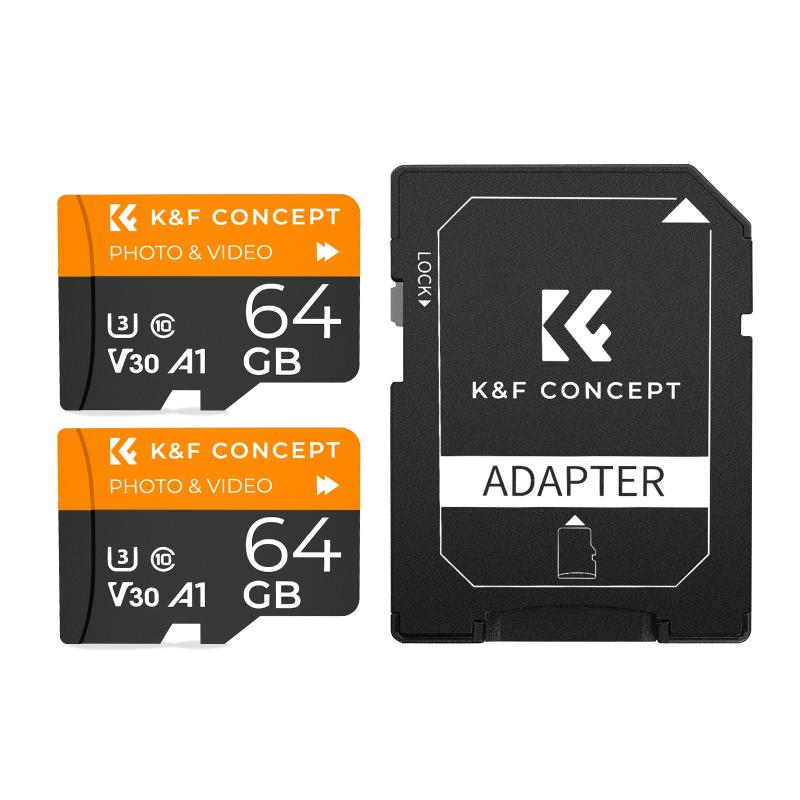
If the physical lock switch is not the issue, then it’s possible that the file system on the SD card has errors. These errors can cause the card to become read-only. A file system check can often resolve these problems:

1. Insert the SD Card into a Computer: Connect the SD card to your computer, either via a card reader or directly if your computer has an SD card slot.

2. Access the Command Prompt (Windows):

- Open Command Prompt as an Administrator.

- Type `chkdsk E: /f` (replace E: with the appropriate drive letter for your SD card).

3. Execute the Command: This command will check for and attempt to fix file system errors. Once completed, check to see if the read-only condition has been resolved.

Diskpart Utility (Windows)
how to remove read only sd card 3

For users operating on a Windows system, the Diskpart utility can be very effective in removing the read-only attribute from an SD card:

1. Open Command Prompt as Administrator: Press `Win + X` and select 'Command Prompt (Admin)'.

2. Execute Diskpart: Type `diskpart` and press Enter.

3. List the Disks: Type `list disk` to display all connected disks.

4. Select the SD Card: Identify your SD card from the list and type `select disk X`, replacing X with the number associated with your SD card.

5. Remove Read-only Attributes: Type `attributes disk clear readonly`, then press Enter.

6. Exit Diskpart: Type `exit` and press Enter.

Using Disk Utility (Mac)
how to remove read only sd card 4

For Mac users, the Disk Utility tool is a good way to manage disk properties and file systems:

1. Open Disk Utility: Navigate to 'Applications > Utilities > Disk Utility'.

2. Select the SD Card: From the list of available drives, choose your SD card.

3. Run First Aid: Click the 'First Aid' button and follow the prompts to check and repair the file system.

4. Erase and Format if Necessary: If the above steps don’t work, you may need to erase and format the card. Select the SD card, click 'Erase', choose the appropriate file system (exFat or FAT32), and then click 'Erase' again.

Registry Edit (Advanced Users)

For those who are comfortable making changes to the system registry on Windows, editing the registry can sometimes resolve read-only issues:

1. Open Registry Editor: Press `Win + R`, type `regedit`, and press Enter.

2. Navigate to StorageDevicePolicies: Locate `HKEY_LOCAL_MACHINE\SYSTEM\CurrentControlSet\Control\StorageDevicePolicies`.

3. Modify WriteProtect Value: If a `WriteProtect` key exists, set its value to 0. If it doesn’t exist, you can create it as a new DWORD (32-bit) Value and set it to 0.

4. Reboot the Computer: Restart your system to apply the changes.

Third-Party Software

There are various third-party tools designed to manage SD card properties and repair file systems. Programs like AOMEI Partition Assistant, EaseUS Partition Master, and others can be useful:

1. Download and Install: Install a reputable partition management tool.

2. Select Your SD Card: Launch the software and select your SD card from the list of drives.

3. Remove Write Protection: Utilize the tool’s features to remove write protection and fix file system errors.

When All Else Fails: Backup and Format

If none of these solutions work, the last resort is to back up your data and format the SD card:

1. Backup Data: Copy all readable data to a safe location.

2. Format the SD Card: Use either Windows Disk Management, macOS Disk Utility, or third-party software to format the SD card. Choose a file system compatible with your devices (exFAT for cross-platform use).

Preventative Measures

To avoid encountering similar issues in the future, keep these tips in mind:

- Regularly back up data.

- Eject the card safely before removing it from any device.

- Handle the card carefully to avoid damaging the lock switch.

- Avoid using unknown devices to read/write data on the SD card.

In conclusion, encountering a read-only SD card can be inconvenient, but with the proper knowledge and tools, it is an issue that can be resolved. By following the steps outlined in this article, users can regain full access to their SD cards and continue using them as needed. Remember always to handle your storage devices carefully and perform regular maintenance checks to extend their lifespan and reliability.


Leave your comment
Cancel reply
Note: HTML is not translated!
Related products
SD Card Reader for iPhone/iPad/Android/Mac/Computer/Camera, 4 in 1 Micro SD Card Reader Tracking Camera Viewer, Portable Memory Card Reader SD Card Adapter Compatible with SD and Micro SD Card/TF Card ( black)
$14.99
K&F Concept 36 Slots SD Micro SD Memory Card Case, Water-Resistant SD Card Holder, Anti-Shock Card Carrying Storage Box for 24 Micro SD SDXC SDHC TF Cards and 12 SD SDXC SDHC Cards
$18.99 $9.99
K&F Concept 28 Slots Micro SD Card Case,Water-Resistant Anti-Shock Anti-Dust TF Card Holder,Micro SD/Micro SDHC/Micro SDXC Card Box Organizer Storage
$18.99 $9.99
128GB MicroDrive Micro SD UHS-I Memory Card
2
$31.99
K&F Concept 24 Slots SD Card Holder Memory Card Case, Water-Resistant Shockproof Memory Card Storage Carrying Case for 12 SD SDXC SDHC Cards, 12 CFexpress Type A Cards
$18.99 $9.99
32GB Micro SD Card U3/V30/A1 with Adapter, Memory Card for Cameras, Borescopes,  Microscopes, Night Vision Goggles, Kentfaith
32GB Micro SD Card U3/V30/A1 with Adapter, Memory Card for Cameras, Borescopes, Microscopes, Night Vision Goggles, Kentfaith
$19.99 $15.99
64GB Micro SD Card U3/V30/A1 with Adapter, Memory Card for Cameras, Borescopes,  Microscopes, Night Vision Goggles, Kentfaith
64GB Micro SD Card U3/V30/A1 with Adapter, Memory Card for Cameras, Borescopes, Microscopes, Night Vision Goggles, Kentfaith
$23.75 $23.73
4K 32MP Hunting Camera, 100° Wide Motion Sensor 0.2s Trigger IP67 Waterproof, 2.31" Display, with 64G SD Card +Card Reader
$114.99
Digital Mini Microscope for Kids, 100x-1000x Handheld Microscope with 32GB SD Card & Battery
32
$92.99 $65.99
Products You May Like
128GB Voice Activated Pen Recorder with Playback, DSP Noise Reduction for Lecture Meeting Interview, Kentfaith
13
$112.49 $89.99
Fast Shopping From Us 60”/1.5m Lightweight Tripod 17.6lbs Load with 360 Degree Ball Head,Quick Release Plate,Detachable Monopod for SLR DSLR C225C0 (BA225)
90
$190.99 $112.99
HD Tracking Camera, Hunting Camera HB-E2 2.7K 20MP, PIR Sports Night Vision Camera with 64G SD Card and Tree Spike, Multi-function Card Reader
297
$84.99
77mm Lens Filter Kit Neutral Density ND8+ND64+CPL Circular Polarizer for Professional Camera Lens with Multiple Layer Nano Coated
11
$109.99 $70.99
Hidden 1080P Mini Spy Camera Wireless with Infrared Night Vision - SQ11
19
$19.99
ID107Plus Smart Bracelet Fitness Tracker Heart Rate Monitor - Black
20
$24.99
67mm Bilateral Motion Blur Special Effect Filter Optical Glass for Camera Lens Nano-B Series
$51.99 $35.09
10Pcs Double-Headed Cleaning Stick Set, CMOS APS-C Frame Cleaning Stick 16mm Cleaning Cloth Sticks Set
1
$34.99 $17.99
52mm Black Mist 1/4 + CPL Filter Set, Dreamy Cinematic Effect Mist CPL Polarising Filter 18 Multi-Layer Coatings Nano-Klear Series
37
$41.99 $32.99
4k Video Camera Camcorder for YouTube Ultra HD 4K 48MP Video Blog Camcorder with Microphone and Remote Control WiFi Digital Camera 3.0" IPS Touch Screen IR Night Vision 2 Batteries
508
$227.99 $157.99
Related articles
How To Change Sd Card From Read Only?
How To Read Micro Sd Card On Pc?
How To Remove A Sd Card From Phone?
How To Remove Memory Card From Note 8?
How To Remove Memory Card From Nikon Camera?
How To Read Camera Lens?
How To Open Sd Card Packaging?
How To Fix The Sd Card?
How To Check Sd Card Size?
Where To Buy Binoculars?
Blog You May Like
Camera Bag That Can Fit Microsoft Surface Pro?
Camera Lens Filter Buying Guide (For Reference Only)
Android Video Player That Can Record From Camera?
What Is A Good Binoculars To Buy?
How To Record On Pc With Audio?
How To Get Voice In Screen Recording?
What Is A Good Lavalier Microphone?
unsure your lens mount?
Which Ring Light Is Best For Makeup?
What To Use Binoculars For?
Related categories
camera card memory C mount lens adapter m4/3 adapter
Popular products
4k video memory card speed portable sd card reader 64Gb Micro Sd Memory Card 32gb sd flash memory card 4k sd memory card Full Size Sd Memory Card sd memory card carrying case 64gb memory card micro surveillance memory card magnetic memory card
Related searches
Micro To Sd Card Adapter Sd Card Cameras Sd Card Recorder Standard Sd Card Internal Sd Card Sd Card Security Cameras Camera Sd Card Holder Micro Sd Card Adapters Canon Sd Card Adapter Sd Card For Cameras
Popular searches
Pentax 645 To K Mount Adapter Fd Mount Telephoto Lens Best Ef Lens Mount Camera Bodies Lumix S5 Lens Mount Sky View 70 Telescope Sony Vesa Adapter 448584401 600 Mm Sony A Mount Lens Fujifilm S5500 Adapter Ring Iphone 12 Pro Max Camera Lens Replacement Best Outdoor Motion Sensor Camera With Night Vision
Blog Category
  • Activities
  • Guide
    • Filter Guide
    • Lens Adapter
    • Product Review
  • News & Reviews
    • Camera Reviews
    • Sample Gallery
    • News
  • Tutorials
    • Solar eclipse photography
    • Photography Basics
    • Landscape Photography
  • Inspiration
    • Travel
    • Travel Stories
Search Article
Latest from the Blog
Can You Zoom In With Binoculars?
How To Find Camera Roll On Iphone 5s?
What Is A Good Quality Dash Cam?
What Is Nd Filter On Video Camera?
How To Fix The Straps On A Camera?
Which Binoculars To Buy?
What Is The Difference Between Binoculars And Telescope?
Black Friday 2025 Special at Kentfaith
How To Make A Camera Flash After Effects?
Dash Cam That Can Connect To Phone?
  • Easy Payment Multilple Payment Options

  • Free Shipping Global WareHouse Shipment

  • No Risk 30-Day No Reason Return

  • Limited Deals Buy More, Save More

  • Tax Free No any surcharges or tax fee

Information
  • About us
  • Contact Us
  • Site Map
  • Blog
  • Video
  • Gallery
  • VIP Membership Rewards
Service
  • Privacy Policy
  • Terms & Conditions
  • Shipping & Delivery
  • Payment Info
  • Warranty, Return & Refund
  • Intellectual Property Rights
  • Ambassador
  • Affiliates
  • Wholesale
Support
  • My account
  • Order History
  • FAQs
  • Extend Warranty
  • Logistics Tracking
Follow us
NewsLetter

Get the latest product, K&F Concept respects your privacy.

Powered By KENTFAITH © 2025