kfconcept

KENTFAITH
K&F Concept    Blog >

Enjoy Your Selected Digital Life

Recently Viewed
  • Recently Viewed
  • 77mm ND2-32 (1-5 Stop) Variable ND Filter and CPL Circular Polarizing Filter 2 in 1 for Camera Lens No X Spot Weather Sealed Nano-Xcel
    77mm ND2-32 (1-5 Stop) Variable ND Filter and CPL Circular Polarizing Filter 2 in 1 for Camera Lens No X Spot Weather Sealed Nano-Xcel
    $101.99 $73.08
Compare (0) 0
  • Compare
  • You have not chosen any products to compare.

  • Compare
Currency: USD
  • Currency
Shop by Scene Shop by Rank

Log Into Your Account

Account

Order History

Wish List

Login

Forgotten Password?

Or connect with

Register Account

Already have an Account?Log In

  • Shopping Cart
  • Your shopping cart is empty!

  • Register/Login to purchase, earn points
  • Favorite
  • Your wish list is empty.

  • Register/Login to like, earn points
  • Activities
  • Guide
    • Filter Guide
    • Lens Adapter
    • Product Review
  • News & Reviews
    • Camera Reviews
    • Sample Gallery
    • News
  • Tutorials
    • Solar eclipse photography
    • Photography Basics
    • Landscape Photography
  • Inspiration
    • Travel
    • Travel Stories
  • Home
  • Blog
  • How To Operate A Camera Mounted Flash?

How To Operate A Camera Mounted Flash?

Kentfaith 2024-07-25 06:13:29 0 Comments

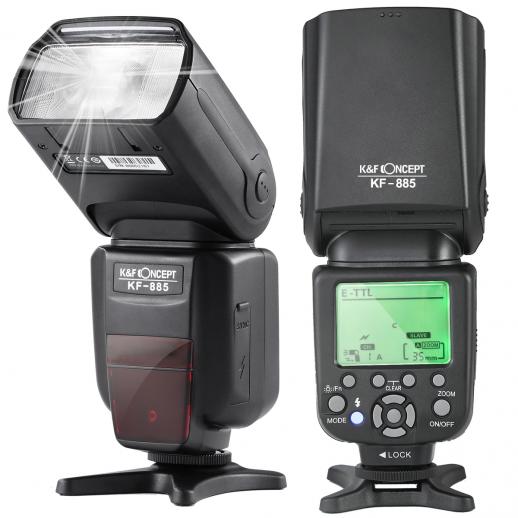
Operating a camera-mounted flash can be a game-changer for photographers, whether you're a beginner or a seasoned professional. Understanding how to use this tool effectively can significantly enhance the quality of your photos, especially in low-light conditions or when you need to fill in shadows. In this article, we will delve into the essentials of operating a camera-mounted flash, covering everything from basic setup to advanced techniques.

Understanding the Basics

1. Mounting the Flash

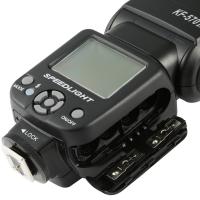
The first step in using a camera-mounted flash is, of course, mounting it onto your camera. Most flashes are designed to fit into the camera's hot shoe, a bracket located on the top of the camera body. Ensure that the flash is securely attached and locked into place to prevent it from falling off during use.

2. Powering On

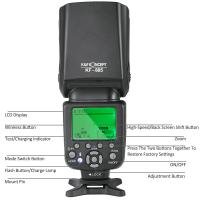
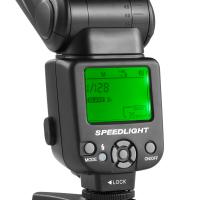
Once the flash is mounted, turn it on. Most flashes have a power switch or button. Some advanced models may also have an LCD screen that displays various settings. Make sure the flash is fully charged or has fresh batteries to avoid interruptions during your shoot.

3. Basic Settings

Familiarize yourself with the basic settings of your flash. These typically include:

- Mode: Most flashes have several modes, such as TTL (Through The Lens), Manual, and Multi. TTL mode automatically adjusts the flash output based on the camera's metering system, while Manual mode allows you to set the flash power manually.

- Zoom: The zoom setting adjusts the flash coverage to match the focal length of your lens. This helps in directing the light more precisely.

- Exposure Compensation: This setting allows you to increase or decrease the flash output to achieve the desired exposure.

Advanced Techniques

1. Bounce Flash

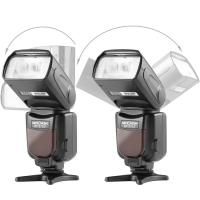
One of the most effective ways to use a camera-mounted flash is to bounce the light off a ceiling or wall. This technique diffuses the light, creating a softer and more natural look. To do this, tilt the flash head upwards or to the side, depending on your shooting environment. Bouncing the flash can significantly reduce harsh shadows and produce more flattering portraits.

2. Diffusers and Modifiers

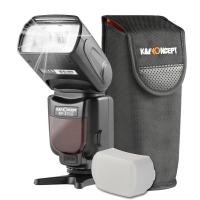
Using diffusers and other light modifiers can further soften the light from your flash. A diffuser is a simple attachment that spreads the light more evenly. Other modifiers, such as softboxes or bounce cards, can also be used to control the direction and quality of the light.

3. High-Speed Sync

High-Speed Sync (HSS) is a feature that allows you to use the flash at shutter speeds faster than the camera's native sync speed. This is particularly useful for outdoor photography when you need to balance the flash with bright ambient light. To enable HSS, consult your flash and camera manuals, as the process can vary between models.

4. Rear Curtain Sync

Rear Curtain Sync is a technique where the flash fires at the end of the exposure rather than at the beginning. This can create interesting motion blur effects, making it ideal for capturing dynamic subjects like dancers or athletes. To use this feature, set your camera to a slower shutter speed and enable Rear Curtain Sync in the flash settings.

Practical Tips

1. Avoid Red-Eye

Red-eye occurs when the flash is too close to the lens, causing light to reflect off the subject's retina. To minimize this, use a flash with a red-eye reduction mode or position the flash further away from the lens. You can also use post-processing software to correct red-eye in your photos.

2. Balancing Flash and Ambient Light

Achieving a natural look often involves balancing the flash with the ambient light. Start by setting your camera to expose for the ambient light, then adjust the flash output to fill in the shadows. This technique, known as fill flash, is particularly useful for outdoor portraits.

3. Using Flash Gels

Flash gels are colored filters that can be attached to your flash to match the color temperature of the ambient light. For example, if you're shooting under tungsten lighting, using an orange gel can help balance the color temperature, resulting in more natural-looking photos.

4. Experiment with Angles

Don't be afraid to experiment with different flash angles. Direct flash can be harsh and unflattering, but angling the flash or using bounce techniques can create more pleasing results. Try different positions and angles to see what works best for your subject and environment.

Troubleshooting Common Issues

1. Overexposure or Underexposure

If your photos are consistently overexposed or underexposed, check your flash settings. In TTL mode, you can use flash exposure compensation to adjust the output. In Manual mode, try adjusting the flash power or changing the distance between the flash and the subject.

2. Flash Misfires

Flash misfires can be frustrating, especially during important shoots. Ensure that your flash is fully charged and that the contacts between the flash and the camera are clean. If the problem persists, try resetting the flash or consulting the user manual for troubleshooting tips.

3. Slow Recycle Time

Recycle time is the duration it takes for the flash to recharge between shots. If you find the recycle time too slow, consider using high-capacity batteries or an external battery pack. Some flashes also have a power-saving mode that can help extend battery life.

Mastering the use of a camera-mounted flash can significantly elevate your photography, allowing you to capture well-lit, professional-quality images in a variety of settings. By understanding the basics, experimenting with advanced techniques, and troubleshooting common issues, you can make the most of this versatile tool. Whether you're shooting portraits, events, or creative projects, a camera-mounted flash can be an invaluable addition to your photographic arsenal.
Leave your comment
Cancel reply
Note: HTML is not translated!
Related products
Head-Mounted Night Vision Binoculars with 3D VR Viewing & 6X Zoom, Up To 700M/2296FT Night Vision Range, Kentfaith Night Vision Binoculars
11
$629.99 $439.99
3D VR Night Vision Binoculars with Infrared Head Mounted 6X Zoom Kentfaith
13
$524.99 $367.99
Minolta A / Sony A Lenses to Leica M Lens Mount Adapter K&F Concept M47151 Lens Adapter
31
$75.99 $39.99
Minolta A / Sony A Lenses to Pentax Q Lens Mount Adapter K&F Concept M22161 Lens Adapter
$45.99 $23.99
Sony Alpha Minolta AF A-Type Lens to NEX E-Mount Mirrorless Camera with Matting Varnish Design
146
$64.99 $35.99
Minolta A / Sony A Lenses to Pentax Q Lens Mount Adapter with Tripod Mount K&F Concept M22162 Lens Adapter
$55.99 $28.99
【$49.99 Flash Deal One order per customer】Camera Lens Backpack Beschoi Waterproof 26L for 15" Laptop with Tripod Strap and Rain Cover for DSLR/SLR Camera (Only Ship to US)
146
$69.99
Lens Mount Adapter Compatible with Sony Alpha Minolta AF A-Type Lens to NEX E-Mount Mirrorless Camera Body
155
$53.99 $27.99
Lens Mount Adapter for Pentax K/M/A/FA/DA Mount Lens to Sony NEX E-Mount Camera Body
146
$60.99 $34.99
40.5mm Black Mist Filter 1/4 Special Effects Filter Cinematic Look Black Diffusion Effect Filter for Camera Lens Nano-X Series
$54.99 $35.99
Products You May Like
62mm Magnetic MCUV Filter,HD Waterproof Scratch-Resistant Anti-Reflection Green Film with Magnetic Metal Cover Nano-Xcel series
75
$51.99 $40.99
72mm 6-Point Fine-Line Star Effect Filter, Cine & Dreamlike Special Filter 18-Layer Coated Optical Glass with 3 Vacuum Cleaning Cloths - Nano-Klear Series
4
$37.99 $23.37
24MP*1296P Night Vision, 120° Wide-Angle*0.2s Trigger 2-Inch Screen Tracking Camera, Dead Wood Color 4PCS
$306.99
49mm ND8+ND64+ND1000 Lens Filter Kit with 3 Vacuum Cleaning Cloths and Filter Pouch, 24 Layer Multi-coated HD Optical Glass, Nano-Dazzle Series
87
$62.99 $49.99
Waterproof Camera Backpack 17L with Rain Cover for DSLR Camera, 14" Laptop, Tripod, Lenses, for Men Women to Picnics, Hiking, Dark Grey
$159.99 $80.99
49mm Magnetic Variable ND2-ND32 (1-5 Stop) Lens Filters NO X Spot, Nano-Xcel Series (Compatible with 52mm magnetic cap)
30
$72.99 $57.99
M316 Automatic 360° intelligent follow up camera head, remote intelligent shooting camera bracket, AI intelligent music head with speaker, 3600mAh built-in battery, no APP, ready to use, for live vlog Black
23
$60.99
Handheld underwater detector, all metal mode, vibration pulse sensing, underwater treasure hunting detector, fully waterproof
$92.49 $73.99
LP-E12 Battery and Charger Set with Dual Slot Charger for Canon M2, M200, M50, M100, M10, 100D
86
$25.99
Wireless Intraoral Camera WiFi 2MP 8 LED Lights for Home Dental Clinic Kentfaith
10
$99.99 $79.99
Related articles
How To Make A Camera Flash?
How To Fix A Camera Flash?
How To Draw A Camera Flash?
When To Use A Camera Flash?
How Bright Is A Camera Flash?
How To Make A Camera Flash After Effects?
How To Make A Flash Ring?
How Far Does A Camera Flash Reach?
How Many Lumens Is A Camera Flash?
How To Post Live Feed From Security Camera?
Blog You May Like
How To Choose Camera Filter Size?
What Is A Camera Propeller Filter?
What Nd Lens Filter For Eclipse ?
When To Use A Graduated Neutral Density Filter?
How To Use Nikon Wifi Adapter?
What Is Neutral Density Filter Used For?
Baby Cameras That Can Take Pictures?
How To Remove Memory Card From Nikon Camera?
Which Baby Monitor Should I Buy?
Skype Can T Find Video Camera?
Related categories
detachable camera flash canon ring flash A Mount Lens Adapter C mount lens adapter Sony A Mount Lens Adapters ring flash nikon flash the camera minolta a mount lenses
Popular products
night vision goggles helmet infrared hunting binoculars night vision binoculars for stargazing leica m sony e mount adapter sony minolta adapter black flash infrared trail camera black flash trail camera invisible flash trail camera no flash trail camera white flash trail camera
Related searches
Flash On A Digital Camera Mounted Video Camera Head Mounted Video Camera External Camera Flash Flip Flash Camera Camera Flash Filter Large Camera Flash Flash Photography Camera Speed Flash Camera Camera Flash Diffuser
Popular searches
24 70mm Lens Canon Mount Pentax 645 Hasselblad Adapter Speed Camera On Tripod Black And White Lens Filter Tamron 24-70 F 2.8 For Pentax Mount Star Filter For Camera Tripod For Cell Phone With Remote Nikon F Microscope Adapter Nikon D7100 Mount Type ??? Nikon Ft1 Mount Adapter
Blog Category
  • Activities
  • Guide
    • Filter Guide
    • Lens Adapter
    • Product Review
  • News & Reviews
    • Camera Reviews
    • Sample Gallery
    • News
  • Tutorials
    • Solar eclipse photography
    • Photography Basics
    • Landscape Photography
  • Inspiration
    • Travel
    • Travel Stories
Search Article
Latest from the Blog
What Is The Best Camera To Record Videos?
How Much Storage For Security Camera?
ND Filter: The Complete Guide to Neutral Density Filters for Photography and Video
What Is A Good Quality Dash Cam?
What Power Binoculars For Long Distance Viewing?
Which Binoculars To Buy?
How To Put Sd Card In Camera?
Is the Sony A7M5 worth buying?
How To Find A Good Digital Camera?
How Do Metal Detectors Work? A Complete Guide for Beginners and Pros
  • Easy Payment Multilple Payment Options

  • Free Shipping Global WareHouse Shipment

  • No Risk 30-Day No Reason Return

  • Limited Deals Buy More, Save More

  • Tax Free No any surcharges or tax fee

Information
  • About us
  • Contact Us
  • Site Map
  • Blog
  • Video
  • Gallery
  • VIP Membership Rewards
Service
  • Privacy Policy
  • Terms & Conditions
  • Shipping & Delivery
  • Payment Info
  • Warranty, Return & Refund
  • Intellectual Property Rights
  • Ambassador
  • Affiliates
  • Wholesale
Support
  • My account
  • Order History
  • FAQs
  • Extend Warranty
  • Logistics Tracking
Follow us
NewsLetter

Get the latest product, K&F Concept respects your privacy.
Powered By KENTFAITH © 2025