How To Repair Mobile Camera Lens?
Mobile phones have become an indispensable part of our lives, and their cameras are one of the most frequently used features. Whether for capturing memories, scanning documents, or video calling, a functional camera lens is essential. However, accidents happen, and a damaged or malfunctioning mobile camera lens can be frustrating. If you're dealing with a scratched, cracked, or otherwise impaired camera lens, this guide will walk you through the steps to repair or replace it.
Understanding the Problem: Diagnosing the Issue
Before diving into repairs, it's important to identify the exact problem with your mobile camera lens. Here are some common issues:
1. Scratches on the Lens: These can cause blurry or distorted images.
2. Cracked or Shattered Lens: This can completely obstruct the camera's view.
3. Dust or Debris Inside the Lens: This can lead to spots or smudges in photos.
4. Fogging or Moisture: Condensation inside the lens can affect image quality.
5. Camera Not Focusing Properly: This could be due to lens damage or internal hardware issues.
Once you've identified the issue, you can decide whether to repair the lens yourself or seek professional help. For minor issues like scratches or dust, DIY solutions may suffice. For more severe damage, such as a cracked lens, you may need to replace the lens or consult a technician.
---
DIY Solutions for Minor Camera Lens Issues
1. Removing Scratches from the Lens
If your camera lens has minor scratches, you can try the following methods:
- Toothpaste Method: Apply a small amount of non-gel toothpaste to a microfiber cloth and gently rub it on the lens in a circular motion. Wipe it clean with a damp cloth. This can help reduce the appearance of scratches.
- Baking Soda Paste: Mix baking soda with water to form a paste. Apply it to the lens using a soft cloth and rub gently. Clean the lens with a damp cloth afterward.
- Screen Polishing Kits: These kits, designed for phone screens, can also work on camera lenses. Follow the instructions provided with the kit.
*Note*: Be cautious when using these methods, as excessive rubbing can damage the lens further.
2. Cleaning Dust or Debris
Dust or debris on the lens can be cleaned using:
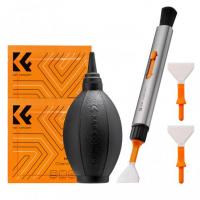
- Compressed Air: Use a can of compressed air to blow away dust particles. Hold the can upright and avoid spraying too close to the lens.
- Lens Cleaning Solution: Apply a few drops of lens cleaning solution to a microfiber cloth and gently wipe the lens.
- Soft Brush: Use a soft-bristled brush to remove debris from the lens surface.
3. Dealing with Fogging or Moisture
If moisture has entered the lens, try these steps:
- Silica Gel Packets: Place your phone in a sealed bag with silica gel packets. These will absorb the moisture over time.
- Rice Method: As a last resort, you can place your phone in a bag of uncooked rice. While not as effective as silica gel, it can help draw out moisture.
- Hair Dryer: Use a hair dryer on a low heat setting to gently warm the phone and evaporate the moisture. Be careful not to overheat the device.
---
Replacing a Cracked or Shattered Camera Lens
If your camera lens is cracked or shattered, a replacement is often the only solution. Here's how you can replace it:
Tools You'll Need:
- Replacement camera lens (specific to your phone model)
- Precision screwdriver set
- Plastic opening tools or guitar picks
- Tweezers
- Adhesive (double-sided tape or glue)
- Microfiber cloth
Steps to Replace the Lens:
1. Purchase the Replacement Lens: Ensure you buy a lens compatible with your phone model. These can be found online or at repair shops.
2. Power Off the Phone: Turn off your phone and remove the SIM card and memory card (if applicable).
3. Remove the Back Cover: Use a plastic opening tool to carefully pry off the back cover of your phone. Some phones may require heating the edges with a hair dryer to loosen the adhesive.
4. Access the Camera Module: Locate the camera module and remove any screws or components blocking access to the lens.
5. Remove the Damaged Lens: Use tweezers to carefully remove the cracked lens. Be cautious of broken glass shards.
6. Clean the Area: Wipe the camera module and surrounding area with a microfiber cloth to remove dust or adhesive residue.
7. Install the New Lens: Place the replacement lens in position and secure it with adhesive. Ensure it is aligned properly.
8. Reassemble the Phone: Reattach the back cover and any components you removed earlier. Power on the phone to test the camera.
*Note*: If you're not confident in your ability to replace the lens, it's best to seek professional help. Improper handling can damage the camera module or other internal components.
---
When to Seek Professional Help
While DIY solutions can be effective for minor issues, some situations require professional assistance:
- The camera module itself is damaged, not just the lens.
- The phone is under warranty, and attempting repairs yourself may void it.
- You lack the tools or expertise to safely replace the lens.
Professional repair services can ensure the job is done correctly and may offer a warranty on their work. Contact your phone manufacturer or a trusted repair shop for assistance.
---
Preventing Future Damage to Your Camera Lens
Once your camera lens is repaired or replaced, take steps to protect it from future damage:
1. Use a Protective Case: Choose a case with a raised edge around the camera to prevent direct contact with surfaces.
2. Apply a Camera Lens Protector: These are small, transparent covers that shield the lens from scratches and cracks.
3. Avoid Placing Your Phone Face Down: Always place your phone on its back to protect the camera lens.
4. Clean the Lens Regularly: Use a microfiber cloth to keep the lens free of dust and smudges.
5. Handle with Care: Be mindful of where you place your phone and avoid dropping it.
---
Repairing a mobile camera lens can range from a simple cleaning to a full replacement, depending on the severity of the damage. While minor issues like scratches or dust can often be resolved with DIY methods, more serious problems may require professional intervention. By following the steps outlined in this guide, you can restore your camera's functionality and continue capturing life's moments.
Remember, prevention is always better than repair. Invest in protective accessories and handle your phone with care to avoid future damage. If you're ever in doubt about repairing your camera lens, don't hesitate to consult a professional. A functional camera is worth the effort, ensuring you never miss a shot.